CloudNativePG Part 5: lldap's Database Goes First
LLDAP becomes the first real tenant on the shared CNPG cluster, and Authelia moves from a file to LDAP via one deadlocked rollout and a self-inflicted outage.
Introduction
The bletchley-pg cluster has been running for a couple of weeks. Part 3 installed it and exposed it with MetalLB; Part 4 added monitoring and tested failover and break scenarios, to find out what failure actually looks like before something real depended on it. Both proved that CloudNativePG worked, neither gave it a tenant.
This part does. LLDAP, a small LDAP server aimed squarely at self-hosters, becomes the first real application with a database on the shared cluster, and Authelia gets cut over from its file-based user list to that directory. Two goals in one move: prove the per-app Database + DatabaseRole pattern end to end, and finally replace a users_database.yml that has been the authentication story since April.
I rendered the configuration, tested LDAP, verified TLS, and still managed to take authentication down because a single-replica deployment with an RWO PVC deadlocked during the rollout.
This post is part of the CloudNativePG sub-series.
- Part 3: Installation and MetalLB
- Part 4: Breaking a Throwaway Database
- Part 5: lldap's Database Goes First
🏠 This is part of the Homelab Journey series - building a production Kubernetes cluster from scratch.
- Certificate Management Revisited
- CloudNativePG Part 5: lldap's Database Goes First (you are here)
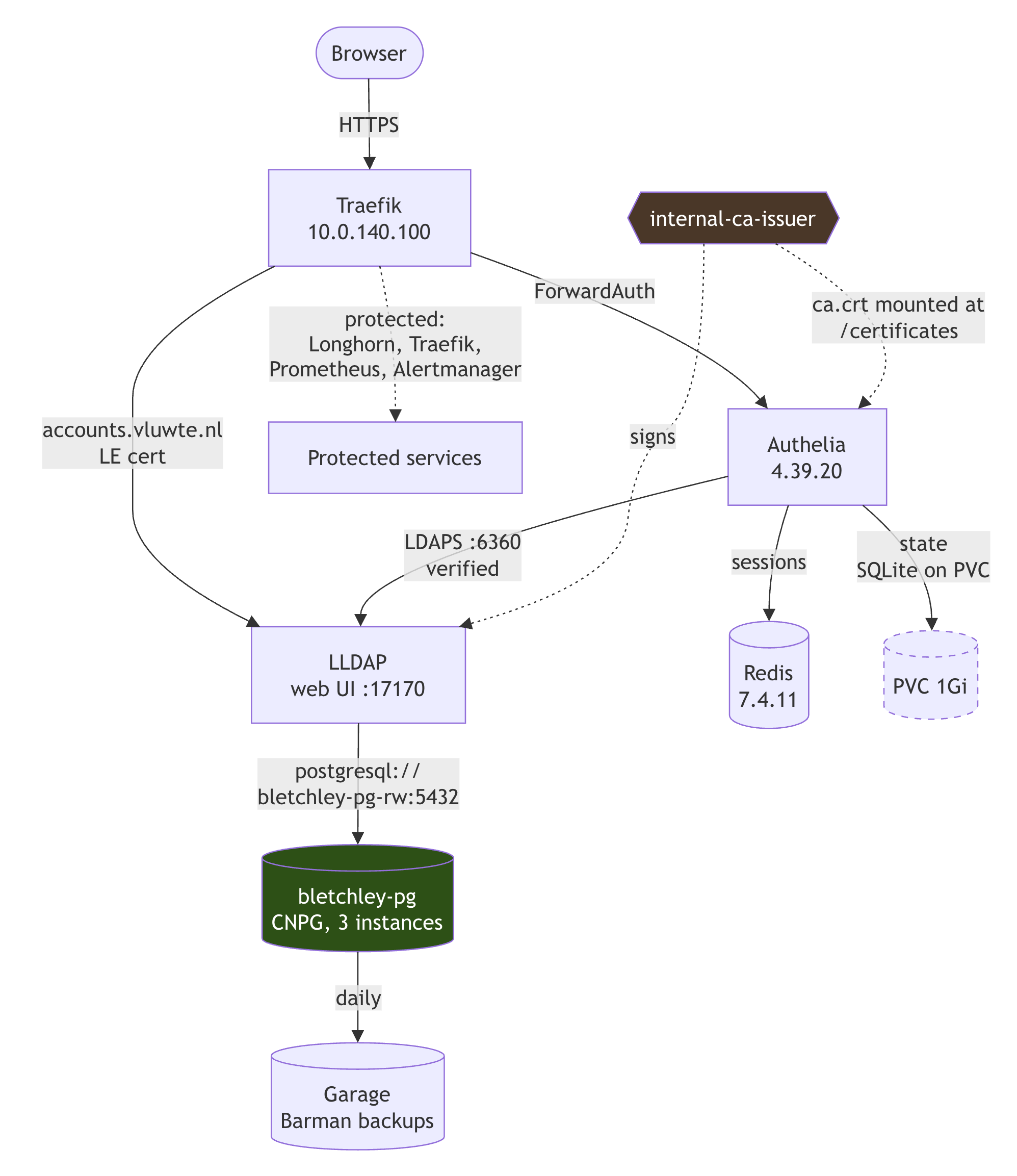
This post assumes you have a CloudNativePG cluster running and an internal CA that is actually a CA. If you're starting from scratch, CloudNativePG Part 3 covers the cluster and Certificate Management Revisited covers the CA — which I discovered, five months late, was a selfSigned issuer wearing a CA's name.Why LLDAP, and Why the Names Outlive the Software
LLDAP's own maintainers are refreshingly clear that it is not a full LDAP server, and point people who need one at OpenLDAP. That framing is exactly why it fits here. It targets the case I actually have: a handful of applications that want LDAP as an external authentication source, and one person who does not want to hand-write LDIF schema files.
Concretely, three things decided it. A built-in web UI for both administration and self-service, which OpenLDAP has neither of. A DATABASE_URL-configurable PostgreSQL backend, which is the entire premise of this part. The trade-off, a limited and opinionated schema with a fixed ou=people / ou=groups structure, is one I am happy to take.
The web UI comes at accounts.vluwte.nl, like "forgejo" is on git.vluwte.nl. The base DN is dc=vluwte,dc=nl, derived from the domain in the standard way. LLDAP supports exactly one base DN per instance, and changing it later re-points every distinguished name in the directory, so it is a decision you make once.
I am no longer certain I made it well. A cluster-scoped dc=bletchley,dc=vluwte,dc=nl would have left the top of the tree free, which is what you would want if a full OpenLDAP ever has to stand up alongside this one rather than replace it outright.
The Database Goes First
Everything that has to exist before LLDAP can start: a credential in OpenBao, two ExternalSecrets to deliver it, then the CNPG resources.
Two facts about CloudNativePG shape this step, and neither is obvious from the CRD names.
A DatabaseRole represents exactly one role. Its fields sit directly under spec; there is no spec.roles array, despite the plural-sounding concept. kubectl explain databaserole.spec --recursive says so in about four seconds, and four seconds is the cheapest place this is ever going to be discovered.
CloudNativePG does not generate role passwords. passwordSecret must reference a Secret you create: kubernetes.io/basic-auth, with username and password keys and a cnpg.io/reload: "true" label. Omit it and the role is created happily with a NULL password.
The second fact decides the entire credential design, and simplifies it. Because there is no CNPG-generated credential sitting in the databases namespace waiting to be relayed, nothing has to copy secrets between namespaces. No kubernetes-provider SecretStore, no cross-namespace RBAC. The password is generated once in OpenBao and delivered independently to both namespaces by two ordinary vault-provider ExternalSecrets:
databases ns : lldap-db-owner      → feeds DatabaseRole.passwordSecret
lldap ns     : lldap-db-credential → feeds LLDAP_DATABASE_URL
One credential, one source of truth, two shapes. The databases copy is a basic-auth Secret because that is what CNPG demands. The lldap copy is templated into a ready-made connection URL, because that is what LLDAP wants:
connection-url: 'postgresql://{{ .username }}:{{ .password }}@bletchley-pg-rw.databases.svc:5432/lldap'
Which brings a small detail with a large blast radius: generate that password with openssl rand -hex 32, not -base64. Base64 emits /, + and =, and all three corrupt a postgresql:// URL.
The apply itself was undramatic, which is the point of secret plumbing:
$ kubectl get secret lldap-db-owner -n databases
NAME             TYPE                       DATA   AGE
lldap-db-owner   kubernetes.io/basic-auth   2      18s
$ kubectl get secret lldap-db-credential -n lldap
NAME                  TYPE     DATA   AGE
lldap-db-credential   Opaque   3      22s
$ kubectl get secret lldap-secret -n lldap
NAME           TYPE     DATA   AGE
lldap-secret   Opaque   4      23s

$ kubectl apply -f apps/lldap/databaserole-lldap.yaml
databaserole.postgresql.cnpg.io/lldap created
$ kubectl get databaserole -n databases
NAME    AGE   CLUSTER        PG NAME   APPLIED   MESSAGE
lldap   31s   bletchley-pg   lldap     true

$ kubectl apply -f apps/lldap/database-lldap.yaml
database.postgresql.cnpg.io/lldap created
$ kubectl get database -n databases
NAME    AGE   CLUSTER        PG NAME   APPLIED   MESSAGE
lldap   8s    bletchley-pg   lldap     true
APPLIED: true, first attempt, on both. Order matters here: the role must exist before the Database that names it as owner, or the Database sits at APPLIED: false until you re-apply it.
Four keys, two sources, and what belongs in a secret store
That third Secret, lldap-secret, has four keys because the chart's deployment template reads four keys via unconditional secretKeyRefs, miss one and the pod does not start. But only two of them are secrets:
| Key | Source | Why |
|---|---|---|
lldap-jwt-secret |
OpenBao | Signs web session JWTs |
lldap-key-seed |
OpenBao | Derives the key protecting every stored password |
base-dn |
Literal in the ExternalSecret | A design decision |
lldap-ldap-user-pass |
Literal in the ExternalSecret | The inert changeme bootstrap placeholder |
They have to share one Secret. They do not have to share one source. Putting a base DN into OpenBao would make bao kv list secret/lldap a less meaningful inventory, and an inventory of secrets that also contains non-secrets is an inventory you stop reading.
Additionally lldap-key-seed is stored in 1Password, which lldap-jwt-secret is not. The distinction is whether the secret is regenerable and whether it protects data at rest. Rotating the JWT secret invalidates active web sessions and nothing else. Losing the key seed is data loss.
Deploying: LDAPS On From the First Install
The certificate goes on before the Helm install. A Certificate has no dependency on the application, cert-manager issues it into a fixed Secret name whether or not anything is listening, so applying it first means LDAPS is enabled from the very first pod.
One quirk worth knowing: the alexmorbo chart hard-codes the LDAPS certificate Secret name as lldap-tls. That name is therefore unavailable for the web UI's Let's Encrypt certificate, which normally follows the <app>-tls convention. So this namespace deliberately breaks it:
lldap-tls— LDAPS, issued byinternal-ca-issuerlldap-web-tls— HTTPS, issued byletsencrypt-production
Two certificates, two issuers, one namespace, both correct. The naming deviation explains itself once you see them side by side.
stern starts before the install, so it captures the pod's whole lifecycle: init, first PostgreSQL connection, admin-user creation:
$ kubectl apply -f apps/lldap/certificate-lldap-ldap.yaml
certificate.cert-manager.io/lldap-ldap-tls created
$ kubectl wait --for=condition=Ready certificate/lldap-ldap-tls -n lldap --timeout=60s
certificate.cert-manager.io/lldap-ldap-tls condition met

$ stern -n lldap . > lldap-deploy-$(date +%Y%m%d-%H%M%S).log &

$ helm install lldap oci://ghcr.io/alexmorbo/helm-charts/lldap --version 1.0.8 \
    -n lldap -f apps/lldap/values.yaml
Pulled: ghcr.io/alexmorbo/helm-charts/lldap:1.0.8
NAME: lldap
STATUS: deployed
REVISION: 1
***********************************************************************
 Welcome to lldap
 Chart version: 1.0.8
 App   version: 0.6.2
***********************************************************************

$ kubectl apply -f apps/lldap/ingresses/ingress-lldap.yaml
ingress.networking.k8s.io/lldap created
With the pod Running look at what stern caught.
[entrypoint] Copying the default config to /data/lldap_config.toml
WARNING: A key_seed was given, we will ignore the key_file and generate one from the seed!
INFO  Starting LLDAP version 0.6.2
INFO  Upgrading DB schema from version 1
INFO  Upgrading DB schema to version 2
...
INFO  Upgrading DB schema to version 11
WARN  Could not find lldap_admin group, trying to create it
WARN  Could not find lldap_password_manager group, trying to create it
WARN  Could not find lldap_strict_readonly group, trying to create it
WARN  Could not find an admin user, trying to create the user "admin" with the config-provided password
INFO  Successfully (re)set password for "a-igor"
INFO  Starting the LDAP server on port 3890
INFO  Starting the LDAPS server on port 6360
INFO  Starting the API/web server on port 17170
Schema version 1 through 11, against an empty database on bletchley-pg. That is LLDAP building its entire schema inside the shared CNPG cluster, which is the thing this part exists to demonstrate.
The key_seed line is the fix confirming itself. LLDAP is telling me it derived its password-protection key from the seed rather than writing /data/private_key — which is exactly what makes persistence.enabled: false safe instead of catastrophic, because /data is an emptyDir and anything written there dies with the pod.
The admin in that warning is hard-coded in LLDAP's source; the account actually created is a-igor, from LLDAP_LDAP_USER_DN. The message just was not written with the override in mind.
Three smaller observations from the same log:
LLDAP never says which database it is using. The captured log returns nothing at all for the obvious check, so the schema migration is only circumstantial evidence:
$ grep -i postgres lldap-deploy-*.log
$
psql settles it properly:
$ kubectl exec -n databases bletchley-pg-1 -- psql -d lldap -c '\dt'
 Schema |          Name          | Type  | Owner
--------+------------------------+-------+-------
 public | group_attribute_schema | table | lldap
 public | groups                 | table | lldap
 public | jwt_storage            | table | lldap
 public | memberships            | table | lldap
 public | users                  | table | lldap
(13 rows)
Thirteen tables, owned by role lldap, in database lldap, on bletchley-pg. That is Part 5's premise in one command.
Kubernetes' own environment variables collide with LLDAP's config prefix. Eighteen warnings on every start:
WARNING: Unknown environment variable: LLDAP_SERVICE_PORT_LDAP
WARNING: Unknown environment variable: LLDAP_PORT_3890_TCP_ADDR
The Service is called lldap, so Kubernetes' legacy service-link variables all arrive with the exact prefix LLDAP uses for its own configuration. It reads them, does not recognise them, and complains. Harmless, silenceable with enableServiceLinks: false, which this chart does not expose. Filed under "things nobody warns you about".
"Which version is running" has two right answers. Helm's NOTES say App version: 0.6.2. The image pulled is 2026-01-06-alpine-rootless to which the chart appends -rootless because readOnlyRootFilesystem is true, and the rootless variants start directly as the target user instead of dropping privilege after fixing permissions. The application logs Starting LLDAP version 0.6.2. All three are true; the chart pins by build date.
Verifying TLS, because Ready=True proves nothing
cert-manager reported both a working certificate and an unverifiable one as Ready, in under a second each, with no controller warnings. That is precisely how a selfSigned issuer masqueraded as an internal CA here for five months. So the check is openssl, not kubectl get certificate:
# pull the anchor and the leaf out of the Secret cert-manager wrote
$ kubectl get secret lldap-tls -n lldap -o jsonpath='{.data.ca\.crt}'  | base64 -d > /tmp/ca.crt
$ kubectl get secret lldap-tls -n lldap -o jsonpath='{.data.tls\.crt}' | base64 -d > /tmp/lldap.crt

$ openssl x509 -in /tmp/ca.crt -noout -subject -issuer
subject=CN=vluwte internal CA
issuer=CN=vluwte internal CA

$ openssl verify -CAfile /tmp/ca.crt /tmp/lldap.crt
/tmp/lldap.crt: OK

$ openssl x509 -in /tmp/lldap.crt -noout -text | grep -A1 'Subject Alternative Name'
    X509v3 Subject Alternative Name:
        DNS:lldap.lldap.svc.cluster.local, DNS:lldap.lldap.svc, DNS:lldap.lldap, DNS:lldap
Those three run locally and only inspect files. The real test has to happen from inside the cluster, from something that can resolve lldap.lldap.svc.cluster.local and reach port 6360. A throwaway pod, holding nothing but the CA root, does it in one command:
CA=$(kubectl get secret lldap-tls -n lldap -o jsonpath='{.data.ca\.crt}')

kubectl run tlscheck --rm -i --restart=Never -n lldap --image=alpine/openssl \
  --env="CA_B64=$CA" --command -- sh -c \
  'echo "$CA_B64" | base64 -d > /tmp/ca.crt && \
   openssl s_client -connect lldap.lldap.svc.cluster.local:6360 \
     -CAfile /tmp/ca.crt -verify_return_error -brief </dev/null'
--rm --restart=Never means the pod is gone the moment the command exits, and alpine/openssl needs no package installation. The CA is passed in base64 as an environment variable rather than mounted, which keeps the whole thing to one line. It is a public certificate, so there is nothing to protect. -verify_return_error is what makes this a test rather than a demonstration: without it, s_client happily reports a failed verification and still exits zero.
CONNECTION ESTABLISHED
Protocol version: TLSv1.3
Peer certificate: CN=lldap.lldap.svc.cluster.local
Verification: OK
Verification: OK is the line that matters: a client with no prior knowledge of LLDAP verified its certificate chain on port 6360, which is exactly what Authelia will do. The part opened with an issuer that turned out not to be a CA, and this closes that arc.
Two cosmetic artefacts of kubectl run are worth expecting so they do not look like failures. The lldap namespace emits a PodSecurity restricted warning for the throwaway pod. A warning, not a rejection, and the pod runs. And the output prints twice, because --rm -i attaches to the pod and then falls back to streaming its logs.
One trap on the way: my first run of that last command omitted -CAfile and failed with Verify return code: 20 (unable to get local issuer certificate). That is a client-side failure, the test pod's image ships only the public CA bundle, and it says nothing whatsoever about the server. When a check fails, establish which side failed before concluding anything. It is the same trap as Ready=True, from the opposite direction: one reports success that means nothing, the other failure that means nothing.
Accounts, and What Self-Service Looks Like Day One
This is where the part changes texture. Two steps of terminal output, and then a web page where you click "add user".
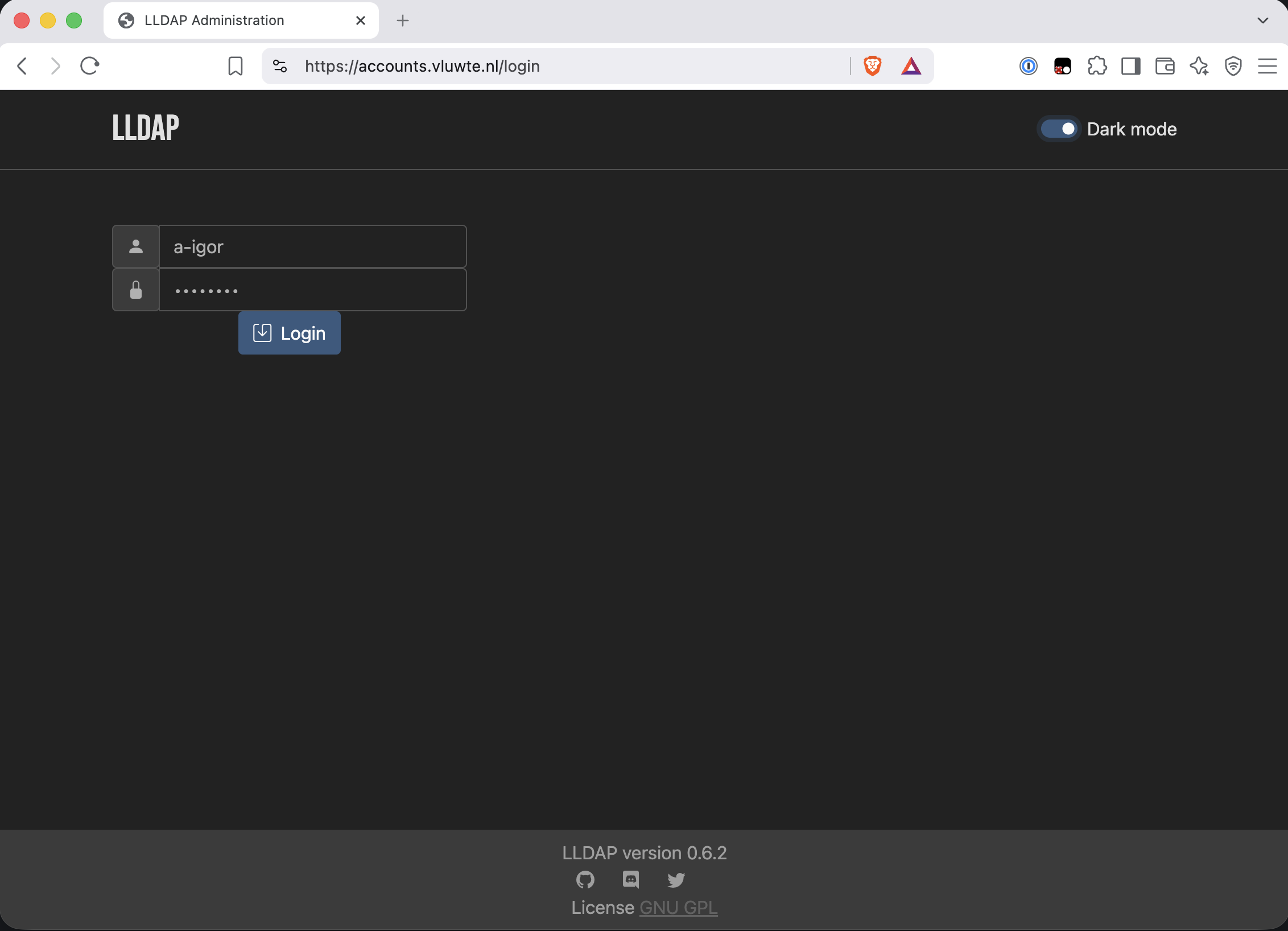
The first action after deployment is logging in as a-igor with the changeme placeholder and setting a real password. That completes the placeholder's whole lifecycle: the bootstrap value existed in Helm values in plaintext, was consumed once to create the account, and is now dead config that nothing reads. A placeholder password is fine provided it is inert the moment it is used.
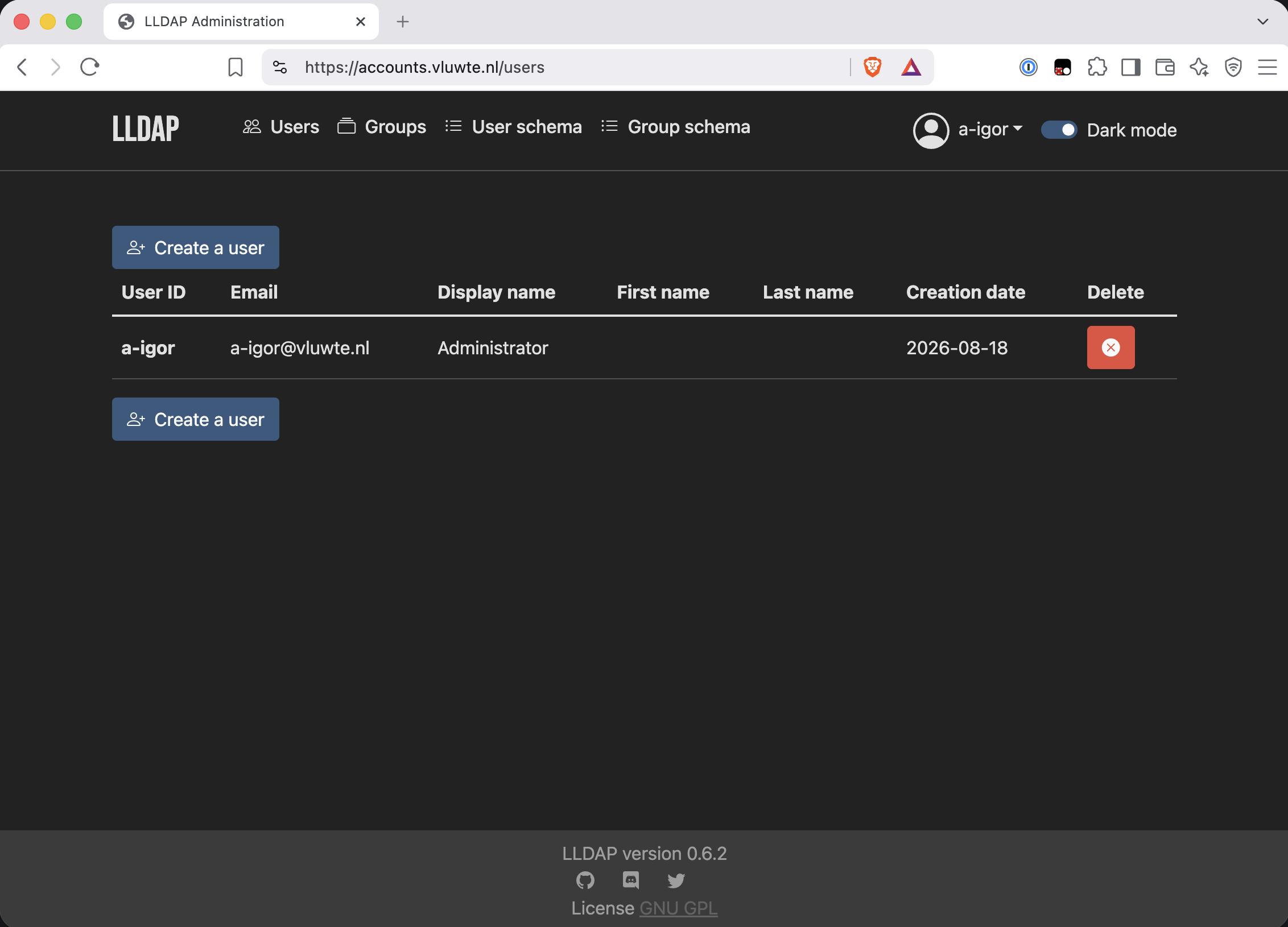
Then two more accounts: igor, a regular user with no elevated group, and authelia, the bind account.
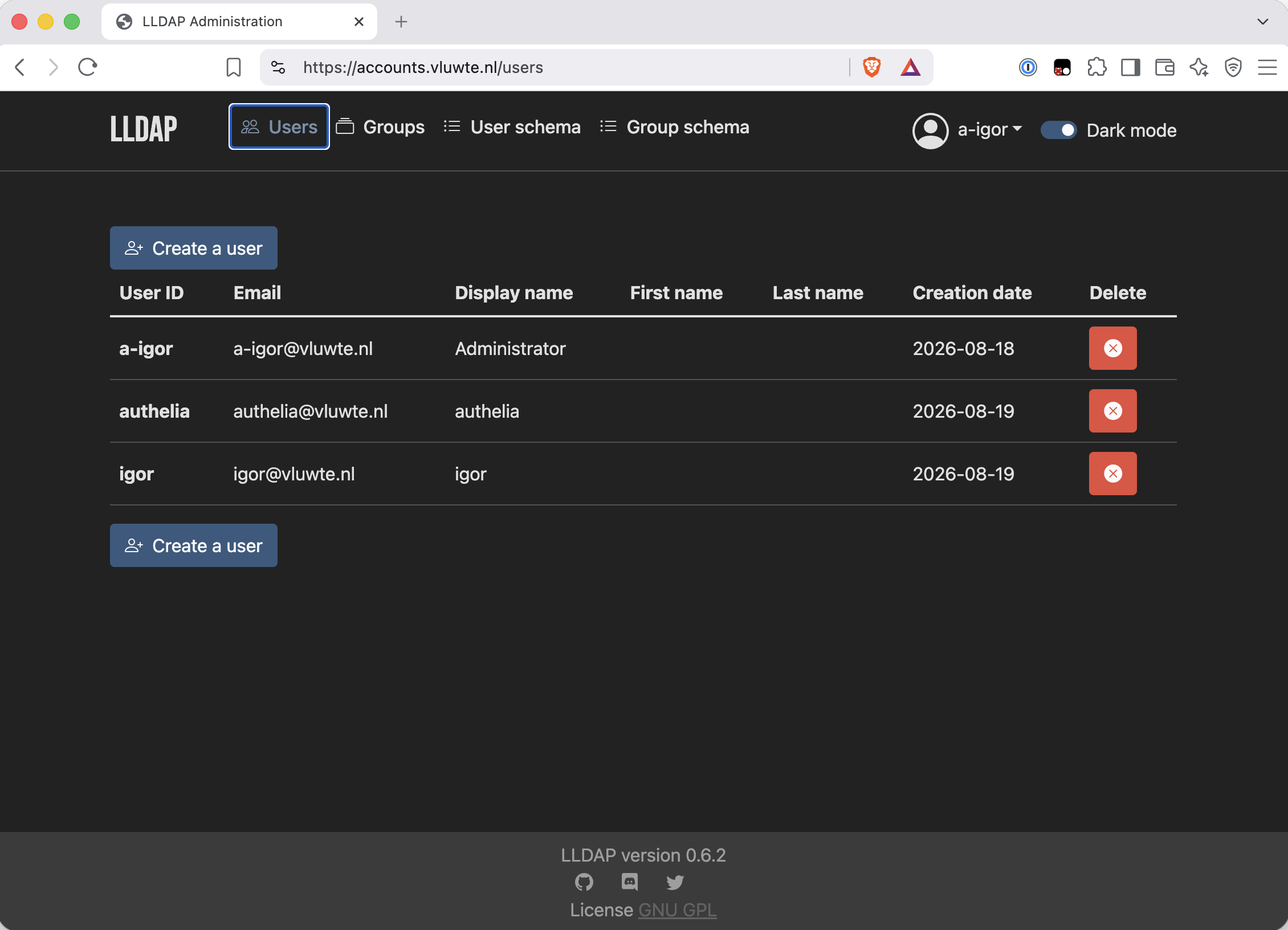
That is worth being honest about. a-igor versus igor is personal discipline, not a control. None of the four Authelia-protected services has an internal user/admin role split, so a-igor is the intended login for all four anyway. The boundary that is enforced belongs to the service account.
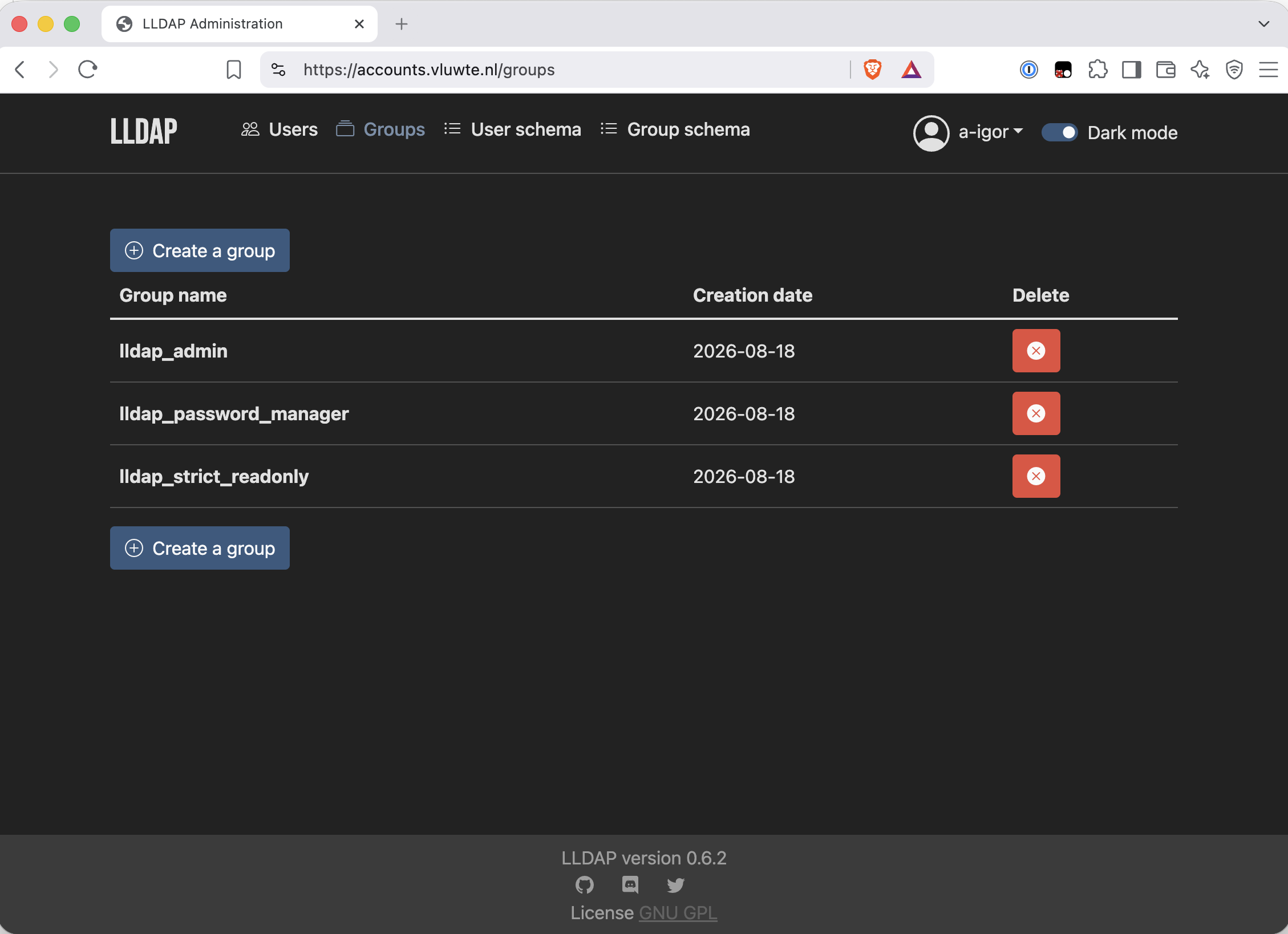
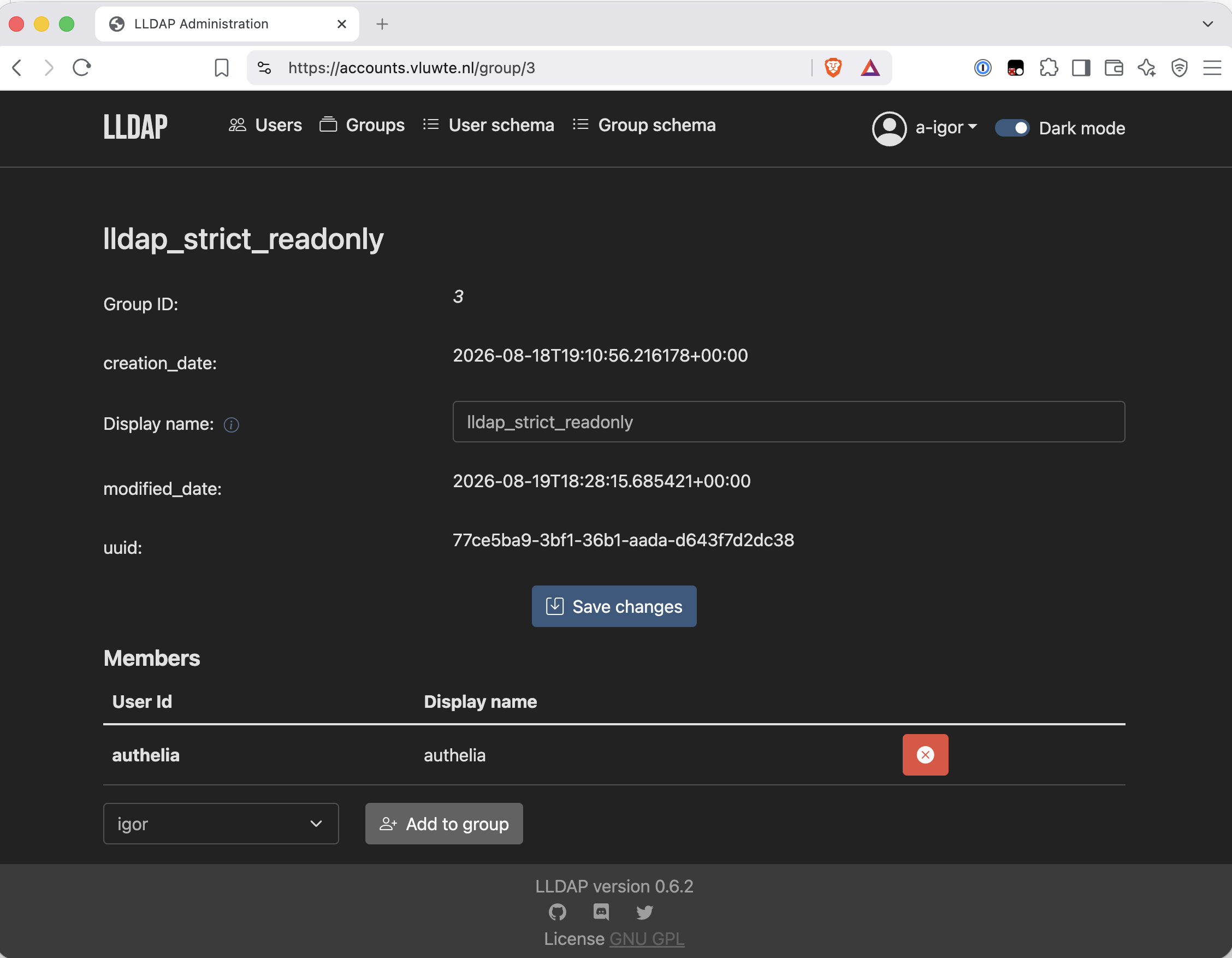
Most LDAP integration guides hand the bind account admin credentials, because that is what works first. lldap_strict_readonly costs nothing and is exactly right: the bind account needs to search ou=people and ou=groups, and nothing else, ever.
Proving the credential before Authelia ever sees it
The transport was proven with openssl. The credential bind DN, password and search permission is the rest of the risk. It is testable without touching Authelia at all. Same throwaway-pod trick, one image up: alpine plus openldap-clients, because there is no ready-made ldapsearch image worth pulling.
CA=$(kubectl get secret lldap-tls -n lldap -o jsonpath='{.data.ca\.crt}')
read -rs PW        # paste the bind password at the silent prompt

kubectl run ldapcheck --rm -i --restart=Never -n lldap --image=alpine \
  --env="CA_B64=$CA" --env="BIND_PW=$PW" --command -- sh -c '
    apk add --no-cache openldap-clients >/dev/null
    echo "$CA_B64" | base64 -d > /tmp/ca.crt
    LDAPTLS_CACERT=/tmp/ca.crt ldapsearch -x \
      -H ldaps://lldap.lldap.svc.cluster.local:6360 \
      -D "uid=authelia,ou=people,dc=vluwte,dc=nl" -w "$BIND_PW" \
      -b "ou=people,dc=vluwte,dc=nl" "(uid=igor)" dn uid mail memberOf'
LDAPTLS_CACERT is how you hand ldapsearch a trust anchor without an ldap.conf, and it is the difference between verifying the certificate and merely encrypting to it.
read -rs keeps the bind password out of shell history, which a literal in the command would not. Worth being clear about what that does not solve: the value still reaches the pod as an environment variable, so it is briefly readable in the pod spec and in the API audit log. This one is regenerable, so that is an acceptable trade for a one-off check which it would not be for the key seed.
# igor, people, vluwte.nl
dn: uid=igor,ou=people,dc=vluwte,dc=nl
mail: igor@vluwte.nl
uid: igor

# search result
search: 2
result: 0 Success
# numEntries: 1
Eight lines of LDIF containing everything this part built: an encrypted bind as a read-only service account, against a directory whose rows live in a PostgreSQL cluster three parts of this series in the making.
But look at what is not there. I asked for four attributes: dn uid mail memberOf. The return was three, with result: 0 Success. igor was deliberately created with no groups, and LDAP omits empty attributes rather than returning them blank, so this was expected. The problem is that "the attribute is empty" and "the attribute is not served" produce identical output, and only one of those is fine.
Re-running the same command against a-igor, one filter different:
-b "ou=people,dc=vluwte,dc=nl" "(uid=a-igor)" dn uid mail memberOf'
dn: uid=a-igor,ou=people,dc=vluwte,dc=nl
mail: a-igor@vluwte.nl
memberOf: cn=lldap_admin,ou=groups,dc=vluwte,dc=nl
uid: a-igor
Gap closed. Two commands show the difference between "the command succeeded" and "the check passed". Also a quiet argument for testing with more than one account.
The Cutover, and the Outage the Checks Could Not Prevent
Authelia's ForwardAuth gates Longhorn, the Traefik dashboard, Alertmanager and Prometheus. A bad configuration here does not just break LDAP; it locks me out of the tools I would use to diagnose it. So the LDAP configuration ships as a Helm values overlay applied as a second -f, leaving the existing file-backend values file completely untouched. The rollback is one thing: drop the second -f. Nothing to restore from (git) history, nothing to reconstruct under pressure.
The single most valuable line in that overlay is three words long:
implementation: 'lldap'
Authelia has native LLDAP support, added in the 4.38 series, which supplies the users filter, the groups filter, the attribute names (uid, cn, mail, memberOf) and the ou=people / ou=groups search bases automatically. There is no hand-written attribute mapping in this configuration at all, and that one line is why.
The render failed, and the chart was right to fail it
Rendering first is the whole point — the chart's own validations run at helm template, not at apply:
$ helm template authelia authelia/authelia -n authelia \
    -f apps/authelia/authelia-values.yaml \
    -f apps/authelia/authelia-values-ldap.yaml > /tmp/authelia-render.yaml
Error: execution error at (authelia/templates/validations.secrets.check.yaml:10:4):
The secret authelia-ldap-bind must be configured as one of the additional secrets
as it's being used for the 'configMap.authentication_backend.ldap.password' secret
Naming a Secret in password.secret_name is not enough. The chart cross-checks every *.secret_name against secret.additionalSecrets and calls fail if it is not declared in both places.
The root cause of the miss is more interesting than the fix. Every conclusion I had drawn about secret_name came from reading the chart's deployment template, which showed the value being consumed. Reading a template that uses a value proves the value works. It does not prove nothing else is required alongside it.
Reading the chart's values.yaml turned up a second thing worth having: the chart has a first-class field for CA trust.
certificates:
  existingSecret: authelia-ca-trust
That one line both mounts the Secret at /certificates and makes templates/configMap.yaml emit certificates_directory: '/certificates' into the rendered config. Doing it by hand takes pod.extraVolumes, pod.extraVolumeMounts and an AUTHELIA_CERTIFICATES_DIRECTORY env var. This turns about forty lines in just two, and it drags in the Helm hazard the overlay was carefully working around, since Helm replaces lists rather than merging them and the base file already populates both. Using the chart's own field means the overlay sets nothing under pod: at all, which makes that hazard structurally impossible here instead of merely documented.
With both fixes in, the render came out clean, and three greps confirm what matters:
$ grep -A25 'authentication_backend' /tmp/authelia-render.yaml   # ldap on, file gone
$ grep -n   'certificates_directory' /tmp/authelia-render.yaml   # emitted by the chart
18:    certificates_directory: '/certificates'
$ grep -A20 'volumeMounts'           /tmp/authelia-render.yaml   # both new mounts, and users-database
Six planning predictions confirmed in about forty lines: implementation: 'lldap' present with no hand-written attribute mapping, no file: block, certificates_directory emitted by the chart, the bind password mounted at /secrets/authelia-ldap-bind, and the one that mattered: the users-database volume from the base values file still there, untouched.
Without that render step, this would have been a helm upgrade against the service gating four dashboards, and I would have found the problem while locked out of all of them.
And then the transition broke
Same pattern as the LLDAP install: start the log capture before touching anything, then watch the pods:
$ stern -n authelia . > authelia-ldap-cutover-$(date +%Y%m%d-%H%M%S).log &
$ kubectl -n authelia get pods -o wide -w &

$ helm upgrade authelia authelia/authelia -n authelia \
    -f apps/authelia/authelia-values.yaml \
    -f apps/authelia/authelia-values-ldap.yaml
Release "authelia" has been upgraded. Happy Helming!
REVISION: 11
The upgrade applied. Then the new pod sat in ContainerCreating while the old one kept running:
authelia-79c698cfd7-x4jrh   1/1   Running             0   15d     rock6
authelia-7bcd87bfdd-zqd6f   0/1   ContainerCreating   0   5m16s   rock7
/config is a Longhorn ReadWriteOnce PVC, held by the old pod on rock6. The replacement was scheduled to rock7. RWO means one node at a time and the rollout strategy turns that from a delay into a genuine deadlock: with one replica, maxUnavailable: 25% computes to zero, so the old pod will not terminate until the new one is Ready, and the new one cannot become Ready until the old one releases the volume. Each waits for the other, indefinitely.
Nothing to do with LDAP. It would happen on any upgrade where the replacement landed on a different node.
Then I made it worse. Deleting the old pod seemed like the obvious way to release the volume:
$ kubectl -n authelia delete pod authelia-79c698cfd7-x4jrh
A helm upgrade updates the ConfigMap immediately, and the ConfigMap is not versioned with the ReplicaSet. The old pod had only kept working because its configuration was already loaded in memory. Deleting it produced a fresh pod from the old ReplicaSet. The old spec with no bind-password mount and no certificates mount while reading the new configuration requires both. The stern capture caught it:
level=error msg="Configuration: the location 'certificates_directory' could not be inspected: stat /certificates: no such file or directory"
level=error msg="Configuration: authentication_backend: ldap: option 'password' is required"
level=fatal msg="Can't continue due to the errors loading the configuration"
Two errors, each naming exactly one of the two volumes the old pod spec lacks. Both pods now failing. The old spec crash-looping on the new config, new spec still unable to mount, and Authelia was down. This is precisely the lockout scenario the overlay was designed to escape, reached not through a bad configuration but through a recovery action.
Scaling to zero broke the tie:
kubectl -n authelia scale deployment/authelia --replicas=0   # volume detaches
kubectl -n authelia scale deployment/authelia --replicas=1   # newest ReplicaSet, correct mounts
At zero replicas the volume detaches; scaling back up creates from the newest ReplicaSet, whose spec matches the ConfigMap. Clean startup, Storage schema migration from 23 to 24 is complete, Startup complete.
The permanent fix is one values setting, and it belongs in the base file because it is a property of the application's storage rather than of the LDAP change:
pod:
  strategy:
    type: Recreate
Recreate terminates before it creates. It trades a few seconds of downtime for an upgrade that cannot deadlock, which is the right trade for a single-replica application on RWO storage. RollingUpdate only means anything when the volume can be shared or there is more than one replica.
The verification that the cutover actually worked is small and worth arranging deliberately: I logged in as igor using the password set in LLDAP, which differs from the one in the old users_database.yml. A cached session or a stale file backend would have accepted the old password. That difference turns "it still works" into "it works differently, as intended".
The upgrade nobody asked for
Buried in that clean startup log: Authelia v4.39.20 is starting, and a storage schema migration from 23 to 24.
Before this step the release was chart authelia-0.10.58, application 4.39.19. My upgrade command carried no --version, so Helm resolved authelia/authelia to the newest chart in the repository and brought a new application version with it. The new version came with a schema migration that ran automatically against the SQLite database. Every other Helm release in this project pins an exact chart version. The LLDAP install two days earlier used --version 1.0.8. The Authelia commands in my own plan never did, and it went unnoticed until the log said 4.39.20.
0.10.58 → 0.11.6 is a minor bump, not a patch. Chart minor versions routinely carry values-schema changes, so this crossed a compatibility boundary silently, during the riskiest step of the part.
Two consequences. The highest-risk step quietly did two things at once. Had the pod failed to start, "is it the LDAP config or the version bump?" would have been an extra question to answer mid-outage. And the rollback stopped being purely reversible: dropping the second -f restores the configuration, but the storage schema is now 24, and an older Authelia may refuse to start against it.
Here is the twist, which is too good to leave out. Every chart template I consulted while writing the overlay validations.secrets.check.yaml, deployment.yaml, configMap.yaml, _helpers.tpl was read from the repository's master branch. That is 0.11.x, not the 0.10.58 that was actually installed. So secret.additionalSecrets and certificates.existingSecret were verified against the chart that ended up running, purely because both helm template and helm upgrade resolved to latest.
Two mistakes that happened to cancel out. Had I pinned to 0.10.58 as my own convention demands, the configuration might not have rendered at all. Had I read the templates from the 0.10.58 tag, the unpinned command would have upgraded away from the version I wrote for. Either alone produces a broken cutover.
None of which is a defence of leaving it unpinned, it just means the correct pin is 0.11.6, the version now running and validated, not the one that was running beforehand. Reverting the chart would take the release back to templates this configuration was never tested against.
The argument for pinning is not that upgrades are dangerous. It is that unintended ones destroy your ability to reason about a failure.
What Reading the Render Turned Up
Three chart defaults that nobody set, all found by reading rendered output rather than my own inputs. Only one of them was actually wrong, and it is the one I would never have found any other way.
group_search_mode: 'filter'. Authelia does not read the memberOf attribute to resolve group membership. It searches ou=groups with the filter implementation: 'lldap' supplies. Which means my careful memberOf check two steps earlier verified an adjacent thing. What it had not verified was whether the bind account can search ou=groups at all. Both earlier searches used -b "ou=people,...". The same throwaway pod, with Authelia's own base and filter substituted in, closed it in thirty seconds:
      -b "ou=groups,dc=vluwte,dc=nl" \
      "(&(member=uid=a-igor,ou=people,dc=vluwte,dc=nl)(objectClass=groupOfNames))" dn cn
dn: cn=lldap_admin,ou=groups,dc=vluwte,dc=nl
cn: lldap_admin

result: 0 Success
# numEntries: 1
lldap_strict_readonly can read ou=groups, and the groupOfNames objectClass and member attribute are both as Authelia's filter expects. Had it come back empty, group memberships would have silently resolved as empty after the cutover: harmless today, and a trap the day a group-based rule gets added.
pooling.enable: false. Each LDAP operation opens a fresh connection, so one login produces three TCP connections and three TLS handshakes. Harmless at this scale, and arguably preferable while the system is new. It means every login leaves a clean, self-contained trace. Recorded as a deliberate non-change rather than an oversight.
Redis was configured but never enabled. This one was real. My original authelia-values.yaml set session.redis.host and .port but never enabled, and the chart gates the entire block on it:
{{- if and ($session.redis) ($session.redis.enabled) }}
So there was no redis: section in the rendered configuration at all. Authelia has been keeping sessions in memory since it first landed on Bletchley, while a Redis pod ran all this time serving nothing. The visible symptom, every pod restart logs everyone out, happened repeatedly during the cutover incident and would naturally have been blamed on it.
Nothing any test would have caught, because everything was working in the sense that logins succeeded. It was visible only as an absence. Read what the software will run, not what you asked it to run.
What a Login Actually Does
With the cutover live, log in at a protected service and read the directory's own log. No debug level required as LLDAP shows the whole flow at info:
$ kubectl -n lldap logs deployment/lldap --tail=50
INFO  LDAP session start: 40dd35c4-...
INFO  LDAP request [ 256µs   | 100.00% ]
INFO  LDAP request [ 168ms   | 100.00% ]
INFO  ┕━ Login attempt for "authelia"
INFO  LDAP request [ 1.58ms  | 100.00% ]
...
INFO  ┕━ Login attempt for "igor"
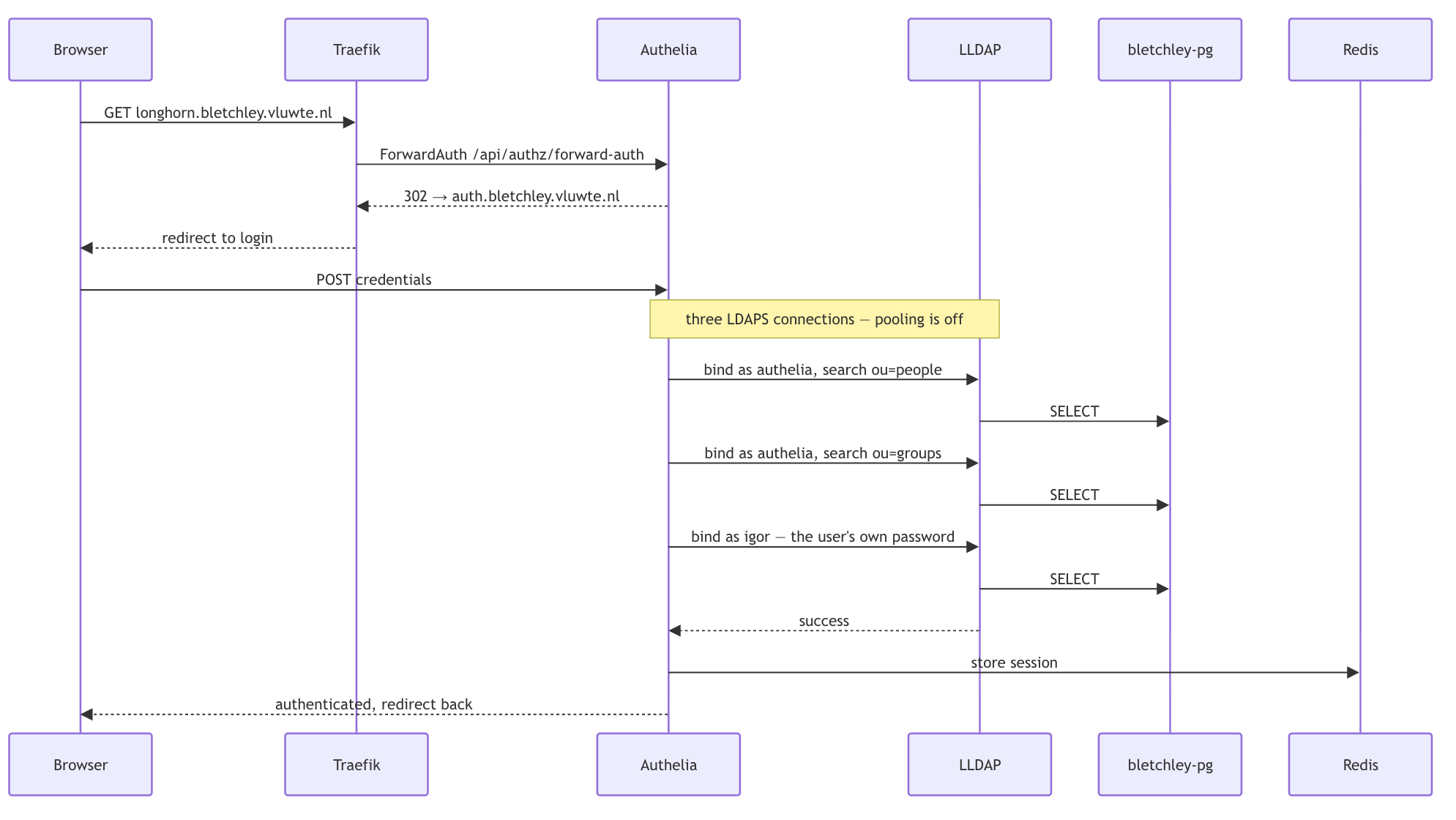
Login attempt for "igor" is the single best line in this part. Authelia does not compare a hash it holds, it hands LLDAP the password the user just typed and asks LLDAP to bind with it. Unencrypted, that credential crosses the pod network in the clear on every single login, and Flannel enforces no pod-to-pod isolation. That was a paragraph of reasoning at planning time. Here it is as an observed fact, one line long.
The timings tell the rest without commentary. The microsecond entries are searches. The three entries around 130–170ms are password verifications, LLDAP's key-derivation work, the only expensive thing in the exchange. You can read the shape of the protocol off the durations alone.
One thing that looks like a failure and is not: Authelia logged nothing on the successful login. At info it records authorization denials, not grants; the granted path is debug. The absence of a line is the success. Worth knowing which side of a transaction is the talkative one before you go looking.
Finishing the Migration
A migration is not finished when the new thing works. It is finished when the old thing is gone.
The overlay was scaffolding, and its value peaked at the moment of cutover. Two reasons to retire it immediately rather than let it sit there:
The rollback target was going stale. igor's password had been changed in LLDAP; users_database.yml still held the old one. A revert would have succeeded with a credential that exists nowhere else. Every password change widens that gap. A fallback that silently restores stale credentials is worse than one requiring a git checkout, because it looks like it works.
Most write-ups treat "keep the old config around" as unambiguously prudent. It is not, past a point. The moment the new system becomes the source of truth, the old configuration starts drifting from reality while still looking usable. A fallback has a shelf life, and knowing when to delete it is part of the migration.
Two files describing one system is a standing cost. Helm's merge semantics are a live trap, and the base file carried a large, inactive file-backend block that read as authoritative and was no longer true.
So the overlay merged into authelia-values.yaml, the file backend came out, the users-database Secret and its ExternalSecret were deleted, and rollback became git revert. Along the way, three things that were not strictly LDAP work but were sitting in a file already being edited: pod.strategy.type: Recreate, session.redis.enabled: true, and the Redis image pinned from the floating redis:7-alpine to redis:7.4.11-alpine.
Enabling Redis quietly pulled in a second requirement, in exactly the shape of the earlier secret_name problem. session.redis.password.disabled defaults to false, so the chart wires up a password it has no reason to need. Projecting a session.redis.password.txt key from the authelia Secret, which holds only three keys and not that one. A Secret volume with an items: list fails to mount when a named key is absent, with no optional: true available. The new pod would have sat in ContainerCreating again, this time for a Redis password that does not exist because Redis has no authentication. disabled: true gates off both the environment variable and the volume item, and is the honest description of the setup.
Caught by rendering, again, rather than by applying.
Eleven seconds
The consolidated upgrade is the first deliberate exercise of Recreate — one values file this time, and the chart version pinned:
$ helm upgrade authelia authelia/authelia --version 0.11.6 -n authelia \
    -f apps/authelia/authelia-values.yaml
Release "authelia" has been upgraded. Happy Helming!
REVISION: 12

$ kubectl -n authelia rollout status deployment/authelia --timeout=300s
deployment "authelia" successfully rolled out
It behaved exactly as the diagnosis predicted, and the numbers are the useful part:
21:12:19  old pod  Shutdown complete
21:12:20  new pod  Authelia v4.39.20 is starting
21:12:21  new pod  Startup complete
   +11s   new pod  1/1 Ready
Strictly sequential: Terminating → Completed → new pod Pending. No overlap, therefore no contested ReadWriteOnce volume, therefore no deadlock. That is the earlier diagnosis confirmed by its own fix: the problem was never the LDAP configuration, it was one replica plus RWO storage plus a strategy that refuses to remove the old pod first.
About eleven seconds of downtime, nearly all of it the readiness probe rather than Authelia. The process was serving two seconds after the old one stopped. That is the whole cost, and it makes the trade concrete: eleven seconds per upgrade, against an upgrade that can wedge indefinitely and take an outage to escape.
The thing rendering could not tell me
helm template showed the redis: block. The startup log showed no errors. Neither established that a session actually round-trips. Only one test does:
# log in at https://longhorn.bletchley.vluwte.nl, then:
$ kubectl -n authelia rollout restart deployment/authelia
$ kubectl -n authelia rollout status deployment/authelia --timeout=300s
# reload the page — still logged in means the session came from Redis
Still logged in.
Before this change that would have logged me out every time, and it is the only reason enabling Redis was worth doing. helm template moved a great many failures earlier and cheaper, and there is still a last category it cannot reach. Configured and working are different claims, and only one of them can be read off a manifest.
While I was in there: Redis had been running as root
$ kubectl -n authelia exec deploy/redis -- id
uid=0(root) gid=0(root) groups=0(root),1(bin),2(daemon),...
All along, every default capability, fronting the session store that authentication now depends on. Not exploited, not likely to be, but it was the least examined thing in the namespace precisely because nothing ever complained about it except a PodSecurity warning nobody read.
Fixed together: non-root uid 999, all capabilities dropped, seccompProfile: RuntimeDefault, readOnlyRootFilesystem: true, --save "", strategy: type: Recreate, and real readiness and liveness probes. readOnlyRootFilesystem is only possible because of --save "". With RDB snapshots disabled Redis writes nothing to disk, so no emptyDir is needed. Disabling them costs nothing either: with no PVC, those snapshots were being written to a container filesystem that dies with the pod.
$ kubectl -n authelia exec deploy/redis -- id
uid=999(redis) gid=999(ping) groups=999(ping)
The startup log confirms it in two absences. Configuration loaded replaces the old Warning: no config file specified because --save "" is configuration. And there are no Background saving started lines at all.
Worth noting the inconsistency this exposes. LLDAP was given a hardened securityContext deliberately in this part. Redis is now hardened too. Authelia, the component that gates every protected service, still has none, and the namespace has been announcing that on every single apply. Nobody notices warnings on a command that succeeds. It is deferred deliberately, and the next section explains why.
What's Working Now
As of August 2026. Everything below was verified rather than assumed.
The directory
- ✅ LLDAP running on
bletchley-pg- 13 tables owned by rolelldap, confirmed bypsql \dt. The first real per-app tenant on the shared CNPG cluster. - ✅ No PVC.
persistence.enabled: false,/dataon an emptyDir, safe becauseLLDAP_KEY_SEEDreplaces the generated private key file. - ✅ Inherits the cluster's backup story - LLDAP's data is in
bletchley-pg, covered by the existing daily Barman backups to Garage. No per-app backup wiring was needed. - ✅ Web UI at
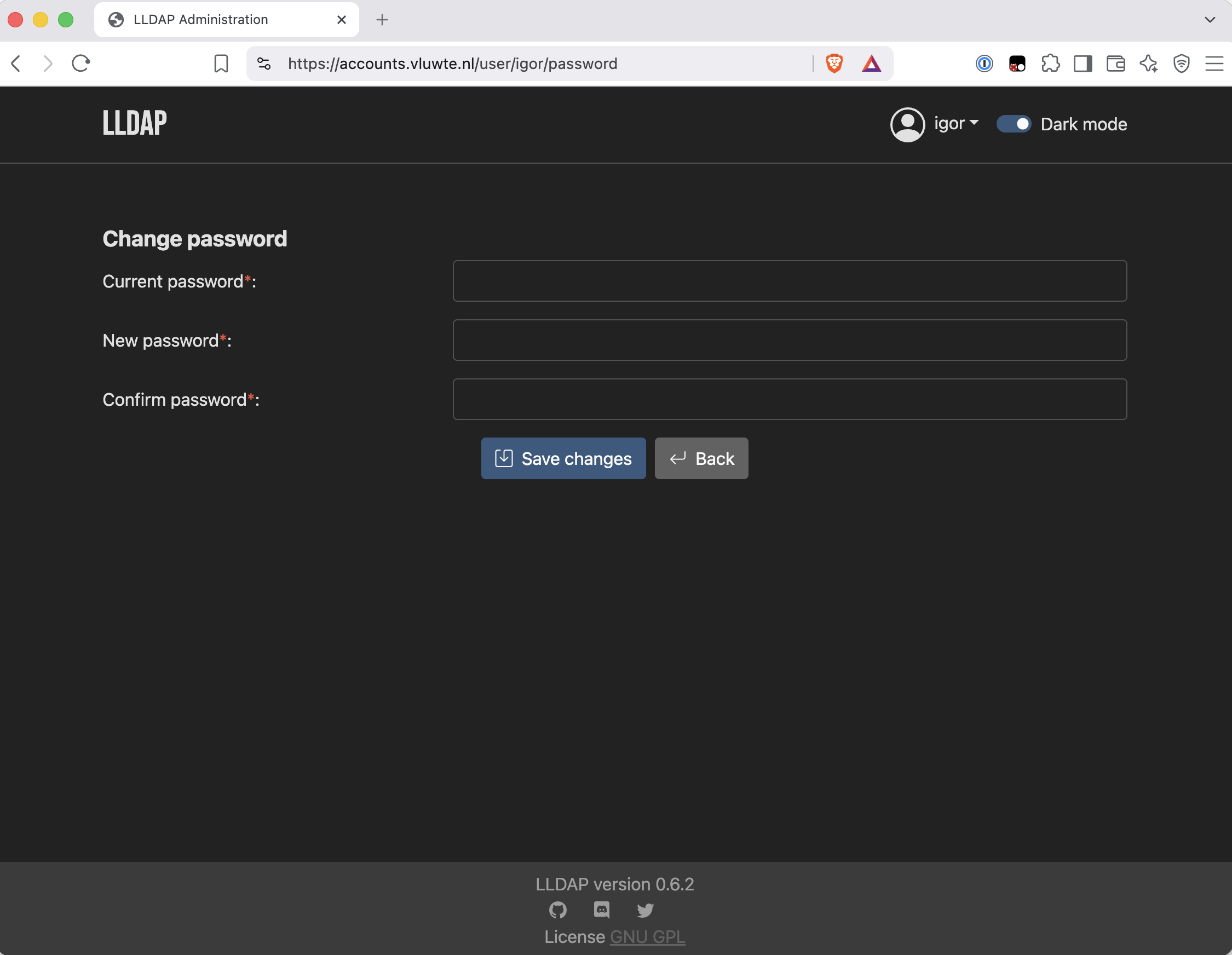
accounts.vluwte.nl, Let's Encrypt certificate, internal DNS only, self-service password change verified. - ✅ Three accounts -
a-igor(lldap_admin),igor(no groups),authelia(lldap_strict_readonly).
The transport
- ✅ LDAPS on 6360 from
internal-ca-issuer, verified end to end:openssl s_clientreturnsVerification: OKfrom a pod holding nothing but the CA root.
Authentication
- ✅ Authelia authenticates against LLDAP - chart
0.11.6, application4.39.20, nativeimplementation: 'lldap', no hand-written attribute mapping. - ✅ Verified with a password that exists only in LLDAP, ruling out a cached session or a stale file backend.
- ✅ Least privilege in the auth path - the bind account holds the weakest role available, and LLDAP's log shows the two-bind flow plainly.
- ✅ Sessions persist across restarts - Redis was configured but never enabled; fixed and confirmed by round-trip.
- ⚠️ Three of the four protected services verified, not four. Longhorn, Alertmanager and Prometheus all authenticate correctly. The Traefik dashboard could not be tested: its web GUI has been broken since March for routing reasons entirely unrelated to authentication, discovered during this work and parked as its own cluster-todo item.
Configuration
- ✅ One values file. The overlay is retired, the file backend is gone, and rollback is
git revert. - ✅ Versions pinned — Authelia chart
0.11.6, LLDAP chart1.0.8/ image2026-01-06-alpine, Redis7.4.11-alpine. - ✅ All live secrets via ESO from OpenBao, and the two that are not regenerable —
lldap-key-seedandstorage.encryption.key— are also in 1Password.
Known limitations
- No group-based access control. All four rules are
one_factorwith nosubject:filter, so any valid LLDAP account reaches all four services. Revisit before a second human or service account exists; adding the filters before the account, not after. - No email password reset. Needs SMTP, deferred until mail hosting exists.
- Redis is now a hard dependency of authentication and is unmonitored. If it is down, logins fail. It belongs in the existing "stateful service health after restarts" monitoring gap.
- Redis is single-replica with no persistence. Its own restart still drops all sessions, an improvement on the previous behaviour, not a solution.
- Authelia still keeps state on a local PVC - SQLite storage and the filesystem notifier runs with no
securityContext. - A pre-existing alert has become noise. Authelia logs
status_code=408request timeouts in pairs every 45 seconds, from Traefik's TCP-only health check. Correct behaviour toward a badly-behaved client, logged atlevel=error, and there is an alert on it that used to mean something. Raised separately as an alert that fires without a problem is worse than no alert.
Lessons Learned
- Move the failure to the cheap place. Every check in this part is the same shape:
kubectl explaininstead of a failed apply,openssl s_clientinstead of a broken bind,ldapsearchas the service account instead of a crash-looping auth proxy,helm templateinstead of ahelm upgradeagainst the thing gating four dashboards. None of it is clever. It is just consistently asking "where would I rather find out?" - Verification covers the configuration, not the transition. Four steps of checks worked exactly as designed, and not one of them could have caught the RWO deadlock because they all tested what the system would be, and what broke was the act of becoming it.
- The ConfigMap is not versioned with the ReplicaSet. A rolling update versions the pod template. It does not version the configuration that template points at. That is the mechanism behind the whole incident, and deleting the old pod is what turned a deadlock into an outage.
- Read the rendered output, not your own inputs. Three chart defaults nobody set turned up that way:
group_search_mode,pooling.enable, and a Redis that had been configured-but-disabled for months. Reading your own values tells you what you asked for. - Pin the version. Not because upgrades are dangerous, but because an unintended one destroys your ability to reason about a failure. A missing
--versionmoved a chart across a minor boundary and migrated a storage schema during the riskiest step of the part. - Consumption does not prove sufficiency. Reading the deployment template showed my Secret reference being used, which felt like confirmation. A validation template three files away disagreed, because the values file I had read was truncated before the section that mattered.
- A fallback has a shelf life. The moment the new system becomes the source of truth, the old configuration starts drifting while still looking usable. Deleting it is part of the migration, not an afterthought.
- When a check fails, work out which side failed first. A verification test that fails because the client has no trust anchor tells you nothing at all about the server.
What's Next
Immediate
- Add Redis to the stateful-service monitoring gap: it is now a hard dependency of authentication.
- Raise the Traefik dashboard routing fault and the 408 alert noise as their own items.
- Redis 7.4 → 8.x, as a separate change. Deliberately not bundled here: enabling Redis for the first time and jumping two major versions in the same breath would leave two plausible causes if sessions misbehaved.
The unexpected roadmap
Reading the Authelia chart's 0.11 release notes after the accidental upgrade turned up something better than a list of deprecations. The maintainers intend to remove the file authentication backend, SQLite storage and the filesystem notifier, leaving PostgreSQL + LDAP + Redis as the only supported configuration.
This part happened to complete two of those three: LDAP by design, Redis by accident. The remaining one is moving Authelia's own database onto bletchley-pg, which is exactly the job just done for LLDAP: the same Database + DatabaseRole + ESO shape, second time through, and smaller because the pattern is established.
There is a structural payoff too. Both stateful settings write to the same PVC. Move them out and Authelia needs no PersistentVolumeClaim at all. This removes the RWO deadlock at the root rather than working around it, makes Recreate and its eleven seconds unnecessary, makes more than one replica possible, and makes hardening Authelia a four-line change instead of a file-ownership problem. The deadlock, the workaround and the downtime are all consequences of one fact, and the upstream project is planning to remove that fact.
← Previous: Certificate Management Revisited
Questions or suggestions? Leave a comment below or reach out at igor@vluwte.nl.
Addendum: The Complete YAML
Everything applied in this part, in the order it was applied. Secrets are placeholders; nothing here contains a live credential.
apps/lldap/namespace.yaml
---
# Applied first — everything else in this directory lands here
apiVersion: v1
kind: Namespace
metadata:
  name: lldap
apps/lldap/secretstore-lldap.yaml
---
# SecretStore for the lldap namespace.
apiVersion: external-secrets.io/v1
kind: SecretStore
metadata:
  name: openbao
  namespace: lldap
spec:
  provider:
    vault:
      server: 'http://openbao.openbao.svc:8200'
      path: 'secret'
      version: 'v2'
      auth:
        kubernetes:
          mountPath: 'kubernetes'
          role: 'lldap-eso'
Note the absence of serviceAccountRef. ESO's controller authenticates with its own identity when that field is omitted, and setting it on a namespaced SecretStore is what triggers an admission rejection — it is only permitted on a ClusterSecretStore.
apps/lldap/externalsecret-lldap-db.yaml
---
# The database credential, generated once in OpenBao and delivered independently
# to the two namespaces that need it. There is no relay between namespaces:
# CNPG never generates a role password, so there is nothing to copy out of
# `databases` — both sides read the same OpenBao path directly.
#
#   databases ns : lldap-db-owner      → feeds DatabaseRole.passwordSecret
#   lldap ns     : lldap-db-credential → feeds LLDAP_DATABASE_URL
apiVersion: external-secrets.io/v1
kind: SecretStore
metadata:
  name: lldap
  namespace: databases
spec:
  provider:
    vault:
      server: 'http://openbao.openbao.svc:8200'
      path: 'secret'
      version: 'v2'
      auth:
        kubernetes:
          mountPath: 'kubernetes'
          role: 'lldap-eso'
---
# CNPG requires a kubernetes.io/basic-auth Secret with username/password keys
# and the cnpg.io/reload label. It will not create one; without it the role is
# created with a NULL password.
apiVersion: external-secrets.io/v1
kind: ExternalSecret
metadata:
  name: lldap-db-owner
  namespace: databases
spec:
  refreshInterval: '1h'
  secretStoreRef:
    name: lldap
    kind: SecretStore
  target:
    name: lldap-db-owner
    creationPolicy: Owner
    template:
      type: kubernetes.io/basic-auth
      metadata:
        labels:
          cnpg.io/reload: 'true'
      data:
        username: '{{ .username }}'
        password: '{{ .password }}'
  dataFrom:
    - extract:
        # Full API path including the `data/` segment — ESO talks to OpenBao's
        # HTTP API directly, so the `bao kv put` CLI shorthand does not apply.
        key: 'secret/data/lldap/db-credential'
---
# The same credential, assembled into a ready-to-use connection URL for LLDAP.
# The password must be URL-safe: generate it with `openssl rand -hex 32`
apiVersion: external-secrets.io/v1
kind: ExternalSecret
metadata:
  name: lldap-db-credential
  namespace: lldap
spec:
  refreshInterval: '1h'
  secretStoreRef:
    name: openbao
    kind: SecretStore
  target:
    name: lldap-db-credential
    creationPolicy: Owner
    template:
      data:
        username: '{{ .username }}'
        password: '{{ .password }}'
        connection-url: 'postgresql://{{ .username }}:{{ .password }}@bletchley-pg-rw.databases.svc:5432/lldap'
  dataFrom:
    - extract:
        key: 'secret/data/lldap/db-credential'
apps/lldap/externalsecret-lldap.yaml
---
# The chart's existingSecret.
#
# alexmorbo/lldap's deployment.yaml reads four keys from this one Secret via
# unconditional secretKeyRefs, so all four must exist or the pod won't start:
#   lldap-jwt-secret, base-dn, lldap-ldap-user-pass   (chart-required)
#   lldap-key-seed                                    (ours, via extraEnv)
#
# They must all live in one Secret — but they do NOT all have to come from the
# same source, and only two of them are secrets:
#
#   FROM OPENBAO (live secrets)
#     lldap-jwt-secret   signs web session JWTs
#     lldap-key-seed     derives the key protecting every stored password
#
#   LITERALS IN THIS FILE (not secrets)
#     base-dn                a design decision, already in git
#     lldap-ldap-user-pass   the `changeme` bootstrap placeholder
#
# Secret classification for the two real ones:
#   lldap-jwt-secret   no 1Password store. Regenerable; encrypts nothing at
#                      rest; rotating it only invalidates active web sessions.
#   lldap-key-seed     STORE IT. Not regenerable. Without it a perfect Postgres
#                      backup restores the rows but not the ability to read any
#                      password.
apiVersion: external-secrets.io/v1
kind: ExternalSecret
metadata:
  name: lldap-secret
  namespace: lldap
spec:
  refreshInterval: '1h'
  secretStoreRef:
    name: openbao
    kind: SecretStore
  target:
    name: lldap-secret
    creationPolicy: Owner
    template:
      engineVersion: v2
      data:
        lldap-jwt-secret: '{{ .jwt }}'
        lldap-key-seed: '{{ .keyseed }}'
        base-dn: 'dc=vluwte,dc=nl'
        lldap-ldap-user-pass: 'changeme'
  data:
    - secretKey: jwt
      remoteRef:
        key: 'secret/data/lldap/chart-secrets'
        property: 'lldap-jwt-secret'
    - secretKey: keyseed
      remoteRef:
        key: 'secret/data/lldap/chart-secrets'
        property: 'lldap-key-seed'
apps/lldap/databaserole-lldap.yaml
---
# A DatabaseRole represents ONE role. Its fields sit directly under spec —
# there is no spec.roles array (that was the first attempt's error).
#
# Field set verified against the running operator with
# `kubectl explain databaserole.spec --recursive`. Required fields are
# cluster.name, name, and passwordSecret.name.
#
# Apply this BEFORE database-lldap.yaml. The Database names this role as its
# owner; if the role does not exist yet the Database sits at APPLIED: false.
apiVersion: postgresql.cnpg.io/v1
kind: DatabaseRole
metadata:
  name: lldap
  namespace: databases
spec:
  cluster:
    name: bletchley-pg
  name: lldap
  ensure: present
  comment: 'Owner role for the lldap directory database (CNPG Part 5)'
  login: true
  superuser: false
  createdb: false
  createrole: false
  inherit: true
  replication: false
  bypassrls: false
  # Keep the Postgres role if the CR is ever deleted — mirrors the Database's
  # retain policy so a CR mishap can't drop access to live data.
  databaseRoleReclaimPolicy: retain
  # CNPG never generates this Secret — it must already exist, be of type
  # kubernetes.io/basic-auth, carry username/password keys and the
  # cnpg.io/reload label. Created by externalsecret-lldap-db.yaml.
  passwordSecret:
    name: lldap-db-owner
apps/lldap/database-lldap.yaml
---
apiVersion: postgresql.cnpg.io/v1
kind: Database
metadata:
  name: lldap
  namespace: databases
spec:
  cluster:
    name: bletchley-pg
  name: lldap
  owner: lldap
  ensure: present
  encoding: 'UTF8'
  # Keep the database when the CR is deleted — the whole point of this part is
  # that the directory outlives any one piece of tooling. Change to 'delete'
  # only for a deliberate teardown.
  databaseReclaimPolicy: retain
apps/lldap/certificate-lldap-ldap.yaml
---
# LDAPS transport certificate — the first real workload for the internal CA.
#
# Apply this BEFORE the Helm install. The Certificate has no dependency on
# LLDAP; cert-manager issues it into the secret whether or not the app exists.
# Creating it first is what lets LDAPS be enabled from the very first install
# instead of needing a second helm upgrade.
#
# secretName is fixed at `lldap-tls` — the chart hard-codes that name.
#
# The dnsNames must include whatever Authelia dials.
apiVersion: cert-manager.io/v1
kind: Certificate
metadata:
  name: lldap-ldap-tls
  namespace: lldap
spec:
  secretName: lldap-tls
  duration: 8760h      # 1 year
  renewBefore: 720h    # 30 days
  commonName: lldap.lldap.svc.cluster.local
  dnsNames:
    - lldap.lldap.svc.cluster.local
    - lldap.lldap.svc
    - lldap.lldap
    - lldap
  usages:
    - server auth
    - digital signature
    - key encipherment
  issuerRef:
    name: internal-ca-issuer
    kind: ClusterIssuer
    group: cert-manager.io
apps/lldap/values.yaml
---
# Helm values for alexmorbo/lldap v1.0.8.
#
#   helm install lldap oci://ghcr.io/alexmorbo/helm-charts/lldap \
#     --version 1.0.8 -n lldap -f apps/lldap/values.yaml

image:
  registry: ghcr.io
  repository: lldap/lldap
  pullPolicy: IfNotPresent

  # ⚠️ THE IMAGE PULLED IS NOT THIS TAG. Because readOnlyRootFilesystem is true
  # below, templates/deployment.yaml appends `-rootless`, so the running image
  # is ghcr.io/lldap/lldap:2026-01-06-alpine-rootless — the variant that starts
  # directly as the target user, which readOnlyRootFilesystem requires.
  #
  # Note also that this is a DATE-based tag, not the chart's appVersion.
  tag: '2026-01-06-alpine'

replicaCount: 1

# --- Secrets -----------------------------------------------------------------
# The default `create: true` path writes secret values in plaintext from
# values.yaml. Always use an existing Secret instead.
secret:
  create: false
  existingSecret: lldap-secret

# --- Storage -----------------------------------------------------------------
# No PVC. /data is mounted unconditionally, backed by an emptyDir when
# persistence is disabled, so LLDAP always has somewhere writable.
#
# ⚠️ THIS MAKES LLDAP_KEY_SEED LOAD-BEARING. With an emptyDir, anything written
# to /data is gone on restart — including the /data/private_key generated when
# no key seed is provided. Without the seed below, every pod restart would
# silently invalidate every stored password while Postgres kept the
# now-undecryptable data.
persistence:
  enabled: false

# --- Networking --------------------------------------------------------------
# ldaps_enabled: true makes the chart set LLDAP_LDAPS_OPTIONS__ENABLED,
# __CERT_FILE and __KEY_FILE itself, and mount the cert Secret at
# /etc/ssl/certs. The Secret name comes from a helper — {fullname}-tls, i.e.
# `lldap-tls`. That is why the Certificate manifest hard-codes that name.
service:
  type: ClusterIP
  ldap_port: 3890
  ldaps_port: 6360
  http_port: 17170
  ldaps_enabled: true

ingress:
  enabled: false

# --- Configuration -----------------------------------------------------------
# The chart has no dedicated fields for the database URL, key seed, or admin
# username/email — all of it goes through extraEnv.
extraEnv:
  - name: LLDAP_DATABASE_URL
    valueFrom:
      secretKeyRef:
        name: lldap-db-credential
        key: connection-url

  # Derives the key that protects stored passwords. Replaces the generated
  # /data/private_key file, which is what makes persistence.enabled: false safe.
  - name: LLDAP_KEY_SEED
    valueFrom:
      secretKeyRef:
        name: lldap-secret
        key: lldap-key-seed

  # Admin bootstrap. Used ONLY when the admin user does not yet exist —
  # create-once-then-inert. The password comes from the existingSecret's
  # lldap-ldap-user-pass key (`changeme`) and is changed through the UI as the
  # first action after deployment.
  - name: LLDAP_LDAP_USER_DN
    value: 'a-igor'
  - name: LLDAP_LDAP_USER_EMAIL
    value: 'a-igor@vluwte.nl'

  - name: LLDAP_HTTP_URL
    value: 'https://accounts.vluwte.nl'

  - name: LLDAP_VERBOSE
    value: 'false'

env:
  TZ: 'Europe/Amsterdam'

# --- Security ----------------------------------------------------------------
# Chart defaults are already hardened — one of the reasons this chart was
# chosen. Restated here so a chart upgrade that weakens them is visible in the
# diff rather than silent.
securityContext:
  allowPrivilegeEscalation: false
  capabilities:
    drop:
      - ALL
  readOnlyRootFilesystem: true
  runAsNonRoot: true
  privileged: false
  runAsUser: 1000
  runAsGroup: 1000
  seccompProfile:
    type: RuntimeDefault

resources:
  requests:
    cpu: 25m
    memory: 64Mi
  limits:
    memory: 256Mi
apps/lldap/ingresses/ingress-lldap.yaml
---
# Web UI at accounts.vluwte.nl
#
# Needs an INTERNAL DNS record only:  accounts.vluwte.nl → 10.0.140.100
#
# ⚠️ TLS SECRET NAME — deliberate deviation.
# House convention is <app>-tls. That name is unavailable here: the alexmorbo
# chart hard-codes `lldap-tls` for the LDAPS certificate, in this namespace.
#
#   lldap-tls      LDAPS, from internal-ca-issuer
#   lldap-web-tls  HTTPS, from letsencrypt-production   (this file)
apiVersion: networking.k8s.io/v1
kind: Ingress
metadata:
  name: lldap
  namespace: lldap
  annotations:
    cert-manager.io/cluster-issuer: letsencrypt-production
    traefik.ingress.kubernetes.io/router.middlewares: traefik-redirect-to-https@kubernetescrd
spec:
  ingressClassName: traefik
  tls:
    - hosts:
        - accounts.vluwte.nl
      secretName: lldap-web-tls
  rules:
    - host: accounts.vluwte.nl
      http:
        paths:
          - path: /
            pathType: Prefix
            backend:
              service:
                name: lldap
                port:
                  number: 17170
apps/authelia/externalsecret-authelia-ldap-bind.yaml
---
# Password for the `authelia` bind user in LLDAP.
#
# The bind account is a USER named `authelia`, added to the
# `lldap_strict_readonly` GROUP. Never lldap_admin. Its DN is
# uid=authelia,ou=people,dc=vluwte,dc=nl.
#
# This value must be set identically in two places: here (OpenBao) and on the
# user in the LLDAP UI. LLDAP is the system of record for the account; OpenBao
# only carries the copy Authelia reads.
#
# Key name is `password` because the values file sets password.path: 'password'
# — the chart resolves that to {secret.mountPath}/authelia-ldap-bind/password
# and wires AUTHELIA_AUTHENTICATION_BACKEND_LDAP_PASSWORD_FILE itself.
apiVersion: external-secrets.io/v1
kind: ExternalSecret
metadata:
  name: authelia-ldap-bind
  namespace: authelia
spec:
  refreshInterval: '1h'
  secretStoreRef:
    name: openbao
    kind: SecretStore
  target:
    name: authelia-ldap-bind
    creationPolicy: Owner
  data:
    - secretKey: password
      remoteRef:
        key: 'secret/data/authelia/ldap-bind'
        property: 'password'
apps/authelia/certificate-authelia-ca-trust.yaml
apiVersion: cert-manager.io/v1
kind: Certificate
metadata:
  name: authelia-ca-trust
  namespace: authelia
spec:
  secretName: authelia-ca-trust
  duration: 8760h      # 1 year
  renewBefore: 720h    # 30 days
  commonName: authelia-internal-ca-trust
  # No dnsNames — this certificate is never presented to anything. It exists
  # only as a delivery vehicle for ca.crt. Because internal-ca-issuer is a
  # `ca`-type issuer, that key is the shared root: identical bytes in every
  # namespace, and stable across leaf renewal. The leaf is never used.
  privateKey:
    rotationPolicy: Always
  issuerRef:
    name: internal-ca-issuer
    kind: ClusterIssuer
    group: cert-manager.io
apps/authelia/authelia-values-ldap.yaml — the transition overlay
Retired in the consolidation step, and reproduced here because it is the shape of the cutover. It is deliberately not a standalone values file: Helm merges later -f files over earlier ones, so it only states what changes, and the rollback is dropping the second -f.
---
# LDAP cutover OVERLAY — not a standalone values file.
#
#   helm upgrade authelia authelia/authelia --version 0.11.6 -n authelia \
#     -f apps/authelia/authelia-values.yaml \
#     -f apps/authelia/authelia-values-ldap.yaml
#
# ⚠️ --version IS REQUIRED, on both the cutover and the rollback. Omitting it
# once already moved this release from chart 0.10.58 to 0.11.6 and Authelia
# 4.39.19 to 4.39.20 mid-cutover, migrating the storage schema 23 → 24.
#
# ⚠️ HELM MERGE SEMANTICS — Helm merges maps but REPLACES lists. The base file
# populates pod.extraVolumes and pod.extraVolumeMounts with the users-database
# entries, so any list this overlay set would replace them wholesale. It
# therefore sets neither — CA trust goes through the chart's native
# `certificates` field instead.

configMap:
  authentication_backend:
    # Off, not deleted. The base file still carries the full block, so dropping
    # this overlay restores file auth intact.
    file:
      enabled: false

    ldap:
      enabled: true

      # The single most valuable line in this file. Authelia has native LLDAP
      # support, which supplies the users filter, groups filter, attribute
      # names (uid / cn / mail / memberOf) and the ou=people / ou=groups search
      # bases. Nothing below needs hand-written attribute mapping.
      implementation: 'lldap'

      # LDAPS, not plain ldap://. Every login is a simple bind carrying the
      # user's real password; Flannel gives no pod-to-pod isolation.
      address: 'ldaps://lldap.lldap.svc.cluster.local:6360'

      tls:
        # Must match a SAN on certificate-lldap-ldap.yaml.
        server_name: 'lldap.lldap.svc.cluster.local'
        # Never true. If verification fails, fix the CA mount — do not disable
        # the check that makes the encryption worth having.
        skip_verify: false
        minimum_version: 'TLS1.2'

      base_dn: 'dc=vluwte,dc=nl'
      additional_users_dn: 'ou=people'    # LLDAP's fixed structure
      additional_groups_dn: 'ou=groups'

      user: 'uid=authelia,ou=people,dc=vluwte,dc=nl'

      password:
        # Chart-native delivery — no hand-rolled _FILE env var.
        #
        # ⚠️ Naming it here is NOT sufficient: it must also be declared in
        # secret.additionalSecrets below, or the chart refuses to render.
        secret_name: 'authelia-ldap-bind'
        path: 'password'

  # access_control is deliberately absent — the four rules stay exactly as they
  # are. All one_factor, no subject: filters.

# --- Secret declaration -------------------------------------------------------
# REQUIRED. Any Secret referenced by a `*.secret_name` must ALSO be declared
# here, or templates/validations.secrets.check.yaml aborts the render.
#
# The chart mounts each entry at {secret.mountPath}/{key} — so with the default
# mountPath of /secrets, the bind password lands at
# /secrets/authelia-ldap-bind/password.
secret:
  additionalSecrets:
    authelia-ldap-bind:
      items:
        - key: password
          path: password

# --- CA trust -----------------------------------------------------------------
# This single line does everything. templates/configMap.yaml opens with a
# conditional that emits `certificates_directory: '/certificates'` whenever it
# is set, and deployment.yaml mounts the Secret there. No env var needed.
certificates:
  existingSecret: authelia-ca-trust

# No `pod:` section at all. That is deliberate — see the merge-semantics note.
apps/authelia/authelia-values.yaml — after consolidation
The single file the overlay was folded into. The file backend is gone, both pod.extraVolume* lists are gone, and the LDAP block, the Secret declaration and the CA mount now live here rather than in a second -f.
secret:
  existingSecret: authelia
  additionalSecrets:
    authelia-ldap-bind:
      items:
        - key: password
          path: password

certificates:
  existingSecret: authelia-ca-trust

ingress:
  enabled: false

pod:
  # kind must stay Deployment: storage.local.enabled: true makes the chart's
  # `stateful` helper return true, so it would otherwise infer a StatefulSet —
  # and kind cannot change in place.
  kind: Deployment
  replicas: 1
  strategy:
    # One replica on a ReadWriteOnce volume. RollingUpdate deadlocks whenever
    # the replacement lands on a different node: the old pod won't release the
    # volume until the new one is Ready, and the new one can't start without it.
    type: Recreate
  resources:
    requests:
      memory: 64Mi
      cpu: 50m
    limits:
      memory: 128Mi

configMap:
  theme: auto

  authentication_backend:
    ldap:
      enabled: true
      implementation: 'lldap'
      address: 'ldaps://lldap.lldap.svc.cluster.local:6360'
      tls:
        server_name: 'lldap.lldap.svc.cluster.local'
        skip_verify: false
        minimum_version: 'TLS1.2'
      base_dn: 'dc=vluwte,dc=nl'
      additional_users_dn: 'ou=people'
      additional_groups_dn: 'ou=groups'
      user: 'uid=authelia,ou=people,dc=vluwte,dc=nl'
      password:
        secret_name: 'authelia-ldap-bind'
        path: 'password'

  session:
    name: authelia_session
    expiration: 2h
    inactivity: 30m
    cookies:
      - domain: bletchley.vluwte.nl
        subdomain: auth
    redis:
      # `enabled` was the missing line. host and port were set from the start,
      # but the chart gates the whole block on this key, so sessions lived in
      # pod memory for four months while a Redis Deployment ran doing nothing.
      enabled: true
      host: redis.authelia.svc.cluster.local
      port: 6379
      password:
        # REQUIRED, not optional. Left at its default of false, the chart
        # projects a session.redis.password.txt key from the `authelia` Secret,
        # which does not contain it — and a Secret volume with an items: list
        # fails to mount when a named key is absent.
        disabled: true

  storage:
    local:
      enabled: true
      path: /config/db.sqlite3

  access_control:
    default_policy: deny
    rules:
      - domain: "longhorn.bletchley.vluwte.nl"
        policy: one_factor
      - domain: "traefik.bletchley.vluwte.nl"
        policy: one_factor
      - domain: "alertmanager.bletchley.vluwte.nl"
        policy: one_factor
      - domain: "prometheus.bletchley.vluwte.nl"
        policy: one_factor

  notifier:
    filesystem:
      enabled: true
      filename: /config/notification.txt

  ntp:
    address: 'udp://10.0.140.1:123'  # internal clock
    disable_failure: true

persistence:
  enabled: true
  size: 1Gi
  storageClass: longhorn
  # backup labels cannot be set via Helm — persistence.labels renders but does
  # not apply to the existing PVC. Tried and rejected.
  # applied directly: backup.vluwte.nl/enabled=true, backup.vluwte.nl/name=authelia
  # coverage: alerting on missing labels and missing backups
The persistence block stays exactly as it was. Removing the file backend did not reduce what that PVC holds — storage.local and the filesystem notifier both still write there, and users_database.yml was a Secret volume that was never part of it. Those two settings are the reason the volume exists, and they are the ones the chart has signalled for removal.
apps/authelia/redis-deployment.yaml
Not an LDAP file at all, but it was in the blast radius: the image pin, the strategy, and the securityContext that took Redis off uid 0.
# apps/authelia/redis-deployment.yaml
apiVersion: apps/v1
kind: Deployment
metadata:
  name: redis
  namespace: authelia
spec:
  replicas: 1
  strategy:
    type: Recreate            # single-replica in-memory store: never two at once
  selector:
    matchLabels:
      app: redis
  template:
    metadata:
      labels:
        app: redis
    spec:
      securityContext:
        runAsNonRoot: true
        runAsUser: 999
        runAsGroup: 999
        seccompProfile:
          type: RuntimeDefault
      containers:
      - name: redis
        image: redis:7.4.11-alpine
        # --save "" disables RDB snapshots. With no PVC they only ever wrote to a
        # container filesystem that dies with the pod — which is also what makes
        # readOnlyRootFilesystem possible below.
        command: ["redis-server", "--save", ""]
        securityContext:
          allowPrivilegeEscalation: false
          readOnlyRootFilesystem: true
          capabilities:
            drop: ["ALL"]
        ports:
        - containerPort: 6379
        readinessProbe:
          exec:
            command: ["redis-cli", "ping"]
          initialDelaySeconds: 2
          periodSeconds: 10
        livenessProbe:
          tcpSocket:
            port: 6379
          initialDelaySeconds: 10
          periodSeconds: 20
        resources:
          requests:
            memory: 32Mi
            cpu: 10m
          limits:
            memory: 64Mi
---
apiVersion: v1
kind: Service
metadata:
  name: redis
  namespace: authelia
spec:
  selector:
    app: redis
  ports:
  - port: 6379
    targetPort: 6379
That readiness probe is worth more than it looks. 1/1 Ready now means redis-cli ping answered, not merely that a process started — which matters before the monitoring item lands, because alerting on "not Ready" is only as good as what Ready means.
← Previous: Certificate Management Revisited
Questions or suggestions? Leave a comment below or reach out at igor@vluwte.nl.