And then there were three
A bargain Turing Pi board turned Bletchley into three boards: one control plane per board, 144 GB for workloads, and etcd quorum kept throughout.
Introduction
Bletchley, my Kubernetes cluster built on Turing Pi 2 boards with Turing RK1 modules running Talos Linux, started with two boards and seven modules. Then a used Turing Pi 2 board came up for sale with four sealed 32 GB RK1s. The price was too good to pass up.
Two boards became three.
The extra hardware was an opportunity to fix a few things I had wanted to change for a while: spread the control plane across all three boards, stop running workloads on control-plane nodes, and prepare to move etcd off the modules' onboard eMMC. The additional memory would also give me room to start moving services out of the Linux VMs still running on Proxmox.
Getting there meant rearranging almost every module and drive in the cluster. The challenge was to do it without losing etcd quorum and with as little downtime as possible.
🏠 This is part of the Homelab Journey series - building a production Kubernetes cluster from scratch.
- Healthy, but Not Reading: Moving DSMR-reader to Bletchley
- And then there were three (you are here)
Why
The old layout had grown one module at a time, and it showed:
- All three control planes lived on one board. Bletchley1 held rock1, rock2 and rock3, so powering that board down for anything took etcd with it.
- Control planes doubled as workers. Three 8 GB modules ran etcd, the API server and regular workloads side by side.
- Etcd wrote to eMMC. The RK1's onboard eMMC is the boot disk, and I have spent several posts measuring what etcd does to it (Wear Without Writes, Getting etcd's Metrics Out of Talos). It is not where I want a write-heavy database living for years.
- Not enough memory to grow. About 64 GB of schedulable RAM, shared with the control plane, left no room to pull in the services still running in Linux VMs on Proxmox.
Four 32 GB modules and a third board address all four: one control plane per board, control planes that only do control, a place for etcd off the eMMC, and workers with real memory.
The design
The goal was to give each board its own control-plane node, keep workloads off those nodes, and put the available memory to work where it was needed: on the workers.
Before
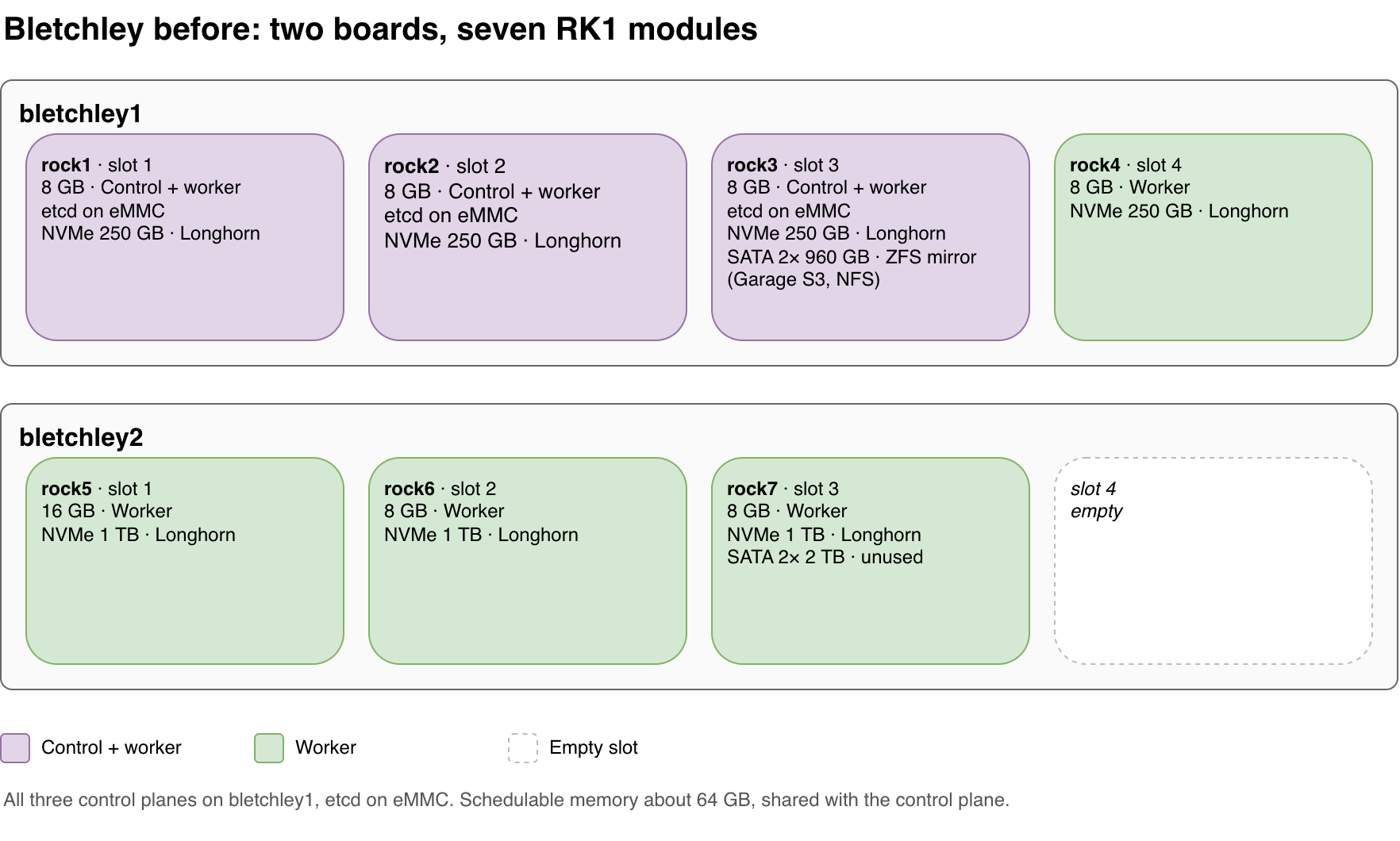
| Board | Slot 1 | Slot 2 | Slot 3 | Slot 4 |
|---|---|---|---|---|
| bletchley1 | 8 GB control + worker | 8 GB control + worker | 8 GB control + worker, 2× 960 GB SATA | 8 GB worker |
| bletchley2 | 16 GB worker | 8 GB worker | 8 GB worker, 2× 2 TB SATA (unused) | empty |
After
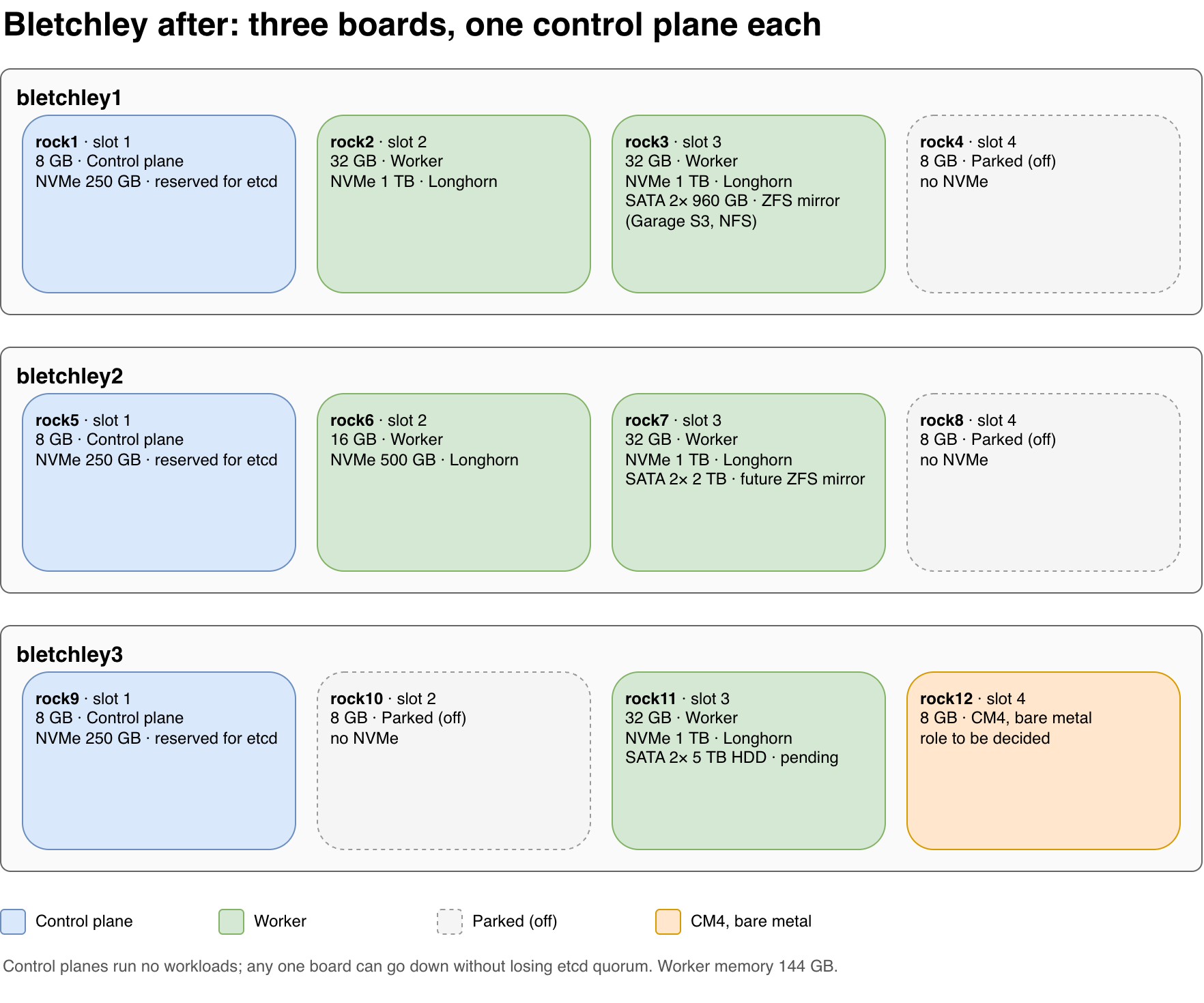
| Board | Slot 1 | Slot 2 | Slot 3 | Slot 4 |
|---|---|---|---|---|
| bletchley1 | 8 GB control | 32 GB worker | 32 GB worker, ZFS mirror 2× 960 GB | 8 GB, parked |
| bletchley2 | 8 GB control | 16 GB worker | 32 GB worker, 2× 2 TB for a future ZFS mirror | 8 GB, parked |
| bletchley3 | 8 GB control | 8 GB, parked | 32 GB worker, 5 TB HDDs pending | CM4, bare metal later |
The new layout follows a few principles:
- One control plane per board. Each board has one control-plane node, with workloads kept off those nodes. With the three etcd voting members distributed across the boards, the final layout is designed to retain quorum if any one board goes offline.
- Prepare for etcd on NVMe. Each control-plane node has its own 250 GB NVMe drive reserved for the planned etcd migration. For now, etcd remains where it was; measuring the effect of moving it is a separate project.
- Keep workload storage on workers. Longhorn uses the workers' 1 TB and 500 GB NVMe drives, with two replicas per volume, disks named
nvme-disk-rockN, and 30% reserved capacity. - Keep bulk storage on ZFS. The existing 960 GB mirror continues to serve Garage and NFS. The 2 TB pair on rock7 will become a second mirror; what it will hold is not decided yet.
- Keep node identities predictable. Names follow physical slot positions, the same scheme as when rock5, rock6 and rock7 joined, and DHCP reservations follow module MAC addresses. Moving a module therefore means creating a node with a different name and address.
- Keep spare capacity available. Three 8 GB modules are parked in their slots for now. They could provide the compute for a larger backup-restore test once I have NVMe drives to restore onto.
The result is 144 GB of worker memory, up from 64 GB shared between workloads and the control plane. That is the capacity I wanted: memory available for applications, rather than memory competing with the control plane.
Getting there, one node at a time
The hard part was not installing the hardware. It was changing the cluster underneath running workloads without losing track of which module, drive, configuration and node identity belonged together.
I labelled every module and NVMe drive, then tracked each one through its old, temporary and final positions. On the Turing Pi 2, the drive sits underneath its slot, and powering a node off through the BMC also cuts power to its M.2 slot. That meant I could move a module and its drive together without shutting down an entire board.
The most important rule was simple: add before removing.
A spare 250 GB NVMe drive under the old rock4 turned out to be the key. That module could take the drive to the third board and become the first new control plane before any of the existing control planes had to leave. From there, I could replace the old control-plane nodes one at a time, checking etcd membership and quorum at each step.
Every move followed the same routine:
- One module per step. Each step moved one module and its associated drive. The destination slot had to be empty before the move began.
- A go/no-go check before every step. Before proceeding, I checked that all nodes were Ready, pods were healthy, etcd membership and quorum were in a safe state, Longhorn volumes were healthy, and Talos and Kubernetes versions matched. If a check failed, I fixed the problem before making the next hardware change.
- The same removal procedure every time. Evict Longhorn replicas, drain the node, run
talosctl resetwith explicit wipe flags, then remove the Kubernetes and Longhorn objects. - The same addition procedure every time. Free the node name, update the DHCP reservation for the new MAC address, install the module, and apply the configuration with all required patches.
There was one planned service interruption: Garage and NFS went down for the few minutes needed to export the ZFS pool, move the module underneath the disks, and import the pool on the new node.
Twelve steps, one Saturday.
Lessons Learned
A plan survives until the first patch file you forget. In rough order of appearance:
- Keep the base configs at the running versions. Over the months I had upgraded Talos and Kubernetes on the nodes, but never updated
worker.yamlandcontrolplane.yamlto match. The first new worker was built from those files and joined with kubelet v1.35.0 while the rest of the cluster ran v1.36.5.talosctl upgrade-k8sfixed the node; setting the install image and kubelet image in the base configs to the running versions fixed the cause. - A forgotten control-plane patch costs a reflash. Without
cp.patch.yamlthe first new control plane came up in the wrong VLAN and joined etcd as a learner under a default hostname. Reflashing it was quicker than untangling it. - Check every line of a patch you reuse.
allowSchedulingOnControlPlanes: truewas still in the control-plane patch from the days when control planes were also workers. The new control plane promptly received workloads and a Longhorn disk, contrary to the new design. Longhorn also creates a default disk on every node unless it is configured to create disks only on labelled nodes. - talosconfig endpoints have to follow the control planes. talosctl never talks to the node you name with
-ndirectly: it sends the request to one of the endpoints in talosconfig, and that node forwards it. Only control planes forward. My endpoints still listed rock1, rock2 and rock3, and after the resize rock2 was a worker. Every call that happened to pick rock2 failed with "no request forwarding", which made the error look random. The fix is to update the endpoints whenever a control plane joins or leaves:
talosctl config endpoint rock1.vluwte.nl rock5.vluwte.nl rock9.vluwte.nl
- Longhorn disks defined in config get no reservation. Longhorn's 30% reservation only applies to disks it creates itself. Disks defined through configuration get exactly the
storageReservedyou write, and leaving it out means 0. - Per-node patches belong to the position, not the module. One worker sent its logs to its neighbour's address because its logging patch came from the module's previous identity.
- Check etcd membership after every control-plane change. One old control plane never left etcd cleanly. Four members with three reachable still had quorum, but with no margin at all until
talosctl etcd remove-membercleaned it up. - Taints don't evict. Longhorn's agent kept running on control planes that were tainted after it had started there, so Longhorn still listed them as nodes until the pods were deleted by hand.
- Evictions pile up on the newest node. The first new worker was the landing spot for every eviction and ended up with a replica of 8 of the 10 volumes. Replica auto-balance spreads them out again.
None of these lost data, and several were caught by the go/no-go check before the next step, which is the best argument for having one.
What's Next
Immediate
- Rebalance Longhorn replicas across the five workers.
- Bring Talos to 1.14 and every application to its latest Helm chart, the same routine as in Keeping the Bletchley Cluster Current, now that all nodes run the same version.
Future
- Move etcd onto the control planes' NVMe drives, and measure whether it was worth it.
- Run the backup restore test on the parked 8 GB modules, once there are NVMe drives to restore onto.
- Migrate services from Linux VMs on Proxmox to Bletchley. DAViCal is a good first candidate, starting with its Postgres database moving into the CloudNativePG cluster.
- Add new services. The wishlist app already runs on Bletchley, and Immich is on the list; the 2 TB pair on
rock7and the 5 TB disks waiting for rock11 are both candidates for photo storage. - Switch off the Intel NUC once its workloads have moved.
- Move all three boards to their final spot on UPS power.
The hardware reshuffle is done, but the bigger payoff is still ahead. Bletchley now has a control plane spread across all three boards and 144 GB of memory dedicated to workloads. Next comes putting that capacity to use, moving etcd onto NVMe, and bringing more of the services currently running on Proxmox into Kubernetes.
For now, the cluster has a better layout, more room to grow, and a migration completed without data loss or unplanned service downtime.
← Previous: Healthy, but Not Reading: Moving DSMR-reader to Bletchley
Questions or suggestions? Leave a comment below or reach out at igor@vluwte.nl.