Enabling fstrim on Longhorn Volumes in Talos Linux
Longhorn allocation never coming down? Here's how to enable automated fstrim via a RecurringJob on Talos Linux — and what it can't fix.
Introduction
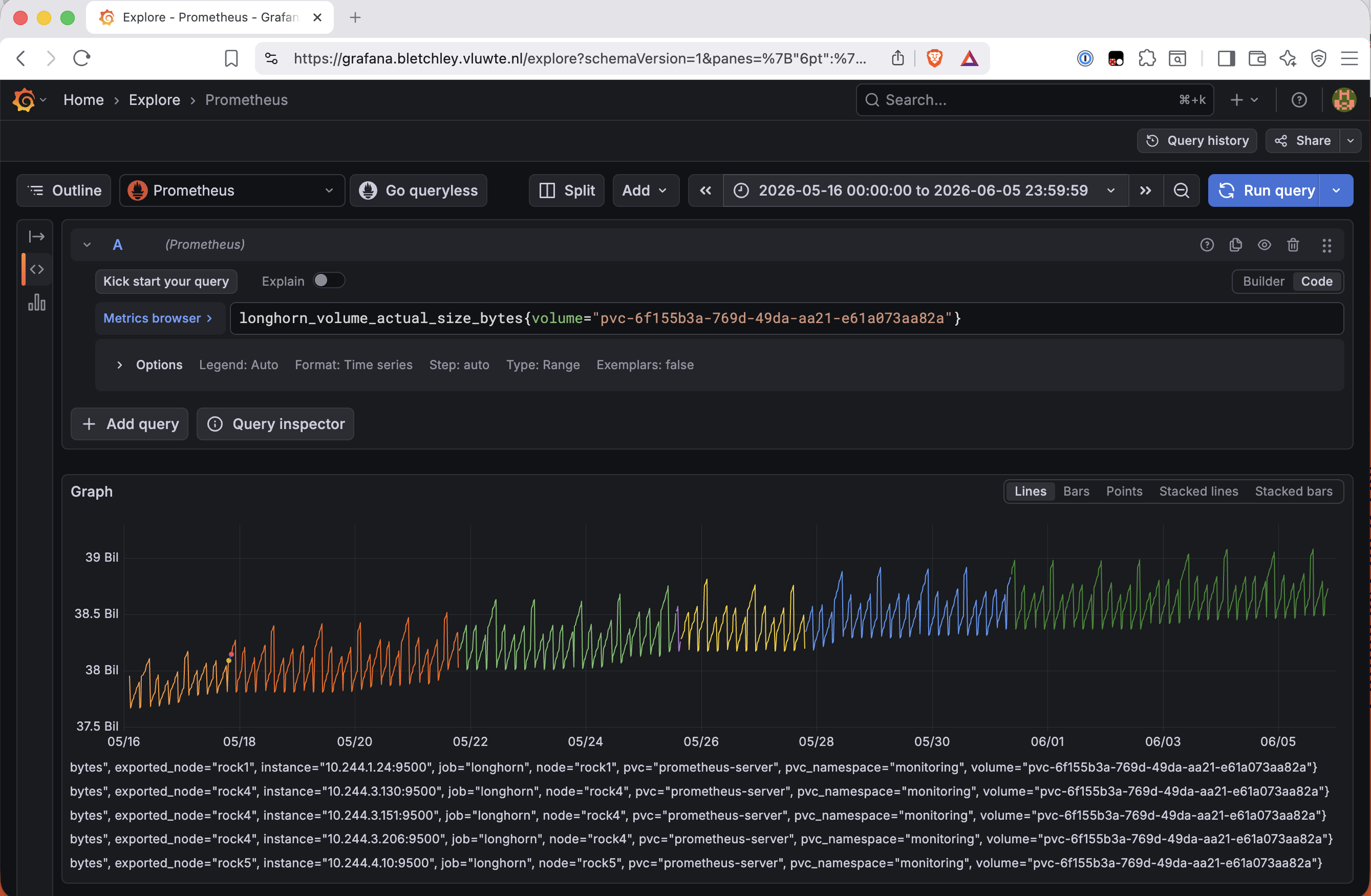
The Grafana Longhorn dashboard on Bletchley had been showing a sawtooth pattern for weeks. Storage allocation would spike during backup cycles and then... never come back down. The floor kept rising. No matter how much data got deleted inside volumes, the numbers reported by Longhorn stayed stubbornly high. I noted this in Fixing the Alerts as still on hold — time to close it.
The fix is fstrim: a tool that tells the underlying NVMe drives which blocks are unused so they can be reclaimed. Without it, a Longhorn volume backed by ext4 holds onto its allocation even after files are deleted. The filesystem marks blocks as free internally but never communicates that to the block device layer, so Longhorn has no way to know those blocks are unused unless the filesystem explicitly issues discard/TRIM operations.
On Talos Linux, fstrim isn't part of the base OS — it comes from the util-linux-tools system extension, which was already installed on all nodes as a Longhorn prerequisite. Without a RecurringJob configured, Longhorn never invokes it. The tool was there all along, but trim simply wasn't happening. I wanted to verify the mechanism worked on Talos before automating it.
🏠 This is part of the Homelab Journey series - building a production Kubernetes cluster from scratch.
- Fixing the Alerts
- Enabling fstrim on Longhorn Volumes in Talos Linux (you are here)
Why Space Doesn't Come Back
Longhorn volumes are block devices backed by replicas distributed across cluster nodes. When a workload writes a file, Longhorn allocates blocks. When the workload deletes that file, the ext4 filesystem marks those blocks as free in its own internal structures — but it does not issue a TRIM command to the underlying block device. From Longhorn's perspective, those blocks are still in use.
This is the standard behaviour for block storage: the filesystem and the storage layer are decoupled by design. The storage layer can only reclaim space if something explicitly tells it which blocks are unused. On a regular server with NVMe drives, systemd or a cron job typically runs fstrim periodically to send that information down the stack. On Longhorn, the equivalent is the filesystem-trim RecurringJob.
There's a related setting worth understanding: UnmapMarkSnapChainRemoved (shown in the Longhorn API as remove-snapshots-during-filesystem-trim). When this is enabled, a trim operation doesn't just reclaim the volume head — it also marks snapshot chains as removed, allowing Longhorn to reclaim space from old snapshots. I left this at the default (disabled) throughout. The reason is straightforward: Bletchley runs 4-hourly backup jobs that create snapshots, and enabling snapshot removal during trim could interact unpredictably with backups in progress. With the default setting, trim only reclaims the volume head, and snapshots are untouched. This is the safe starting position.
Confirming fstrim is Available on Talos
The first step was confirming that fstrim was actually reachable in the context Longhorn uses to run it. Longhorn doesn't exec into workload pods to run trim — it uses nsenter from within the longhorn-manager pod to reach the host's mount namespace and run fstrim against the CSI globalmount path there.
Two checks: the extension is present on all nodes, and the binary is reachable from inside the pod.
talosctl -n rock1,rock2,rock3,rock4,rock5,rock6,rock7 get extensions | grep util-linux
rock1   runtime     ExtensionStatus   2             1         util-linux-tools   2.41.4
rock2   runtime     ExtensionStatus   2             1         util-linux-tools   2.41.4
rock3   runtime     ExtensionStatus   2             1         util-linux-tools   2.41.4
rock4   runtime     ExtensionStatus   2             1         util-linux-tools   2.41.4
rock5   runtime     ExtensionStatus   2             1         util-linux-tools   2.41.4
rock6   runtime     ExtensionStatus   2             1         util-linux-tools   2.41.4
rock7   runtime     ExtensionStatus   2             1         util-linux-tools   2.41.4
kubectl -n longhorn-system exec -it longhorn-manager-2z26p -- fstrim --version
Defaulted container "longhorn-manager" out of: longhorn-manager, pre-pull-share-manager-image
fstrim from util-linux 2.40.4
Both checks pass. The version discrepancy — 2.41.4 on the host, 2.40.4 inside the container — is expected: Longhorn ships its own copy of util-linux in the container image, separate from the Talos extension. Both are modern versions, no issues expected.
The Defaulted container "longhorn-manager" line is also worth noting — it reveals that each longhorn-manager pod runs two containers, and kubectl exec picks the right one automatically.
Manual Trim via the Longhorn UI
Before setting up automation, I wanted to confirm that trim actually works end-to-end on this Talos setup. The Prometheus PVC was the obvious candidate: it's 40 GiB, has high churn from constant metric scrapes, and was likely sitting on a significant amount of recoverable space.
In the Longhorn UI: Volumes → select the volume → Operations → Trim Filesystem.
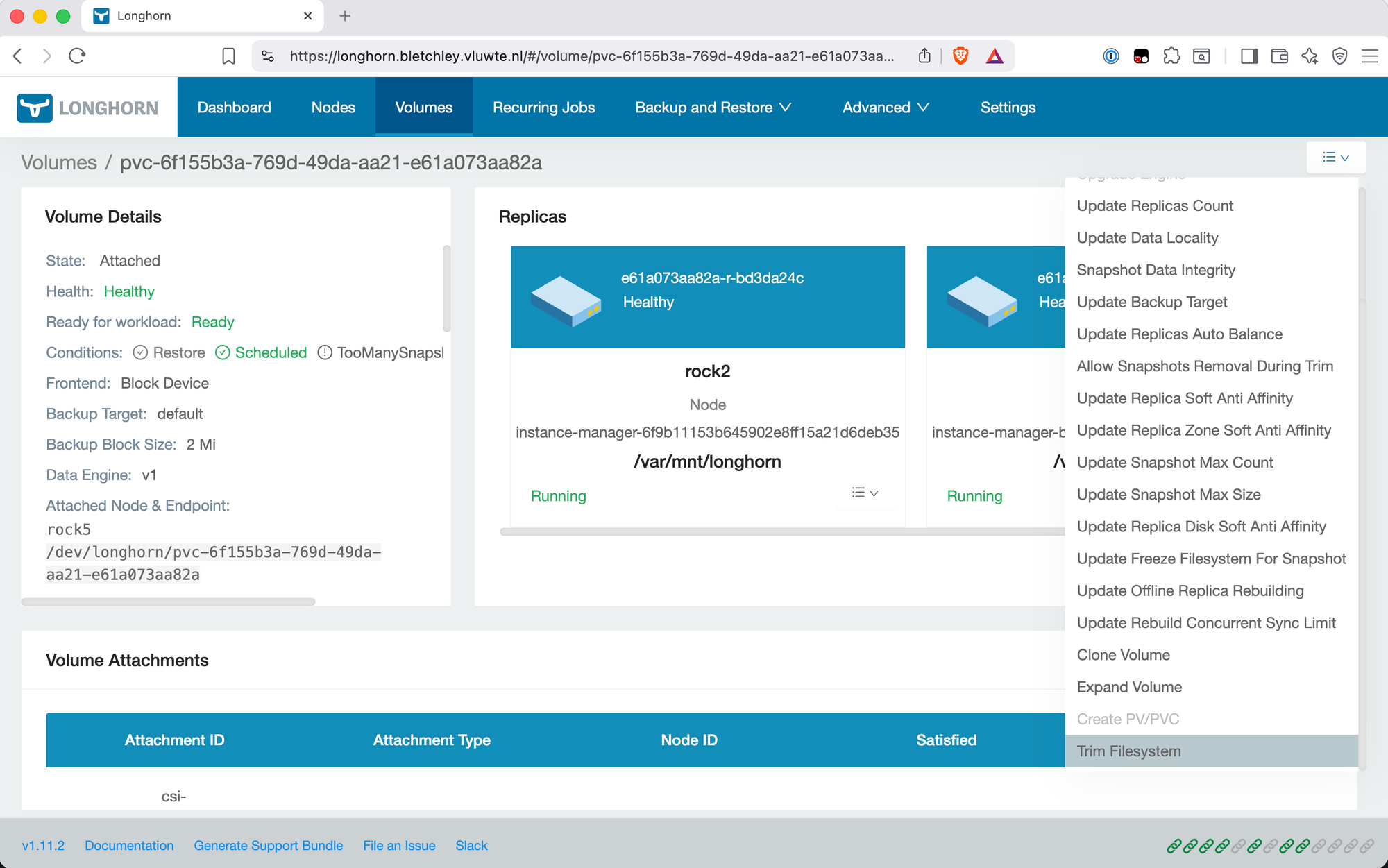
The operation completes instantly from the UI's perspective. The only log evidence at the default verbosity level is an HTTP access log entry in longhorn-manager:
POST /v1/volumes/pvc-6f155b3a...?action=trimFilesystem HTTP/1.1 200
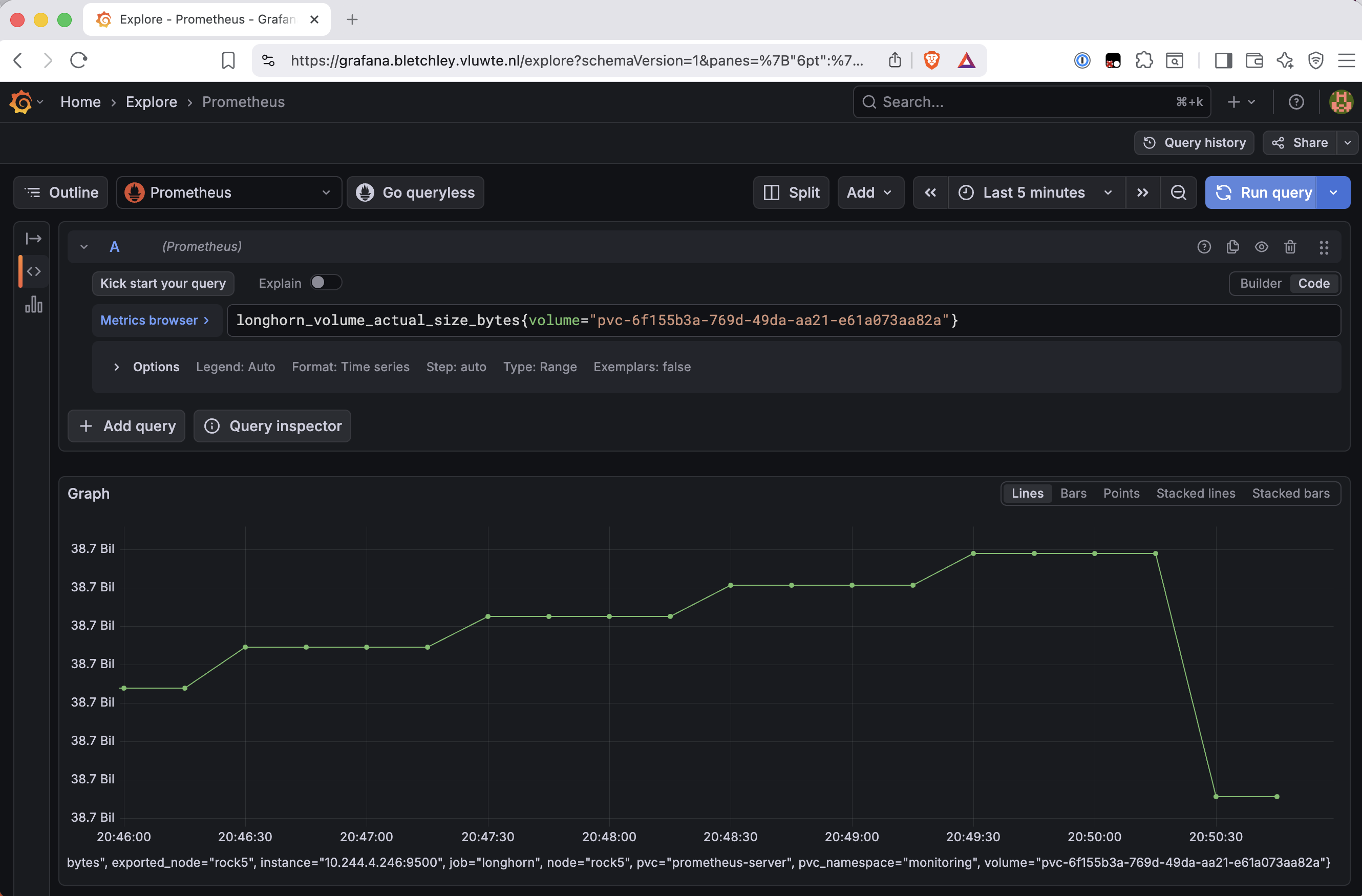
No deeper execution log appears — don't go looking for verbose trim output and assume it failed when you find nothing. The Grafana metric is the real confirmation. After a few minutes, longhorn_volume_actual_size_bytes for the Prometheus PVC had dropped from ~38.7 GiB to ~35.8 GiB — roughly 3 GiB of volume-head blocks reclaimed.
One other useful observation: a second trim run immediately after the first freed nothing. That's correct behaviour — trim only reclaims blocks the filesystem has marked unused since the previous trim. No data was deleted in the interval, so there was nothing to reclaim.
The UnmapMarkSnapChainRemoved Setting
Before creating the RecurringJob, I verified the global setting was at its default:
kubectl -n longhorn-system get settings.longhorn.io remove-snapshots-during-filesystem-trim -o yaml
The value field returned "false" — the default. No change made. With this at the default, trim only reclaims the volume head. Snapshots are never touched regardless of what trim does.
The per-volume field setting.longhorn.io/remove-snapshots-during-filesystem-trim was also showing ignored on every volume, meaning all volumes defer to the global setting. This is visible in the volume labels alongside the backup controller's per-job labels — a useful place to confirm the state of both attachment mechanisms at once.
Setting Up the Trim RecurringJob
The important discovery here was that I didn't need to attach the trim job to each volume individually — Longhorn's default group handles that automatically.
Longhorn's filesystem-trim RecurringJob type handles all the mechanics: it spins up a dedicated pod, iterates over assigned volumes, runs trim on each, and exits. The default group is the key: any Longhorn volume with an empty recurringJobSelector spec field is automatically included in the default group. Since the backup controller attaches its jobs via volume labels rather than the spec field, all eight Longhorn volumes on Bletchley have an empty recurringJobSelector — meaning the default group trim job covers all of them.
The eight volumes are: postgres, loki, openbao, forgejo, prometheus-server, grafana, alertmanager, and authelia. The cluster has 11 PVCs total, but the remaining three (used by Garage S3 and the NFS provisioner) use the ZFS pool on rock3 and are entirely outside Longhorn's scope.
The manifest:
# infra/storage/longhorn/recurring-job-trim.yaml
apiVersion: longhorn.io/v1beta2
kind: RecurringJob
metadata:
  name: longhorn-trim
  namespace: longhorn-system
spec:
  cron: "15 3 * * *"     # Daily 03:15
  task: filesystem-trim
  groups:
    - default
  retain: 0              # Trim jobs don't retain snapshots
  concurrency: 2         # Trim two volumes in parallel
A few things worth calling out. retain: 0 is correct — unlike backup jobs, the trim job doesn't create or retain snapshots. concurrency: 2 trims two volumes in parallel, which is conservative for the 1Gb uplink between nodes. The cron runs at 03:15 daily, after the 4-hourly backup jobs typically complete around 03:00, leaving a clean gap between backup and trim.
Applying it:
kubectl apply -f infra/storage/longhorn/recurring-job-trim.yaml
kubectl -n longhorn-system get recurringjobs
NAME                                  GROUPS        TASK              CRON           RETAIN   CONCURRENCY   AGE
backup-authelia-authelia              []            backup            30 0/4 * * ?   8        1             54d
backup-forgejo-forgejo                []            backup            30 0/4 * * ?   8        1             54d
backup-monitoring-alertmanager        []            backup            30 0/4 * * ?   8        1             55d
backup-monitoring-grafana             []            backup            30 0/4 * * ?   8        1             54d
backup-monitoring-loki                []            backup            45 0/4 * * ?   8        1             26d
backup-monitoring-prometheus-server   []            backup            30 0/4 * * ?   8        1             54d
backup-openbao-openbao                []            backup            30 0/4 * * ?   8        1             55d
longhorn-trim                         ["default"]   filesystem-trim   15 3 * * *     0        2             12s
The GROUPS: [] on the backup controller jobs and GROUPS: ["default"] on the trim job illustrate the two attachment models side by side. The backup controller uses per-volume label-based attachment; the trim job uses Longhorn's built-in group mechanism. Both work; they serve different purposes.
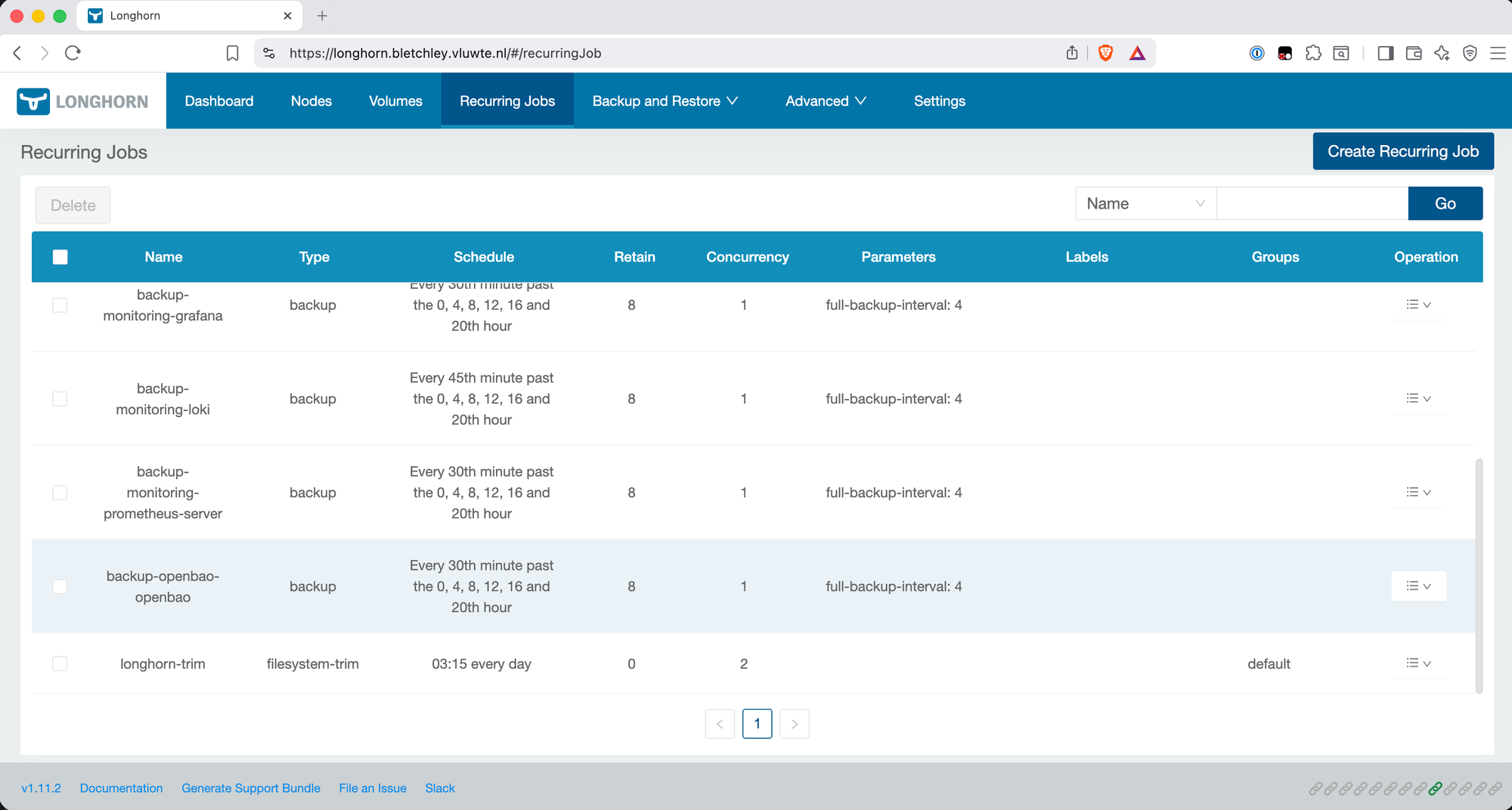
The trim RecurringJob is a standalone manifest at infra/storage/longhorn/recurring-job-trim.yaml — not part of longhorn-values.yaml and not managed by the backup controller. Trim is a cluster-wide housekeeping concern, not a per-PVC backup concern. The two systems stay independent.
Verifying the First Automated Run
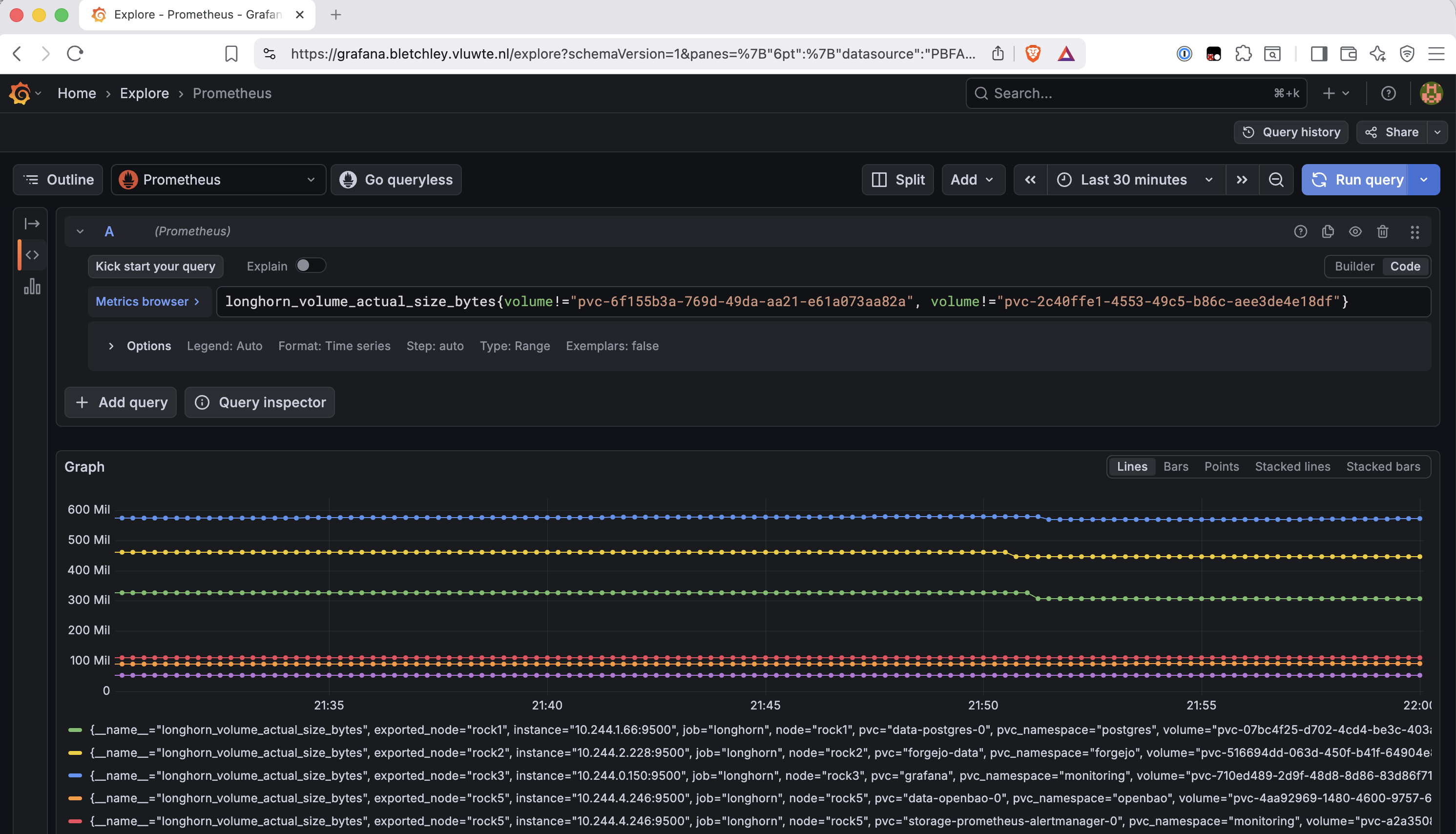
Rather than waiting for the daily cron, I triggered a test run by temporarily changing the cron to fire in the next minute, then reverted to the daily schedule. The trim job spun up a dedicated pod (longhorn-trim-29678150-46jdk) that processed volumes in pairs (concurrency: 2) and completed in approximately 48 seconds for all eight volumes.
Important: The "Purged snapshots" log entry does not mean Longhorn deleted your backup snapshots. It refers to temporary internal snapshots created by the trim job for its own operation — they are cleaned up immediately after trim completes.
Total time by volume: most volumes completed in roughly 5 seconds. Loki took around 47 seconds — consistent with it being the highest-churn volume on the cluster.
In Grafana, the smaller, more active volumes showed clear drops in longhorn_volume_actual_size_bytes at trim time — forgejo and grafana both visible in the 30-minute window. Low-churn volumes (postgres, openbao, alertmanager, authelia) showed little or no change, which is correct. Trim can only reclaim what the filesystem has marked unused since the last run. The size of the drop reflects actual deleted data, not a fixed amount.
What Trim Doesn't Fix
During verification, I checked the Prometheus PVC more carefully. Longhorn reported approximately 35.8 GiB actual size; df -h inside the pod showed only 5.6 GiB in use — 14% filesystem usage.
kubectl -n monitoring exec -it prometheus-server-549ff479b4-7pmz5 \
  -c prometheus-server -- df -h /data
# /dev/longhorn/pvc-6f155b3a-...  39.3G  5.6G  33.7G  14%  /data
The gap is entirely explained by snapshot data. Checking the snapshots for this volume:
kubectl -n longhorn-system get snapshots.longhorn.io \
  -l longhornvolume=pvc-6f155b3a-769d-49da-aa21-e61a073aa82a \
  --sort-by=.metadata.creationTimestamp
# One snapshot, SIZE 38479302656 (~35.8 GiB)
A single backup snapshot holds nearly all the Longhorn-reported allocation for this volume. Trim fixed the volume-head floor problem — blocks deleted inside the volume head are now being reclaimed. But longhorn_volume_actual_size_bytes includes snapshot data, and with UnmapMarkSnapChainRemoved at the default, trim never touches snapshots.
This means the alert rules that use longhorn_volume_actual_size_bytes as a fullness signal (LonghornVolumeAlmostFull, LonghornVolumeCriticallyFull) can fire for volumes that are genuinely low on filesystem usage but accumulating snapshot overhead. The prometheus-server PVC was alerting at 14% actual filesystem usage. That's the wrong signal.
This is a separate problem with a separate solution, tracked in the next post. Trim is correct and working — it just doesn't reach the snapshot layer. The two problems look related (both show up as high Longhorn allocation) but operate at different layers and need different fixes.
What's Working Now
- ✅
fstrimconfirmed available on all 7 nodes viautil-linux-tools2.41.4 (Talos extension) and accessible inside thelonghorn-managercontainer (util-linux 2.40.4) - ✅ Manual UI trim confirmed working on Talos —
longhorn_volume_actual_size_bytesdrop visible in Grafana - ✅
longhorn-trimRecurringJob running daily at 03:15, covering all 8 Longhorn volumes via thedefaultgroup - ✅ First automated trim run completed in ~48 seconds, all 8 volumes trimmed without errors
- ✅ Volume head blocks reclaimed correctly — forgejo and grafana showed visible drops; low-churn volumes flat (correct)
- ✅
UnmapMarkSnapChainRemovedconfirmed at global default (disabled) — no snapshot interaction risk - ✅ Manifest committed to git at
infra/storage/longhorn/recurring-job-trim.yaml - ⚠️
longhorn_volume_actual_size_bytesincludes snapshot data and is not a reliable fullness signal for high-churn volumes — the prometheus-server PVC reports ~35.8 GiB Longhorn actual size but only 5.6 GiB filesystem usage. This is tracked separately in the next post.
← Previous: Fixing the Alerts
Questions or suggestions? Leave a comment below or reach out at igor@vluwte.nl.