CloudNativePG Part 9: Authelia Gives Up Its PVC
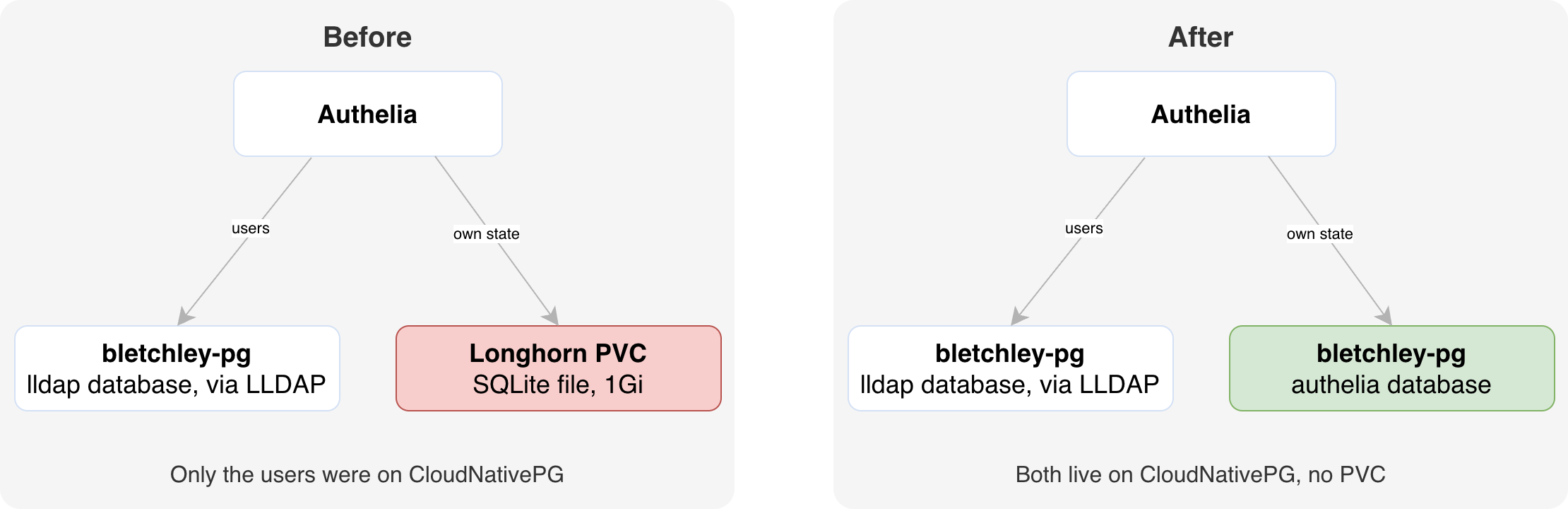
Authelia's users were on CloudNativePG, its own state wasn't. Moving it took an inventory, a third tenant and a backup archive workflow.
Introduction
In Part 5 I moved lldap onto CloudNativePG, and since Authelia authenticates against lldap, I had filed Authelia under "done" in my head. Authelia was on CNPG. Except it wasn't. Its users were. Authelia's own state, the database it writes every login to, was still a SQLite file on a 1Gi Longhorn volume. That volume was also the reason I had postponed rolling updates and hardening for Authelia.
This post moves that state into bletchley-pg as its third tenant, and then removes the volume. The migration itself turned out to be the easy half: an inventory showed there was nothing in the old database worth carrying over. The more interesting half is removing a backed-up volume properly, through the backup controller's archive workflow, with Helm as the thing that finally deletes it. Rolling updates and hardening are not part of this post: removing the volume only makes them possible.
🏠 This is part of the Homelab Journey series - building a production Kubernetes cluster from scratch.
- Traefik Dashboard
- CloudNativePG Part 9: Authelia Gives Up Its PVC (you are here)
This post builds on the CloudNativePG series, in particular Part 5 and Part 6 for the tenant pattern, and Part 8 for how in-cluster clients connect over TLS.
Two Databases Behind One Product
Authelia has two completely separate storage needs, and it is easy to conflate them:
- Who the users are. Users, groups and passwords are managed in lldap, and lldap's data lives in the
lldapdatabase onbletchley-pg. That moved in Part 5. Authelia does not store users at all: it binds to lldap over LDAPS and only checks the credentials it is given. Adding a user or changing a password is therefore done in lldap, not in Authelia. - What Authelia itself remembers. Login history, 2FA registrations, OIDC sessions, user preferences. That lives in Authelia's own storage backend, which is configured separately, and that is what this post is about.
I settled which one I actually had with three commands, from the cheapest to the definitive. First, what Helm thinks is deployed:
helm history authelia -n authelia --max 15
Revision 12, chart authelia-0.11.6, last changed on August 20, the evening of the Part 5 cutover. So if storage had moved to Postgres through Helm, it would have been then. Second, whether anything still writes to the volume:
kubectl -n authelia exec deploy/authelia -- ls -la --full-time /config/
-rw-r--r--    1 root     root        372736 2026-10-03 07:35:48 +0000 db.sqlite3
-rw-------    1 root     root             0 2026-08-22 07:26:19 +0000 notification.txt
The pod had been running since August 22, and something inside it wrote db.sqlite3 on October 3. The only process in that pod is Authelia. Third, what Authelia actually loaded:
kubectl -n authelia get cm authelia -o jsonpath='{.data.configuration\.yaml}' | yq '.storage, .notifier'
local:
  path: '/config/db.sqlite3'
disable_startup_check: false
filesystem:
  filename: '/config/notification.txt'
local:. SQLite. Authelia's own state had never moved. The sentence in my notes, "Authelia is on CNPG", was true of its users and not of its state, and I had read it for more than it said.
The Inventory That Ended the Migration Before It Started
Before choosing how to migrate, I wanted to know what there was to migrate. I copied the file off the pod (to my laptop, outside the repository, since it can hold encrypted 2FA material) and counted rows in every table:
kubectl -n authelia exec deploy/authelia -- cat /config/db.sqlite3 > ~/authelia-db-20261004.sqlite3
for t in $(sqlite3 ~/authelia-db-20261004.sqlite3 '.tables'); do
  printf '%-36s %s\n' "$t" "$(sqlite3 ~/authelia-db-20261004.sqlite3 "SELECT count(*) FROM $t;")"
done
25 tables. The ones that would hurt to lose were all empty: totp_configurations, webauthn_credentials, webauthn_users and duo_devices at 0 rows, which fits with every access rule on this cluster being one_factor. All eleven oauth2_* tables were empty too: Authelia has never acted as an OIDC provider here. What was left:
| Table | Rows | What it is |
|---|---|---|
authentication_logs |
246 | Login history since March |
migrations |
24 | Schema version 24 |
encryption |
3 | Key check values, recreated on a fresh database |
user_preferences |
3 | Default preferred-method rows, meaningless without 2FA |
Not one row a user would miss. That made the migration method irrelevant. No pgloader, no export and import, no worrying about SQLite-to-Postgres type mapping. The plan became: point Authelia at an empty Postgres database and let it build its own schema. The SQLite copy stays as the archive of those 246 log rows.
The notifier was also stored on the PVC, but its file was empty. With persistence removed, it can safely live on an emptyDir for now.
The Third Tenant
A "tenant" on bletchley-pg is an application that gets its own role and its own database on the shared cluster. lldap became the first in Part 5, and Umami the second when I migrated its analytics data in Part 6. Since Part 6, every tenant is the same four declarative objects in the databases namespace, with nothing created by hand in psql:
| Object | Authelia's file | What it does |
|---|---|---|
| SecretStore | secretstore-authelia-db.yaml |
Lets External Secrets Operator (ESO) read the tenant's credential from OpenBao |
| ExternalSecret | externalsecret-authelia-db-owner.yaml |
Turns that credential into a Kubernetes Secret that CloudNativePG can use |
DatabaseRole |
databaserole-authelia.yaml |
Creates the Postgres login role, with its password taken from that Secret |
Database |
database-authelia.yaml |
Creates the database, owned by that role, with retain so deleting the object never drops the data |
The Umami manifests were the template, and copying them was quick because they record their own pitfalls in comments. The ExternalSecret, for example:
    template:
      type: kubernetes.io/basic-auth      # required — CNPG rejects Opaque
      metadata:
        labels:
          cnpg.io/reload: "true"          # required — without it CNPG never picks up changes
For Authelia that meant the four files in the table, copied from Umami's and renamed. They live in apps/authelia/, next to the rest of Authelia, although all four target the databases namespace. The fifth file is Authelia's existing chart ExternalSecret, externalsecret-authelia-chart.yaml, which got one extra key so the Authelia pod receives the same password. All five are in full at the bottom of this post, together with the OpenBao policy and role and the complete Helm values. The password was generated straight into OpenBao and never appeared on screen:
openssl rand -hex 32 | tr -d '\n' | bao kv put -cas=0 secret/authelia/postgres username=authelia password=-
That tr -d '\n' was not in the first version of this command. Why it is there now, and why the password got its own OpenBao path with a policy for exactly that one path, is a story for a follow-up post.
Applying the DatabaseRole produced one moment of doubt. Its status came back as:
applied: false
message: 'secrets "authelia-db-owner" is forbidden: User "system:serviceaccount:databases:bletchley-pg" cannot get resource "secrets" ...'
Yet pg_authid showed the role with a password set. The explanation is in the instance manager's RBAC: its Role grants get on Secrets by resourceNames, and the operator adds a new tenant's Secret to that list when the DatabaseRole appears. The first reconcile ran a moment before the list was updated. A re-read a minute later showed applied: true. A status field records the last attempt, not the current truth; deleting and re-creating the role would have "fixed" something that was already fixing itself.
I verified the credentials independently with a throwaway pod before involving Authelia. The pod read the password from the same Secret key Authelia would use, mounted as a file, and connected as authelia over TLS 1.3, the Part 8 rule for in-cluster tenants. The pod and its commands are in the addendum. From here on, any failure would have to come from Authelia's configuration.
Rehearsing the Upgrade With a Render Diff
The values change itself is two hunks: storage.local becomes storage.postgres (address, plus tls.enabled: true and skip_verify: true), and the whole persistence block goes. Before applying it, I rendered the chart and diffed it against the running release:
helm template authelia authelia/authelia -n authelia --version 0.11.6 \
  -f apps/authelia/authelia-values.yaml > ~/authelia-rendered.yaml
diff <(helm get manifest authelia -n authelia) ~/authelia-rendered.yaml
| Change in the rendered release | Expected? |
|---|---|
ConfigMap: local replaced by postgres with our address and TLS settings |
Yes |
The authelia PersistentVolumeClaim disappears |
Yes, and Helm will delete it |
/config volume: PVC replaced by emptyDir |
Yes |
secrets volume gains the item storage.postgres.password.txt |
Yes |
New env var AUTHELIA_STORAGE_POSTGRES_PASSWORD_FILE |
Not predicted |
The one surprise was the most informative line in the diff. The chart points Authelia at the mounted password file through its _FILE convention, so the password is in neither the ConfigMap nor an environment variable. The env var only holds a path.
The second row is the important one. The PVC is Helm-owned and its reclaim policy is Delete, so the same upgrade that switches storage also deletes the volume, the PV and the Longhorn volume underneath. That is why the upgrade had to wait.
Removing a Volume Properly
This part is specific to Bletchley. The PVC was backed up by my own backup controller, not by a standard tool: a controller I wrote for this cluster, which turns labels on a PVC into a Longhorn RecurringJob and alerts when a volume has no labels or no recent backup. That is also why a backed-up volume should not simply be deleted here: the controller would find a backup job without a volume and treat it as an orphan. So it has its own workflow for removing a volume on purpose:
- Label the PVC with
backup.vluwte.nl/archive=trueand anarchive-delete-afterdate. - Scale the workload down.
- The controller notices on its next reconcile.
- It takes a snapshot and a full backup, and copies the archive labels onto the RecurringJob so they outlive the PVC.
BackupArchiveReadyfires: the PVC is safe to delete.- Delete the PVC. The controller sees the orphaned job, respects the archive label, and keeps it until the delete-after date.
Here, step 6 is the Helm upgrade. I tested the workflow shortly after building it, and that test worked. This was the first time it ran on a volume I actually meant to remove.
If you run Longhorn without a controller like this, the same idea still applies in plain form: stop the workload, take a final backup, check that it completed, and only then delete the volume. The labels and the alert are just how my cluster makes that order hard to skip.
DELETE_AFTER=$(date -v+1m +%Y-%m-%d)      # 2026-11-05
kubectl -n authelia label pvc authelia \
  backup.vluwte.nl/archive=true \
  backup.vluwte.nl/archive-delete-after="$DELETE_AFTER"
kubectl -n authelia scale deploy authelia --replicas=0
The outage started at that scale-down. The controller's log tells the rest of the story in its own words (filtered, all on October 5):
[archive] authelia/authelia: starting archive backup
[archive] snapshot 'archive-authelia-1791233961' created for 'backup-authelia-authelia' (archive labels copied to job)
[archive] backup 'archive-bkp-backup-authelia--1791234262' created from snapshot 'archive-authelia-1791233961'
[archive] backup 'archive-bkp-backup-authelia--1791234262' completed — job 'backup-authelia-authelia' marked archive-ready
[archive] authelia/authelia: archive backup complete — safe to delete PVC
[event]     DELETED authelia/authelia
[archive]   authelia/authelia: PVC deleted but job 'backup-authelia-authelia' is an archive — retaining for expiry check
[archive]   job 'backup-authelia-authelia' retained until 2026-11-05
Three things from that run are worth knowing if you build something similar.
"Up to five minutes" is per hop, and there are two hops. The label-to-backup reconcile is one; the completed-to-ready reconcile is another. Longhorn reported the backup Completed at 21:04:37 UTC, but the controller only marked it archive-ready, and fired the alert, at 21:10:32. I waited for the controller's signal, not Longhorn's, because only the controller marks the job as an archive. Plan for ten minutes, not five.
The alert that says "safe to delete" lives behind the service that is down. Alertmanager's web UI sits behind Authelia ForwardAuth. With Authelia scaled to zero, I read the alert through the API over a port-forward:
curl -s localhost:9093/api/v2/alerts | jq '.[] | select(.labels.alertname | test("archive"; "i")) | {alertname: .labels.alertname, state: .status.state, startsAt}'
{
  "alertname": "BackupArchiveReady",
  "state": "active",
  "startsAt": "2026-10-05T21:10:32.392Z"
}
The first real archive found a bug in the controller. Every reconcile also logged this:
[archive] backup 'archive-bkp-backup-authelia--1791234262' is untracked (reason=manual) — alerting
The untracked-backup detector, added in a later version, does not recognise backups made by the archive path as the controller's own. Two features of the same controller that had never met: unit tests had exercised both paths, and the first real archive exercised them together. It produced a BackupUntracked alert that would keep firing until the archive expires, so I silenced it narrowly, for that one backup, and left the rule active for real untracked backups. The fix belongs in the controller.
The Cutover
With BackupArchiveReady active, the cutover was a single upgrade, pinned to the chart version already running:
helm upgrade authelia authelia/authelia -n authelia --version 0.11.6 \
  -f apps/authelia/authelia-values.yaml
That one command did three things, all predicted: it switched storage to Postgres, deleted the PVC (archive step 6), and brought the Deployment back from 0 replicas, because the chart renders replicas: 1 and Helm's three-way merge restores it. The new pod was running within 29 seconds, and its log has the cleanest line in this whole series:
level=info msg="Storage schema migration from 0 to 24 is being attempted"
level=info msg="Storage schema migration from 0 to 24 is complete"
A fresh database, built in one second by the application that owns it, at the same schema version the SQLite file had. The outage lasted about 15 minutes, nearly all of it spent waiting for the archive gate.
The upgrade printed a warning that needed checking: "This chart automatically generated an encryption key for sensitive data in your database. Please ensure you backup this key." That key encrypts Authelia's 2FA data, and a new database is bound to whichever key it sees first. Mine lives in OpenBao, and a key generated by the chart would not. A generated key would also have to be stored in a Secret owned by the release, so I counted those:
helm get manifest authelia -n authelia | grep -c '^kind: Secret'
0
None. Authelia still gets its key from OpenBao through the ESO-managed authelia Secret. The warning comes from the chart's notes template, printed after every upgrade, and says nothing about what happened in this deployment.
The proof that it all works came from Authelia's own table in Postgres:
             time              | successful | username | auth_type |                request_uri
-------------------------------+------------+----------+-----------+-------------------------------------------
 2026-10-05 21:14:25.523576+00 | t          | a-igor   | 1FA       |
 2026-10-05 21:22:10.770777+00 | t          | a-igor   | 1FA       | https://longhorn.bletchley.vluwte.nl/
 2026-10-06 17:25:24.121238+00 | t          | a-igor   | 1FA       | https://alertmanager.bletchley.vluwte.nl/
The first row is the portal login, the other two are ForwardAuth logins on protected hosts, with the originating URL recorded. Every connection from Authelia showed up in pg_stat_ssl as TLSv1.3. A kubectl rollout restart afterwards kept my session (it lives in Redis) and added no login rows: the pod itself now holds no state at all. And the volume, the PV and the Longhorn volume are gone, while the RecurringJob stays behind, labelled with everything it needs to describe the archive on its own until November 5.
Lessons Learned
- Check the claim against the system, cheapest check first. Helm history, a file timestamp and the loaded config took three commands and turned an assumed cleanup into a real migration.
- Inventory before choosing a migration method. Counting rows made the method question disappear: there was nothing to convert.
- Re-read a status before reacting to it.
applied: falsewas the first attempt losing an RBAC race, not a failure. - A render diff is the cheapest rehearsal. Every hunk either matched a reason written down beforehand or got one before going further.
- Wait for the workflow's own signal. Longhorn's
Completedand the controller's archive-ready were six minutes apart, and only one of them meant "safe to delete". - A first real run tests the features around it too. The archive workflow worked as documented, and exposed a bug in a different part of the same controller.
What's Next
Immediate:
- Fix the backup controller so archive backups are not flagged as untracked.
- Clean up the archive on or after November 5, when
BackupArchiveExpiredfires.
Unblocked by this post:
- Switch Authelia to
RollingUpdateand measure the restart downtime before and after (about 11 seconds today). - Harden Authelia's
securityContextfor the PodSecurityrestrictedprofile. The condition it was waiting for, "until the PVC goes", is now met. - Upgrade the Authelia chart past 0.11.6, as its own change with its own render diff.
Later:
- An SMTP notifier, the day 2FA is enabled.
Content pipeline:
- A deep dive into handling the database password: one secret, two readers, and verifying it without ever looking at it.
Addendum: Every File in This Change
Everything above is the story. Everything below is the implementation reference: if you are here to reproduce the change, these are the files I actually applied, in the order I applied them. Nothing here contains a secret: the password only ever exists in OpenBao and in the two Secrets ESO creates from it.
1. OpenBao: policy, role and credential
apps/openbao/policies/authelia-db.hcl, the second policy tracked in git:
# Read-only access to the Authelia database credential, for the SecretStore in
# the databases namespace (password for the CNPG role `authelia`).
# Deliberately one path, not secret/data/authelia/* — that prefix also holds
# chart-secrets, including storage.encryption.key.
path "secret/data/authelia/postgres" {
  capabilities = ["read"]
}
The policy, the Kubernetes auth role that uses it, and the credential:
bao policy write authelia-db apps/openbao/policies/authelia-db.hcl

bao write auth/kubernetes/role/authelia-db \
  bound_service_account_names=external-secrets \
  bound_service_account_namespaces=external-secrets \
  token_policies=authelia-db \
  token_ttl=1h

openssl rand -hex 32 | tr -d '\n' | bao kv put -cas=0 secret/authelia/postgres username=authelia password=-
bao kv get -format=json secret/authelia/postgres | jq '.data.data.password | length'   # must be 64
Authelia's own SecretStore uses the existing role authelia-eso, whose policy already reads secret/data/authelia/*, so nothing changed in OpenBao for that side.
2. The databases side: four manifests
They live in apps/authelia/, next to the rest of Authelia, although all four target the databases namespace. Apply them in this order, and wait for the Secret before creating the role: a DatabaseRole created before its passwordSecret exists gets a NULL password.
secretstore-authelia-db.yaml:
# Lives in `databases`: feeds the CNPG role password. Uses role `authelia-db`,
# which can read secret/data/authelia/postgres and nothing else.
apiVersion: external-secrets.io/v1
kind: SecretStore
metadata:
  name: authelia
  namespace: databases
spec:
  provider:
    vault:
      server: http://openbao.openbao.svc:8200
      path: secret
      version: v2
      auth:
        kubernetes:
          mountPath: kubernetes
          role: authelia-db
externalsecret-authelia-db-owner.yaml:
apiVersion: external-secrets.io/v1
kind: ExternalSecret
metadata:
  name: authelia-db-owner
  namespace: databases
spec:
  refreshInterval: 1h
  secretStoreRef:
    kind: SecretStore
    name: authelia
  dataFrom:
    - extract:
        key: secret/data/authelia/postgres
  target:
    name: authelia-db-owner
    creationPolicy: Owner
    template:
      type: kubernetes.io/basic-auth      # required — CNPG rejects Opaque
      metadata:
        labels:
          cnpg.io/reload: "true"          # required — without it CNPG never picks up changes
      data:
        username: "{{ .username }}"
        password: "{{ .password }}"
databaserole-authelia.yaml:
apiVersion: postgresql.cnpg.io/v1
kind: DatabaseRole
metadata:
  name: authelia
  namespace: databases
spec:
  cluster:
    name: bletchley-pg
  name: authelia
  ensure: present
  login: true
  superuser: false
  createdb: false
  createrole: false
  passwordSecret:
    name: authelia-db-owner    # CNPG never generates a password; omit and the role gets NULL
database-authelia.yaml:
apiVersion: postgresql.cnpg.io/v1
kind: Database
metadata:
  name: authelia
  namespace: databases
spec:
  cluster:
    name: bletchley-pg
  name: authelia
  owner: authelia
  encoding: UTF8
  databaseReclaimPolicy: retain      # deleting the CR must never drop the data
kubectl apply -f apps/authelia/secretstore-authelia-db.yaml -f apps/authelia/externalsecret-authelia-db-owner.yaml
kubectl -n databases wait --for=condition=Ready externalsecret/authelia-db-owner --timeout=60s
kubectl apply -f apps/authelia/databaserole-authelia.yaml
kubectl apply -f apps/authelia/database-authelia.yaml
3. The authelia side: one more key in the chart ExternalSecret
externalsecret-authelia-chart.yaml produces the authelia Secret that the chart mounts at /secrets/internal. The last entry is new:
apiVersion: external-secrets.io/v1
kind: ExternalSecret
metadata:
  name: authelia-chart-secrets
  namespace: authelia
spec:
  refreshInterval: 1h
  secretStoreRef:
    name: openbao
    kind: SecretStore
  target:
    name: authelia
    creationPolicy: Owner
  data:
    - secretKey: identity_validation.reset_password.jwt.hmac.key
      remoteRef:
        key: secret/data/authelia/chart-secrets
        property: identity_validation.reset_password.jwt.hmac.key
    - secretKey: session.encryption.key
      remoteRef:
        key: secret/data/authelia/chart-secrets
        property: session.encryption.key
    - secretKey: storage.encryption.key
      remoteRef:
        key: secret/data/authelia/chart-secrets
        property: storage.encryption.key
    - secretKey: storage.postgres.password.txt
      remoteRef:
        key: secret/data/authelia/postgres
        property: password
Until the cutover, the running pod does not see the new key: the chart mounts this Secret with an explicit items list, and the new key only appears in that list once storage.postgres is enabled.
4. The connection probe
A throwaway pod, pg-probe, that tests the role, password, network path and TLS before Authelia depends on them. It mounts the same Secret key Authelia will read, as a file, so the password never appears in a command or in the pod spec:
kubectl -n authelia apply -f - <<'EOF'
apiVersion: v1
kind: Pod
metadata:
  name: pg-probe
spec:
  restartPolicy: Never
  containers:
    - name: psql
      image: postgres:17-alpine
      command: ["sh", "-c"]
      args:
        - >
          PGPASSWORD="$(cat /secrets/storage.postgres.password.txt)"
          psql "host=bletchley-pg-rw.databases.svc.cluster.local dbname=authelia user=authelia sslmode=require"
          -At -c 'SELECT current_user, current_database();'
          -c 'SELECT ssl, version FROM pg_stat_ssl WHERE pid = pg_backend_pid();'
      volumeMounts:
        - name: pw
          mountPath: /secrets
          readOnly: true
  volumes:
    - name: pw
      secret:
        secretName: authelia
        items:
          - key: storage.postgres.password.txt
            path: storage.postgres.password.txt
EOF
kubectl -n authelia wait --for=jsonpath='{.status.phase}'=Succeeded pod/pg-probe --timeout=60s
kubectl -n authelia logs pg-probe
kubectl -n authelia delete pod pg-probe
Applying it prints the usual PodSecurity restricted warning (the namespace only warns). The expected output is authelia|authelia (logged in as authelia, into database authelia) and t|TLSv1.3.
5. The Helm values
apps/authelia/authelia-values.yaml as it is now deployed (revision 13). Two things changed compared with the values that had been running since August:
- the
storageblock:local(SQLite at/config/db.sqlite3) becamepostgres, with the address and TLS settings; - the whole
persistenceblock was removed (enabled: true,size: 1Gi,storageClass: longhorn, and a comment about the hand-applied backup labels).
secret:
  existingSecret: authelia
  additionalSecrets:
    authelia-ldap-bind:
      items:
        - key: password
          path: password

certificates:
  existingSecret: authelia-ca-trust

ingress:
  enabled: false

pod:
  kind: Deployment
  replicas: 1
  strategy:
    type: Recreate
  resources:
    requests:
      memory: 64Mi
      cpu: 50m
    limits:
      memory: 128Mi

configMap:
  theme: auto

  authentication_backend:
    ldap:
      enabled: true
      implementation: 'lldap'
      address: 'ldaps://lldap.lldap.svc.cluster.local:6360'
      tls:
        server_name: 'lldap.lldap.svc.cluster.local'
        skip_verify: false
        minimum_version: 'TLS1.2'
      base_dn: 'dc=vluwte,dc=nl'
      additional_users_dn: 'ou=people'
      additional_groups_dn: 'ou=groups'
      user: 'uid=authelia,ou=people,dc=vluwte,dc=nl'
      password:
        secret_name: 'authelia-ldap-bind'
        path: 'password'

  session:
    name: authelia_session
    expiration: 2h
    inactivity: 30m
    cookies:
      - domain: bletchley.vluwte.nl
        subdomain: auth
    redis:
      enabled: true
      host: redis.authelia.svc.cluster.local
      port: 6379
      password:
        disabled: true

  storage:
    postgres:
      enabled: true
      address: tcp://bletchley-pg-rw.databases.svc.cluster.local:5432
      tls:
        enabled: true
        skip_verify: true  # Part 8 rule: in-cluster, encrypted, hostname not verified

  access_control:
    default_policy: deny
    rules:
      - domain: "longhorn.bletchley.vluwte.nl"
        policy: one_factor
      - domain: "traefik.bletchley.vluwte.nl"
        policy: one_factor
      - domain: "alertmanager.bletchley.vluwte.nl"
        policy: one_factor
      - domain: "prometheus.bletchley.vluwte.nl"
        policy: one_factor

  notifier:
    filesystem:
      enabled: true
      filename: /config/notification.txt

  ntp:
    address: 'udp://10.0.140.1:123'  # internal clock
    disable_failure: true
A few things the file shows by leaving them out:
- Database, schema, username and password location stay at the chart defaults:
authelia,public,authelia, and the keystorage.postgres.password.txtin the chart's ownautheliaSecret (secret.existingSecret). That is why section 3 only had to add one key. - The notifier is unchanged. With persistence off, the chart puts an
emptyDirat the same/configpath. strategy: Recreateis still there. Nothing requires it any more, but switching toRollingUpdateis its own change.- No user is defined here. The LDAP block only tells Authelia where lldap is and how to bind; users and their passwords live in lldap.
← Previous: I'm Still Here
Questions or suggestions? Leave a comment below or reach out at igor@vluwte.nl.