Longhorn Storage Upgrade: Replacing 500GB NVMe with 1TB
Rolling NVMe upgrade on a live Talos cluster: phase=failed, the extraMounts unlock sequence, and why storageReserved needs an explicit value.
Introduction
On paper this was a simple hardware swap. The Bletchley cluster runs Talos Linux, where the OS lives on eMMC and the NVMe is pure Longhorn data storage — no reflash needed, no machine config complexity, just swap the drive and re-add it in Longhorn. That's the theory.
In practice, the upgrade across rock5, rock6, and rock7 involved two problems I didn't anticipate. First: the new drives came with pre-existing partitions that the Talos volume manager couldn't reconcile, locking them with phase=failed — which meant talosctl wipe disk refused to run. The fix required temporarily removing the extraMounts configuration to release the lock, wiping, then re-applying the patch. Second: after the wipe and remount, Longhorn retained stale disk metadata from the previous disk entry, which resulted in an invalid schedulable-capacity calculation after the replacement.
Three nodes, one at a time, across a single afternoon. This post walks through what I actually did — including both detours.
🏠 This is part of the Homelab Journey series - building a production Kubernetes cluster from scratch.
- Growing the Cluster: Adding rock5, rock6, and rock7
- Longhorn Storage Upgrade: Replacing 500GB NVMe with 1TB (you are here)
This post assumes you have a working Longhorn installation and are familiar with Talos machine config patching. The disk removal and re-add sequence for Longhorn is covered in detail in the Growing the Cluster post first.
Why Upgrade Now
Board 2 of the TuringPi houses rock5, rock6, and rock7, each with a 500 GB NVMe SSD. Board 1 (rock1–rock4) remains unchanged at 250 GB per node. With Longhorn's default 30% storage reservation, the board-2 nodes were contributing about 350 Gi schedulable each — enough to get workloads running, but tight for the plans I have for the future.
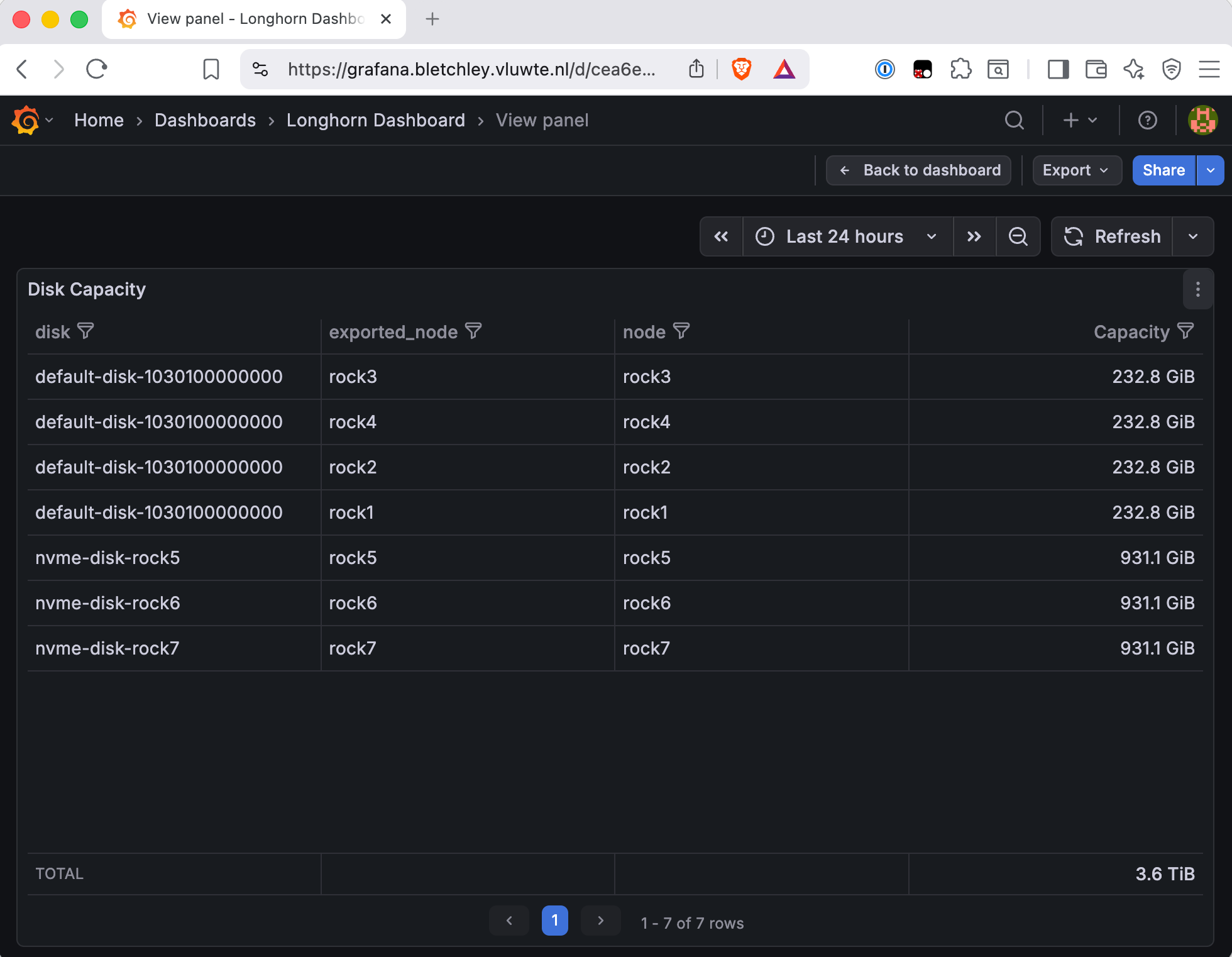
Doubling to 1 TB per node adds roughly 1.5 TB raw to the Longhorn pool and brings each board-2 node to 651 Gi schedulable. The overall cluster total moves from 1.9 TiB to 3.6 TiB, which is visible in the Grafana screenshot above.
The decision to upgrade one node at a time was straightforward: all three are pure workers, no etcd involvement, so any order is safe.
Pre-flight
Before touching any hardware, all Longhorn volumes need to be healthy and all backups current. With replica count 2 across 7 nodes, draining one worker puts those replicas in a degraded state — which is fine. But starting from anything other than fully healthy is asking for trouble.
# All nodes Ready
kubectl get nodes

# No degraded or faulted volumes — this must be clean before starting
kubectl -n longhorn-system get volumes
# Expect: robustness=healthy across the board

# Backup target reachable
kubectl -n longhorn-system get backuptargets
# Expect: Available

# etcd healthy (board 1 control plane — unaffected, but confirm clean)
talosctl -n 10.0.140.11 etcd members
talosctl -n 10.0.140.11 etcd status
Everything was clean. Eight PVC volumes all healthy, backup target available, etcd showing 3 healthy members.
The Per-Node Sequence
The same sequence ran for rock5, then rock6, then rock7. I didn't start the next node until all Longhorn volumes returned to robustness=healthy after each one.
Step 1 — Disable Longhorn disk scheduling
Prevents Longhorn from scheduling new replicas onto this node while it's being serviced.
kubectl -n longhorn-system edit node.longhorn.io <NODE>
# Set: spec.allowScheduling: false
Step 2 — Cordon and drain
kubectl cordon <NODE>
kubectl drain <NODE> --ignore-daemonsets --delete-emptydir-data
The drain output includes a wall of DaemonSet warnings — Longhorn instance-manager, node-exporter, Alloy, Vector, and so on. These are all expected and safe. The one that retries a few times is instance-manager, which hits its pod disruption budget; it eventually evicts cleanly.
After drain, check that volumes are degraded rather than faulted. Degraded means one replica is offline (expected — that replica was on the node that was just drained). Faulted means both replicas are gone, which would be a problem.
kubectl -n longhorn-system get volumes
# Expect: robustness=degraded on volumes that had a replica on this node
# If robustness=faulted: stop and investigate
For all three nodes across all three maintenance cycles, the volumes stayed healthy — none had both replicas on board-2 nodes simultaneously.
Step 3 — Shutdown and power off
Talos graceful shutdown, then cut power via the board 2 BMC:
talosctl -n <NODE_IP> shutdown

# Power off via board 2 BMC (note: board 2 has its own BMC, separate from board 1)
tpi power off -n <SLOT>
# rock5 = slot 1, rock6 = slot 2, rock7 = slot 3

tpi power status
# Confirm the right slot shows 'off'
Step 4 — Physical swap
Straightforward. The RK1's NVMe is on the module's own M.2 slot. Pop the case, swap the drive, close it back up. Anti-static precautions apply. Set the old 500 GB drives aside labelled — they're still healthy.
The Problem: phase=failed
Here's where the plan diverged.
After powering the node back on and letting it rejoin the cluster, the assumption was that the new blank NVMe would be sitting there waiting for Longhorn to claim it. Instead:
talosctl -n rock5.vluwte.nl get volumestatus | grep nvme
rock5.vluwte.nl   runtime   VolumeStatus   /dev/nvme0n1-1   1   partition   failed   /dev/nvme0n1p1   1.0 TB
phase=failed. The new drive wasn't blank — it came with a pre-existing partition (nvme0n1p1), which caused the volume manager to mark the device failed when applying the existing disk configuration. In this state, talosctl wipe disk refuses to run — it won't wipe a disk the volume manager considers active, even in a failed state. The exact error behind the failure isn't something I captured, but the fix was the same regardless.
The fix is to temporarily remove the extraMounts configuration from the node's machine config. This caused Talos to stop tracking the device, after which talosctl wipe disk succeeded.
# 1. Confirm phase=failed
talosctl -n <NODE_IP> get volumestatus | grep nvme
# phase=failed — this is why wipe refuses

# 2. Remove extraMounts and the disk/volumes section from the machine config
talosctl -n <NODE_IP> edit mc
# Remove the disks block referencing nvme0n1 and the extraMounts entry for /var/mnt/longhorn
# Save — node reboots automatically

# 3. Confirm the lock is released
talosctl -n <NODE_IP> get volumestatus | grep nvme
# Expect: no output

# 4. Wipe
talosctl wipe disk nvme0n1 --nodes <NODE_IP> --drop-partition
# Clean exit, no output

# 5. Re-apply the Longhorn patch
talosctl -n <NODE_IP> patch mc --patch @longhorn-patch.yaml
# Node reboots again

# 6. Confirm the mount landed on NVMe, not eMMC
talosctl -n <NODE_IP> get mounts | grep longhorn
# Expect: SOURCE=/dev/nvme0n1p1 — if it shows mmcblk0, stop
This two-reboot sequence ran identically for all three nodes. For rock5 I worked through it as a surprise; for rock6 and rock7 I ran it as the expected procedure. The diff for removing the config shows clearly what's being stripped:
--- a
+++ b
@@ -27,10 +27,6 @@
                 - routes: []
                   dhcp: true
                   vlanId: 140
-    disks:
-        - device: /dev/nvme0n1
-          partitions:
-            - mountpoint: /var/mnt/longhorn
     install:
         disk: /dev/mmcblk0
After the Longhorn patch is re-applied and the node reboots, confirm the volume manager is satisfied:
talosctl -n <NODE_IP> get volumestatus | grep nvme
# Expect: phase=ready, location=/dev/nvme0n1p1, size=1.0 TB

talosctl -n <NODE_IP> cat /var/mnt/longhorn/longhorn-disk.cfg
# Expect: fresh UUID, state=ready
# {"diskName":"nvme-disk","diskUUID":"<fresh-uuid>","diskDriver":"","state":"ready"}
The Longhorn Side: Stale Disk Entry and storageReserved
With the NVMe freshly formatted and mounted, attention turns to Longhorn. The existing Longhorn disk object no longer matched the newly initialized disk, Longhorn sees a mismatch and won't use the disk.
The cleanest approach is to remove the entry entirely and let Longhorn re-register it from longhorn-disk.cfg. But there's a prerequisite: the disk entry must have allowScheduling: false before you can remove it (scheduling was already disabled in Step 1, so this is usually already in the right state).
# Disable scheduling on the disk entry if not already
kubectl -n longhorn-system edit node.longhorn.io <NODE>
# spec.disks.nvme-disk.allowScheduling: false

# Remove the disk entry entirely
kubectl -n longhorn-system edit node.longhorn.io <NODE>
# Change spec.disks to: {}
# Clean save — if you get a validation error, wait 10s and retry
On all nodes, the disk did not auto-reappear within 2 minutes. I added it manually via the Longhorn UI: Nodes → Edit Node → Add Disk, path /var/mnt/longhorn. That part is straightforward.
The non-obvious part is storageReserved. If you leave the field blank in the UI, Longhorn writes storageReserved: 0, which means zero reservation — 100% of the raw disk is considered schedulable. That sounds fine until you remember the old disk entry still retained its previous storageReserved value, which resulted in an invalid schedulable-capacity calculation after the replacement. You need to set it to something explicit.
What value? Longhorn's default is 30% of the disk, controlled by the storage-reserved-percentage-for-default-disk setting. That default exists to protect the kubelet from DiskPressure conditions when Longhorn is sharing the root disk at /var/lib/longhorn. On a dedicated NVMe with the OS on eMMC, that concern is reduced significantly — Longhorn's own best practices documentation says you can safely go lower on a dedicated disk. I set it to match Longhorn's default (30% of 931.1 GiB = 279172874240 bytes) for now, but this is a candidate to revisit downward.
Setting it via the UI leaves the field in a potentially inconsistent state. The reliable path is to patch it directly:
kubectl -n longhorn-system edit node.longhorn.io <NODE>
# Under spec.disks.nvme-disk:
# storageReserved: 279172874240
After that, the node should show correct capacity: ~930 Gi total, ~651 Gi schedulable.
Uncordon and re-enable scheduling
kubectl uncordon <NODE>

# Re-enable node-level scheduling in Longhorn
kubectl -n longhorn-system edit node.longhorn.io <NODE>
# spec.allowScheduling: true
Wait for rebalancing
Longhorn starts rebuilding replicas onto the new disk immediately. Cross-board replication between board 1 and board 2 goes through the single 1 Gb uplink — not the backplane. Watch the volumes rather than guessing how long it takes.
watch kubectl -n longhorn-system get volumes
# Wait until all volumes return to robustness=healthy before moving to the next node
Post-upgrade Verification
After all three nodes:
kubectl get nodes -o wide
# All 7 nodes Ready, board-2 nodes rejoined cleanly

kubectl -n longhorn-system get volumes
# All volumes healthy

kubectl -n longhorn-system get backuptargets
# Backup target Available

talosctl -n 10.0.140.11 etcd members
# 3 members, all healthy
Everything clean. The Grafana Longhorn dashboard shows the updated totals: each board-2 node now at 931.1 GiB, total cluster storage 3.6 TiB.
What's Working Now
- ✅ rock5, rock6, rock7 each contributing 931.1 GiB raw to Longhorn (up from 232.8 GiB)
- ✅ Total Longhorn pool: 3.6 TiB raw across all 7 nodes
- ✅ All 8 PVC volumes healthy after the rolling upgrade
- ✅ Backup target available, manual backup test passed
- ✅ etcd unaffected throughout (board 2 nodes are pure workers)
- ⚠️ Known limitation: cross-board replication still bottlenecks on the single 1 Gb uplink — rebuild time per node wasn't measured but is worth monitoring on future upgrades
Lessons Learned
- New drives aren't necessarily blank. A previously used drive can arrive with an existing partition that Talos's volume manager can't reconcile, producing
phase=failed. Don't assume a new-to-you drive is empty. - phase=failed blocks
talosctl wipe disk. Talos still considered the device managed by the volume subsystem, andtalosctl wipe diskrefused to operate on it while in that state. Removing theextraMountsconfiguration cleanly releases the volume-manager lock and allowed the wipe to proceed. - Longhorn's stale disk entry carries corrupted metadata. The stale disk object retained its previous
storageReservedvalue even after the underlying disk UUID changed, which can produce negative schedulable capacity. Always set it explicitly after re-adding a disk. Longhorn's default of 30% exists to protect the kubelet on a shared root disk — on a dedicated NVMe it's conservative, and the docs suggest you can go lower. - Auto-registration from
longhorn-disk.cfgisn't guaranteed. The replaced disk didn't reappear automatically after clearing the entry. Manual add via the UI is a fine fallback — just don't skip thestorageReservedpatch afterwards. - The one-at-a-time rule is load-bearing. With replica count 2 across 7 nodes, draining one worker degrades volumes temporarily. That's fine. Draining two would risk faulted volumes if any volume happened to have both replicas on board-2 nodes.
What's Next
The next post covers the other rock7 storage work: adding the 2× 2TB SATA drives that have been sitting waiting since the node joined the cluster. Those back a Garage S3 expansion — more capacity for Longhorn backups and larger object workloads.
← Previous: Growing the Cluster: Adding rock5, rock6, and rock7
Questions or suggestions? Leave a comment below or reach out at igor@vluwte.nl.