PostgreSQL Backups on Kubernetes: Per-Database Dumps, Rotation, and Prometheus Monitoring
Per-database pg_dump to Garage S3, a touch file state machine, daily/weekly rotation, a Go Prometheus exporter, and Alertmanager rules for the PostgreSQL backup system on Bletchley.
Introduction
When the PostgreSQL StatefulSet on Bletchley was first set up, the backup story was simple: one CronJob, pg_dumpall, dump everything to S3. That's a reasonable starting point, but it has a problem — pg_dumpall produces a single file containing every database. When you want to restore one database, you restore everything. When you want to monitor backup health per database, you can't. And when the cluster eventually runs five or six databases, size anomalies in one will be invisible against the combined total.
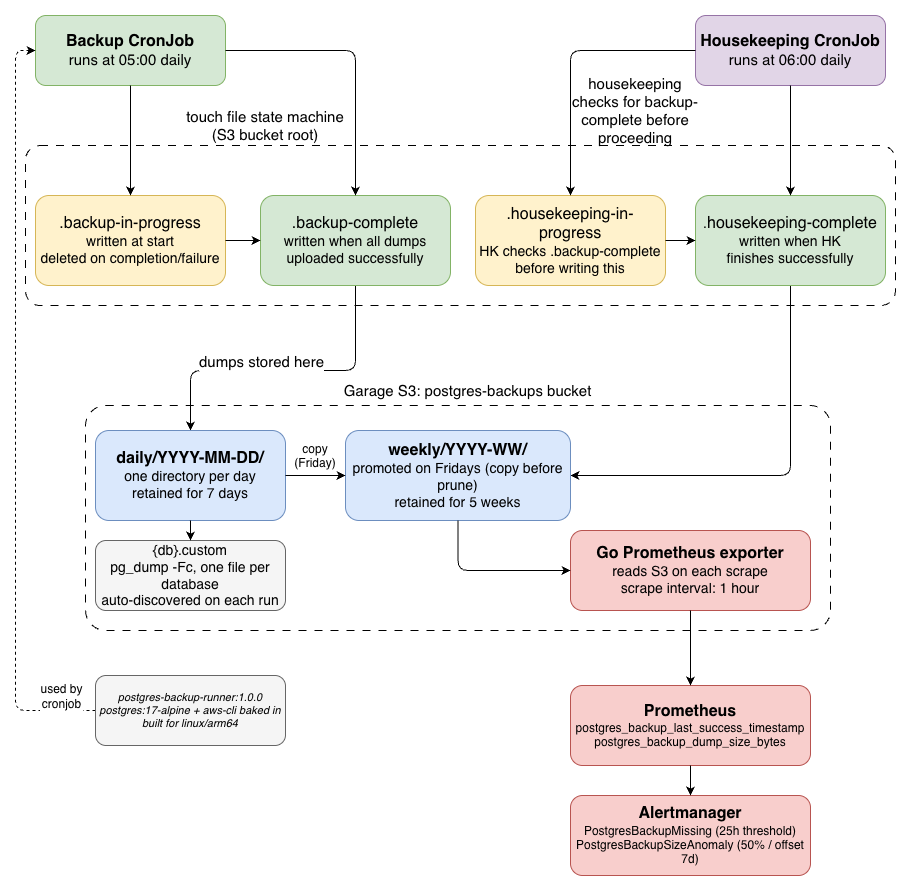
What emerged instead is a proper backup system: per-database dumps, a separate housekeeping CronJob that handles daily/weekly rotation, a Go-based Prometheus exporter that reads backup state from S3 and exposes metrics, and Alertmanager rules for missing backups and size drift. Each piece is simple on its own, but together they give a clear picture of what's backed up, when, and whether anything looks wrong.
This post documents the design decisions, the touch file state machine that coordinates the two CronJobs, and how the metrics and alerts work in practice.
🏠 This is part of the Homelab Journey series - building a production Kubernetes cluster from scratch.
- PostgreSQL on Bletchley
- PostgreSQL Backups on Kubernetes: Per-Database Dumps, Rotation, and Prometheus Monitoring (you are here)
This post assumes the PostgreSQL StatefulSet is already running. The setup is covered in PostgreSQL on Bletchley.
Why Not pg_dumpall?
pg_dumpall is the obvious choice for backing up a PostgreSQL instance — one command, one file, everything in it. The problems become apparent when you think about restore and monitoring.
With a single combined dump, restoring one database means either restoring everything or manually extracting the relevant SQL from the file. Per-database dumps using pg_dump -Fc (custom format) produce self-contained, independently restorable files. Any single database can be restored with pg_restore without touching the others.
The second reason is monitoring. Per-database files make it straightforward to track backup size per database over time. If the umami dump file suddenly drops to zero bytes, or doubles in size, that's detectable and alertable. With a combined file, a problem in one database is masked by the others.
The backup script iterates over user databases (excluding the postgres maintenance database) and dumps each one:
DATABASES=$(psql -h "$PGHOST" -U postgres -t -A \
  -c "SELECT datname FROM pg_database WHERE datistemplate = false AND datname != 'postgres';")

for DB in $DATABASES; do
  pg_dump -h "$PGHOST" -U postgres -d "$DB" -Fc -f "tmp/$DB.custom"
  aws s3 cp "tmp/$DB.custom" "s3://postgres-backups/daily/$(date +%Y-%m-%d)/$DB.custom" \
    --endpoint-url "$S3_ENDPOINT"
done
New databases added to the instance are automatically picked up on the next backup run — no changes needed to the CronJob or script.
The Touch File State Machine
With two CronJobs — one for backups, one for housekeeping — there needs to be a way for housekeeping to know whether a backup has completed successfully before it runs. Running housekeeping on stale state, or while a backup is in progress, would produce incorrect results.
The solution is a set of touch files stored in the S3 bucket root. Each file is a small text object whose presence signals a specific state:
.backup-in-progress — written at the start of the backup job, deleted on completion or failure.
.backup-complete — written when all database dumps have uploaded successfully.
.housekeeping-in-progress — written at the start of housekeeping, deleted on completion.
.housekeeping-complete — written when housekeeping finishes.
Housekeeping checks for .backup-complete before proceeding. If it's not present — either because the backup is still running, or because it failed — housekeeping skips that cycle. The state is reset at the start of each backup run.
From the housekeeping job output:
postgres-housekeeping-test3-dspx6 housekeeping 2026-05-02 21:22:30   11 .backup-complete
postgres-housekeeping-test3-dspx6 housekeeping Writing .housekeeping-in-progress
postgres-housekeeping-test3-dspx6 housekeeping Pruning daily backups older than 7 days
postgres-housekeeping-test3-dspx6 housekeeping Pruning weekly backups older than 5 weeks
postgres-housekeeping-test3-dspx6 housekeeping delete: s3://postgres-backups/.backup-complete
postgres-housekeeping-test3-dspx6 housekeeping delete: s3://postgres-backups/.housekeeping-in-progress
postgres-housekeeping-test3-dspx6 housekeeping Writing .housekeeping-complete
postgres-housekeeping-test3-dspx6 housekeeping Housekeeping complete.
The 11 next to .backup-complete is the file size in bytes — just a small text object. The presence of the file is what matters.
Daily and Weekly Rotation
Backups are stored under a daily/YYYY-MM-DD/ prefix in the postgres-backups bucket. The retention policy keeps 7 daily backups and 5 weekly backups.
Weekly promotion happens on Friday: housekeeping copies the Friday daily backup to weekly/YYYY-WW/ before pruning. This means losing a Friday daily doesn't take the weekly with it — the copy happens before the prune.
The S3 cleanup uses aws s3 ls to list backup directories and deletes any that exceed the retention window. Garage S3 (the self-hosted S3-compatible storage on the cluster) works with standard aws s3 commands using --endpoint-url — the --region flag is not needed, which matches the pattern established in the Garage S3 post.
The Custom Runner Image
The backup CronJob originally installed aws-cli at runtime using apk add — which works, but it's slow and means every backup run fetches the package from the internet. The fix is a dedicated image:
FROM postgres:17-alpine
RUN apk add --no-cache aws-cli
Built for linux/arm64 and pushed to the internal registry at 10.0.0.80:5000/postgres-backup-runner:1.0.0. The CronJobs reference this image directly — no runtime package installation.
Both CronJobs produce PodSecurity warnings about missing securityContext fields (allowPrivilegeEscalation, runAsNonRoot, seccompProfile). These are warnings, not failures — the postgres namespace uses the privileged PodSecurity standard because the PostgreSQL container itself runs as root. Tightening this is on the list for a future pass.
The Prometheus Exporter
A backup CronJob produces files in S3. The files either exist and are healthy, or they don't. Prometheus can't scrape an S3 bucket directly — so there's a small Go service (postgres-backup) that acts as a bridge.
The exporter runs as a Deployment in the postgres namespace. On each scrape, it reads the backup state from S3 (listing objects, reading the JSON metadata from .housekeeping-complete), and exposes Prometheus gauges:
postgres_backup_last_success_timestamp_seconds — Unix timestamp of the last successful backup, per database.
postgres_backup_dump_size_bytes — Size of the most recent dump file, per database.
postgres_backup_housekeeping_last_success_timestamp_seconds — When housekeeping last completed.
The exporter is built using a multi-stage Dockerfile: Go binary compiled against golang:1.23-alpine, copied into gcr.io/distroless/static:nonroot for a minimal, non-root runtime image. The binary is about 5MB.
Prometheus scrapes the exporter via a ServiceMonitor in the postgres namespace. The scrape interval is set to 1 hour — backup state doesn't change between runs, so there's no value in scraping more frequently.
Alertmanager Rules
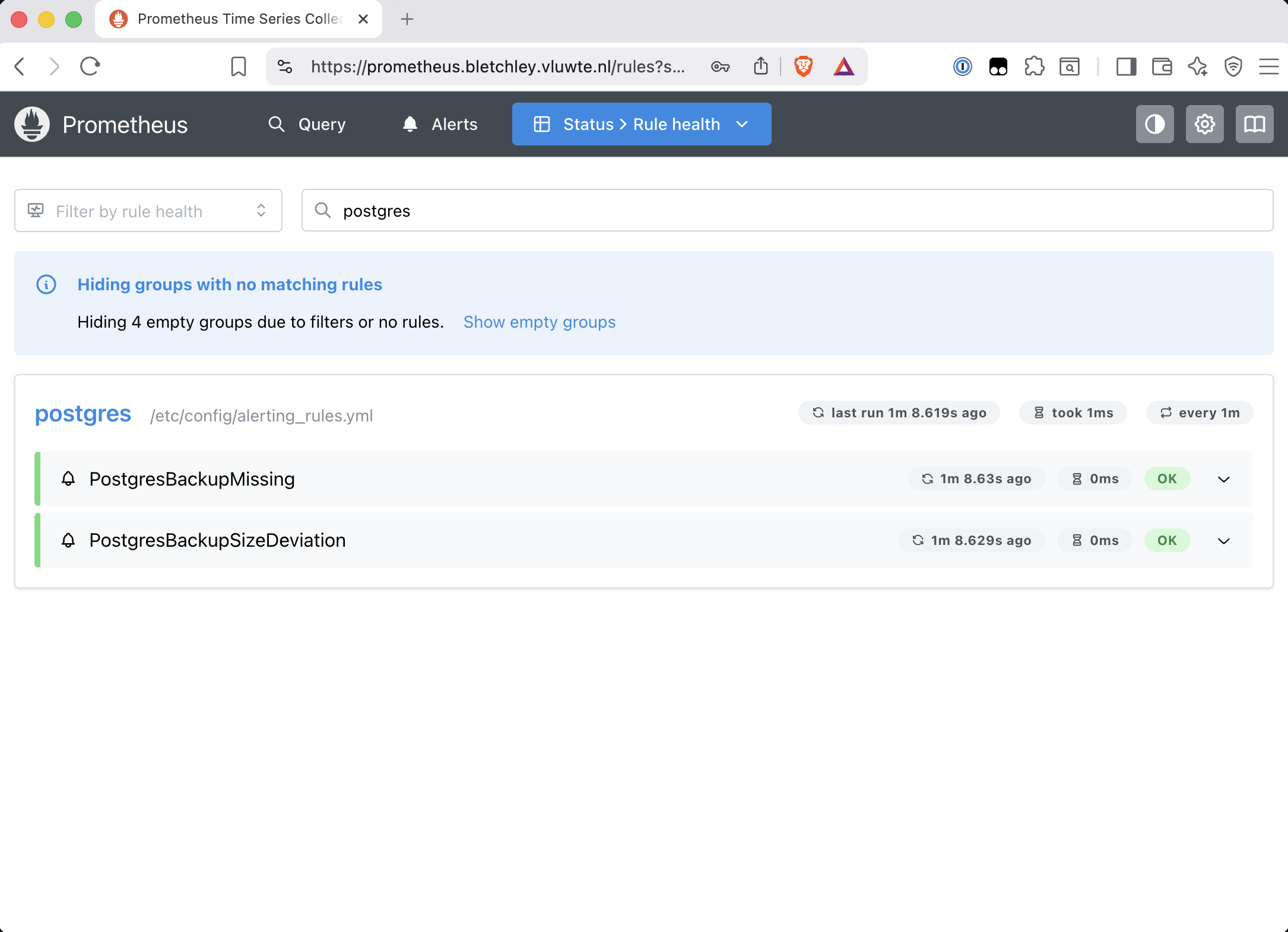
Two alert rules cover the main failure modes.
Missing backup:
- alert: PostgresBackupMissing
  expr: |
    time() - postgres_backup_last_success_timestamp_seconds > 86400 + 3600
  for: 0m
  labels:
    severity: warning
  annotations:
    summary: "PostgreSQL backup missing for {{ $labels.database }}"
    description: "No successful backup in the last 25 hours for database {{ $labels.database }}."
The threshold is 25 hours (86400 + 3600 seconds) to give an hour of slack for timing variation. The backup CronJob runs at 05:00; if it runs slightly late or housekeeping takes longer, the alert shouldn't fire unnecessarily.
Size deviation:
- alert: PostgresBackupSizeAnomaly
  expr: |
    abs(
      postgres_backup_dump_size_bytes
      - postgres_backup_dump_size_bytes offset 7d
    ) / postgres_backup_dump_size_bytes offset 7d > 0.5
  for: 0m
  labels:
    severity: warning
  annotations:
    summary: "PostgreSQL backup size anomaly for {{ $labels.database }}"
    description: "Backup size for {{ $labels.database }} differs from 7 days ago by more than 50%."
This catches two failure modes: a backup that's significantly smaller than expected (possible corruption or partial dump) and one that's much larger (unexpected data growth worth investigating). The 50% threshold is deliberately wide during initial operation — once the baseline is established, it can be tightened.
Using offset 7d compares against the same day of the previous week rather than the previous day, which avoids false positives when backups are slightly larger at the end of the month due to analytics data accumulation.
First Automated Run
The backup system ran its first scheduled run on May 5, 2026 at 05:00. The stern output below shows both the backup job (05:00) and the housekeeping job (06:00) — the full state machine in one frame:
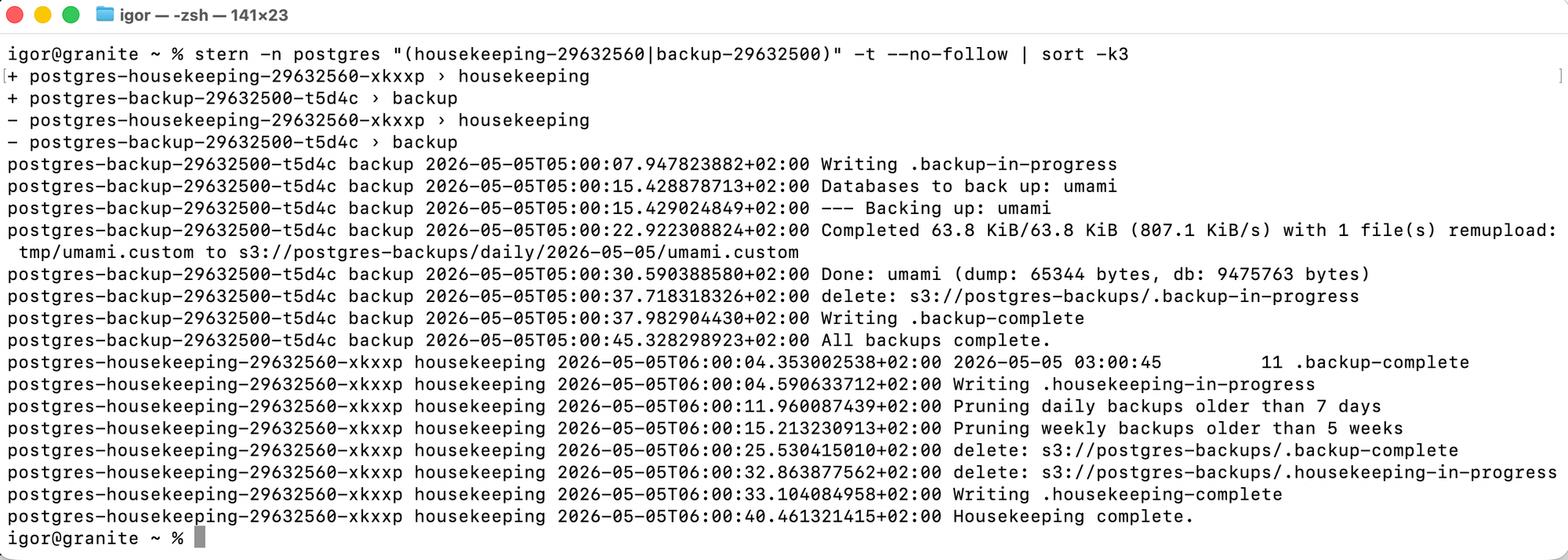
Housekeeping ran at 06:00, found .backup-complete, ran rotation, and wrote .housekeeping-complete. The Prometheus exporter picked up the new state on the next scrape.
What's Working Now
- ✅ Daily backup CronJob running at 05:00 — per-database dumps to
s3://postgres-backups/daily/ - ✅ Housekeeping CronJob running at 06:00 — 7-day daily / 5-week weekly rotation
- ✅ Touch file state machine coordinating both CronJobs
- ✅
postgres-backup-runner:1.0.0custom image — aws-cli baked in, no runtime installs - ✅ Go Prometheus exporter running in
postgresnamespace, scraped by Prometheus - ✅ Alertmanager rules for missing backups and size anomalies
Known Limitations and Future Work
The PodSecurity warnings on both CronJobs are unresolved. The containers run as root (PostgreSQL's requirement), which conflicts with the restricted PodSecurity standard. A proper fix involves running pg_dump as the postgres user (UID 70) with appropriate securityContext settings — it's on the list but wasn't worth blocking the backup system for.
Longer term, tools like pgBackRest or barman offer more sophisticated PostgreSQL-specific backup features: incremental backups, point-in-time recovery, parallel restore. For the current single-database, small-data setup, pg_dump to S3 with rotation and monitoring is sufficient. If the cluster ever runs larger databases where full dumps become expensive, pgBackRest would be the natural next step.
← Previous: PostgreSQL on Bletchley
Questions or suggestions? Leave a comment below or reach out at igor@vluwte.nl.