Getting etcd off the eMMC
Moving etcd and all of /var onto the control planes' NVMe on Talos took their eMMC writes from 15 GB a day to effectively zero, with one election.
Introduction
Every control plane on Bletchley was writing about 15 GB a day to its eMMC. That is the 32 GB flash chip soldered onto each RK1 module: no S.M.A.R.T., no published endurance rating, and no way to replace it short of replacing the module. Half a drive-write a day on storage like that is not an emergency, but it is a clock running on the one part I cannot swap.
The fix was sitting right next to it. Since the move to three boards, each control plane has a 250 GB Kingston NV1 NVMe that was doing nothing. At the end of that post, "move etcd onto the control planes' NVMe drives, and measure whether it was worth it" was the first item on the list.
On Talos that turned out not to mean moving etcd at all, but moving everything around it. Three control planes, two evenings, one deliberate election, and the eMMC on every control plane now writes effectively nothing.
🏠 This is part of the Homelab Journey series - building a production Kubernetes cluster from scratch.
- Bringing the Registry Home
- Getting etcd off the eMMC (you are here)
Who Writes to the eMMC
The eMMC has no S.M.A.R.T., so Teaching Prometheus to Read an eMMC built an exporter for the two wear registers it does have. Those registers move in steps of ten percent; the write rate is what can be projected. node_disk_written_bytes_total gave it on September 5: about 14.6 GB a day on the control planes, against about 1.6 GB on the workers.
The split is by role, not by node. The Disk With No SMART traced it to what a control plane keeps under /var: etcd above all, plus containerd's image store, kubelet state and logs. Workers run their workloads on Longhorn volumes on their NVMe drives; their eMMC barely moves. On a 32 GB chip, 14.6 GB a day is about half a drive-write every day.
Why You Cannot Just Move etcd on Talos
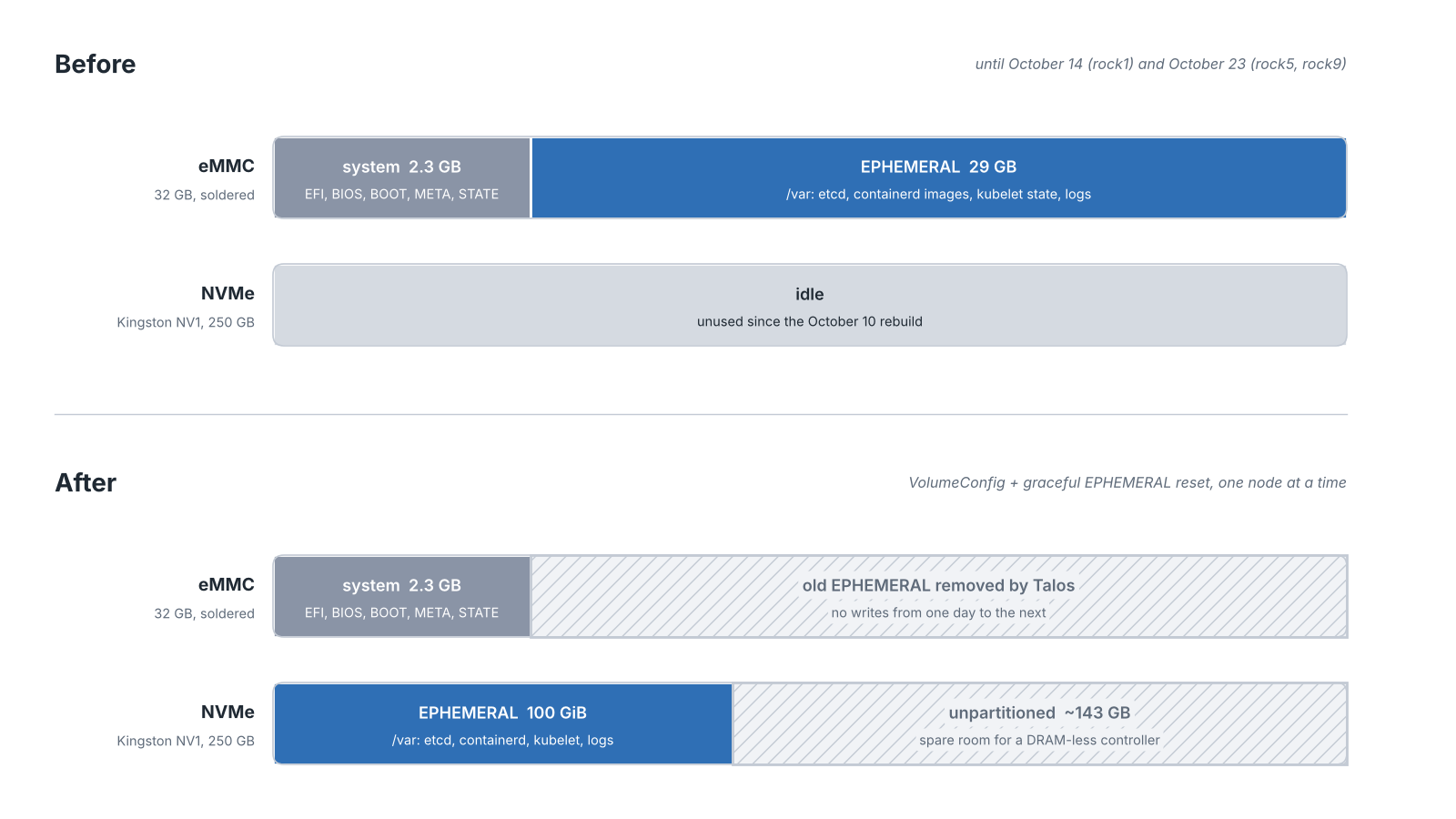
On a general-purpose Linux box this would be a one-line change: point etcd's --data-dir at a filesystem on the NVMe and restart it. Talos does not work that way. etcd's data lives at /var/lib/etcd, on the EPHEMERAL volume, and the etcd container is not given anything outside it. So the question was not "how do I move etcd", but "what is the smallest thing I can move that contains etcd".
| Option | What it does | Why it did or didn't win |
|---|---|---|
| A: Move EPHEMERAL, reset in place | A VolumeConfig that places EPHEMERAL on the NVMe, then a graceful reset that wipes only EPHEMERAL. The node leaves etcd, /var is rebuilt on the NVMe, and the node rejoins as a new member. The machine config and node identity are kept. |
Chosen. One patch and one reset per node, no reinstall. It also takes containerd's image store, kubelet state and logs off the eMMC. Costs: quorum runs on two of three members for a few minutes per node, and etcd now depends on a 2022, out-of-warranty, DRAM-less drive. |
B: Reinstall with the VolumeConfig from the start |
Remove the node, flash it again through the BMC, install with EPHEMERAL on the NVMe. | Same end state with a lot more to go wrong. Kept as the fallback in case A reused the old partition on the eMMC. |
| C: Only etcd on the NVMe | A user volume on the NVMe with etcd's data directory pointed at it. | Talos fixes the data directory. Even if it could be made to work, it would be an undocumented setup on the one component whose restore I have never tested. |
| D: Stay on the eMMC, make etcd write less | Tune snapshot counts, compaction and defragmentation. | Slows the wear on an irreplaceable part instead of removing it, with an idle drive right next to it. |
Option A needs only a small patch. EPHEMERAL was 29 GB on the eMMC and held everything, with an etcd database of 82 MB, so 100 GiB is ample. The cap is deliberate: it leaves about 143 GB of each drive unpartitioned. On a drive with no DRAM cache, space the filesystem never writes to can be extra room for the controller to work with, as long as the controller knows the space is unused.
# infra/talos/ephemeral-nvme.patch.yaml
apiVersion: v1alpha1
kind: VolumeConfig
name: EPHEMERAL
provisioning:
  diskSelector:
    match: disk.transport == 'nvme' && !system_disk
  minSize: 20GiB
  maxSize: 100GiB
  grow: false
There was one question that decided whether option A was safe, and I couldn't answer it from the documentation. After applying the new VolumeConfig and wiping EPHEMERAL, would Talos create a new partition on the NVMe, or find the existing (now empty) EPHEMERAL partition on the eMMC by its label and reuse it?
The second outcome would defeat the whole exercise: the node would come back healthy, but still be writing to the eMMC.
There was only one way to find out. That made rock1 the pilot.
The Pilot: rock1
rock1 went first, on October 14, on its own. rock5 and rock9 stayed on the eMMC until the pilot had told me everything I needed to know, which in the end took nine days.
A pilot that could be undone
Two things made the pilot cheap to try. First, the patch does nothing on its own: Talos locates existing volumes, it does not move them, so nothing changes until the reset. Second, the reset can be reversed. If EPHEMERAL had landed on the eMMC again, or etcd had not rejoined, the way back was to remove the VolumeConfig and run the same reset again. If rock1 had not come back at all, I would have removed its member from rock5 and fallen back to option B.
The part with no tested way back is etcd itself. I have never restored it from a snapshot, so a snapshot is a safety net with an unproven landing. For rock1, that net was the nightly talos-backup snapshot. In hindsight a fresh one, taken minutes before the reset, would have been better, and that is what the other two got.
The old Longhorn disk
Before the October rebuild, rock1's NVMe had been used as a Longhorn disk. Before Talos could provision EPHEMERAL on it, I needed to make sure the old Longhorn configuration was completely out of the way.
The first attempt to wipe the disk was refused:
talosctl -n rock1.vluwte.nl wipe disk nvme0n1
error wiping device on node rock1.vluwte.nl: rpc error: code = FailedPrecondition
desc = blockdevice "nvme0n1" is in use by volume "/dev/nvme0n1-1"
The original Longhorn patch had been applied to every node, control planes included, and on rock1 it had never been cleaned up. A machine.disks entry still mounted the NVMe at /var/mnt/longhorn. Talos has no manual unmount; the entry has to come out of the machine config. A JSON patch that removes /machine/disks was refused:
talosctl -n rock1.vluwte.nl patch mc --patch '[{"op": "remove", "path": "/machine/disks"}]'
JSON6902 patches are not supported for multi-document machine configuration
A strategic-merge patch with $patch: delete would not do it either. talosctl edit mc did, without a reboot, and the wipe went through after that.
The reset
With the patch applied, the move itself is a handful of commands:
talosctl -e rock5.vluwte.nl -n rock1.vluwte.nl patch mc --patch @ephemeral-nvme.patch.yaml
talosctl -n rock1.vluwte.nl etcd forfeit-leadership
kubectl cordon rock1
kubectl drain rock1 --ignore-daemonsets --delete-emptydir-data
talosctl -e rock5.vluwte.nl -n rock1.vluwte.nl reset \
  --graceful=true \
  --system-labels-to-wipe EPHEMERAL \
  --reboot --wait
Two of the commands specify both -e and -n, and that distinction matters during a reset. -e selects the endpoint that handles the request; -n selects the node the request is about.
Without -e, talosctl picks an endpoint from my talosconfig, which lists all three control planes. That could mean sending a reset request to rock1 through rock1 itself. Once rock1 wipes /var and reboots, that connection disappears, leaving --wait with nothing to monitor.
Using rock5 as the endpoint avoids that problem: it stays up and can continue reporting on rock1 until the post-reset checks pass.
The patch itself doesn't require a separate endpoint because it doesn't reboot anything, but using the same endpoint consistently removes one more variable from the procedure.
forfeit-leadership printed nothing: rock9 was the leader, so there was nothing to hand off. The drain was nearly as quiet. A "dedicated" control plane is not quite empty, but the only pod it evicted was a MetalLB status cleaner.
The graceful reset handles etcd by itself: the member leaves the cluster, EPHEMERAL is wiped, the node reboots, and it rejoins under a new member ID. --wait returned after about two minutes, and the volumes told the rest:
talosctl -n rock1.vluwte.nl get discoveredvolumes
NODE              NAMESPACE   TYPE               ID          SIZE     DISCOVERED   LABEL       PARTITIONLABEL
rock1.vluwte.nl   runtime     DiscoveredVolume   mmcblk0p1   105 MB   vfat         EFI         EFI
rock1.vluwte.nl   runtime     DiscoveredVolume   mmcblk0p2   1.0 MB                            BIOS
rock1.vluwte.nl   runtime     DiscoveredVolume   mmcblk0p3   2.1 GB   xfs          BOOT        BOOT
rock1.vluwte.nl   runtime     DiscoveredVolume   mmcblk0p4   1.0 MB   talosmeta                META
rock1.vluwte.nl   runtime     DiscoveredVolume   mmcblk0p5   105 MB   xfs          STATE       STATE
rock1.vluwte.nl   runtime     DiscoveredVolume   nvme0n1p1   107 GB   xfs          EPHEMERAL   EPHEMERAL
(Partitions only; the loop devices and whole-disk rows are left out.)
The gating question answered itself: EPHEMERAL was on the NVMe, and the old 29 GB mmcblk0p6 was gone. Talos had removed it rather than reused it. From the first config edit to the rejoin took about 14 minutes, most of it reading output.
The raft term is the cheapest way to see whether etcd had a bad time: it goes up by one with every election, failed ones included. It was 118 before the reset and still 118 after rock1 rejoined. rock9 was the leader and stayed leader.
What the pilot showed
A week either side of October 14, rock1 alone:
| rock1 | On the eMMC | On its NV1 |
|---|---|---|
| eMMC writes per day | 14.0 GB | 0 (2.2 MB on one day out of seven) |
| NVMe writes per day | 0 | 13.4 GB |
| WAL fsync p99, hourly median | 6.6 ms | 12.5 ms |
| Backend commit p99, hourly median | 7.1 ms | 19.7 ms |
The wear part worked exactly as intended: the writes moved one for one, and at 13.4 GB a day the NV1 has years of rated endurance to spare.
The latency part was the surprise. etcd got slower, and worse than the averages, the eMMC had been perfectly steady and the NV1 was not: one day 8 ms, the next 20. Moving rock5 would put an NV1 in every quorum, so rock5 went on hold. On October 23 I decided to accept the cost: tens of milliseconds is far below anything etcd reacts to (heartbeats every 100 ms, an election timeout of one second), and this is a homelab. With that decided, the pilot was done.
Rinse and Repeat: rock5 and rock9
rock5 and rock9 moved on the evening of October 23, within half an hour of each other, with the same patch and the same commands as rock1. What changed was the preparation around them, and one more finding on rock1.
Checking the other two first
Before touching either node, I checked them for the leftovers that had stopped rock1's wipe. Neither had the Longhorn disk entry, and both NVMe drives were already blank, so no wipe was needed. rock9 had a souvenir of its own instead: a longhorn-disk.cfg and an empty replicas/ directory on its eMMC, from a few hours on October 10 when Longhorn briefly ran there. It lived on EPHEMERAL, so the reset would clean it up anyway.
The same check turned up a second leftover on rock1: a kubelet bind mount for /var/mnt/longhorn, which recreated the empty directory at every boot. Another edit mc, this time with --mode=no-reboot, and only the kubelet restarted.
Fresh snapshots
Before each of the two moves, I checked that all three etcd members were healthy and that the previous nightly backup had succeeded, and then took a fresh snapshot. Before rock5:
talosctl -n rock1.vluwte.nl,rock5.vluwte.nl,rock9.vluwte.nl etcd status
talosctl -n rock5.vluwte.nl etcd alarm list
talosctl -n rock5.vluwte.nl etcd snapshot ~/etcd-pre-nvme-$(date +%Y%m%d-%H%M).db
kubectl -n talos-backup get jobs --sort-by=.status.startTime | tail -3
alarm list printed nothing, which is what it should print. The snapshot:
etcd snapshot saved to "/Users/igor/etcd-pre-nvme-20261023-2126.db" (81707040 bytes)
snapshot info: hash 09d47f3a, revision 88186598, total keys 2134, total size 81707008
rock5, then rock9
rock5 went exactly like rock1, with -e rock1.vluwte.nl as the endpoint this time, since rock1 was now the node that would stay up. With nothing to clean up it took about ten minutes. The drain evicted a CoreDNS replica, which the second replica covered. The raft term stayed at 118.
rock9 was different in one way: it was the etcd leader, and it also held the Kubernetes API's virtual IP. So before its reset I handed leadership over on purpose:
talosctl -n rock9.vluwte.nl etcd forfeit-leadership
That moved the term from 118 to 119, the only election in the whole move. rock1 became the leader, the VIP moved to rock1 during the reset, and kubectl kept working throughout. The drain evicted nothing at all.
Did It Work?
For wear, completely. These are the daily write figures for the week before and after rock5 and rock9 moved (October 16–23 and October 23–30), from node_disk_written_bytes_total:
| Node | eMMC before | eMMC after | NVMe after |
|---|---|---|---|
| rock1 | 0 (moved Oct 14) | 0 | 15.7 GB/day |
| rock5 | 15.6 GB/day | 0 | 15.4 GB/day |
| rock9 | 15.5 GB/day | 0 | 13.9 GB/day |
| workers (eMMC) | 1.1–2.6 GB/day | 1.1–2.4 GB/day | n/a |
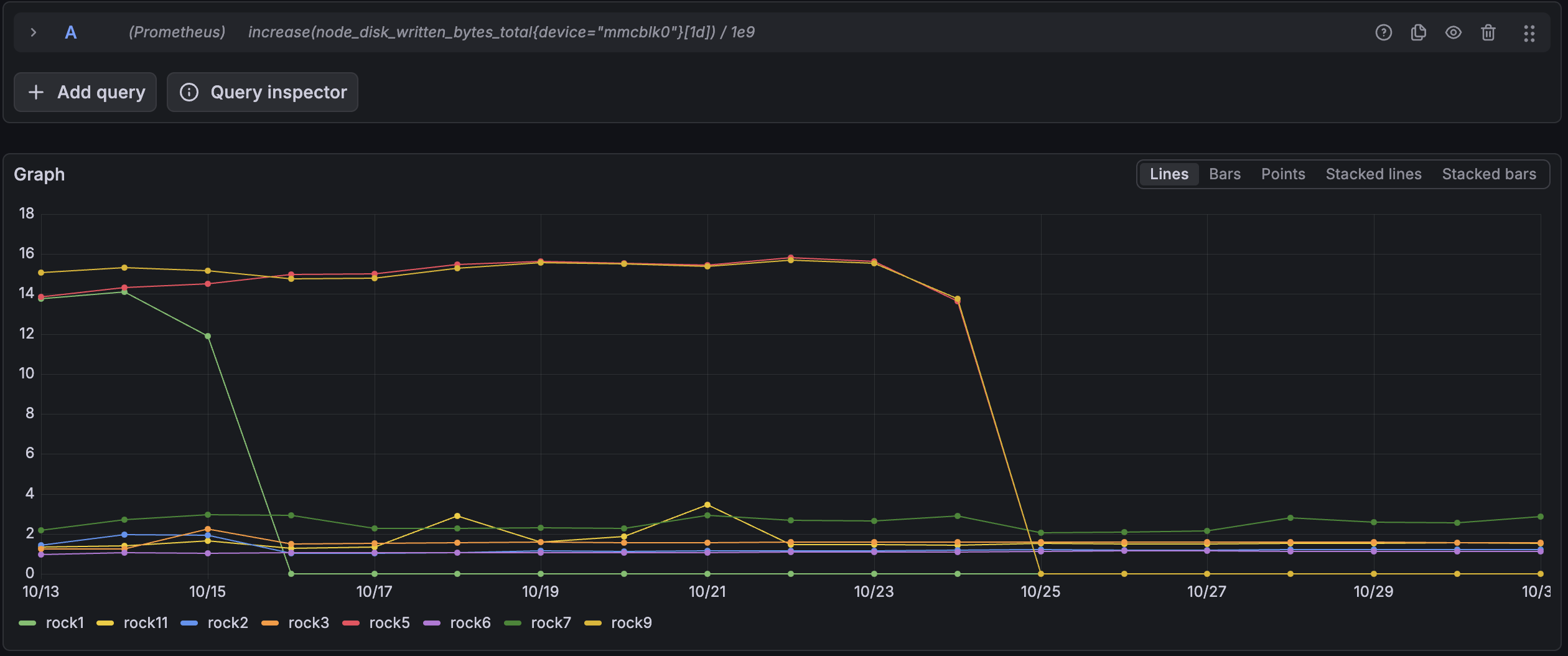
The result wasn't just a reduction to worker-level writes, which was the original goal. It was effectively zero.
With EPHEMERAL gone, the control planes' eMMC is left with only the boot and state partitions. Across the measurement period, writes fell from roughly 15 GB a day to negligible levels.
The control planes now write less to their eMMC than any of the workers. The original problem is gone.
The load moved to the NVMe more or less one for one. At about 15 GB a day, each NV1 has roughly ten years to go before it reaches its 60 TBW rating, and The Wear That Wasn't already showed that these drives have done very little real writing for their age.
One detail fell out of the numbers for free. rock9 led the cluster in the week before; rock1 led it in the week after. rock9's writes dropped by about 1.6 GB a day when it stopped leading, and rock1's rose by about 2.1 GB a day when it started. The leader writes about 2 GB a day more than a follower.
The Price
With all three control planes on NV1s, every write now waits for an NV1, and the latency cost the pilot showed on rock1 became the cluster's cost.
I knew I was trading lower eMMC wear for higher etcd latency, and I was comfortable with that trade-off. What I didn't expect was how differently three identical drives, in the same cluster, doing the same job, would behave.
That is a story of its own, and it's the next post.
Lessons Learned
- On Talos, move the volume, not the service. etcd's data directory is not configurable, but EPHEMERAL is, and moving all of
/vartook more writes off the eMMC than moving etcd alone would have. - Make the pilot reversible before you start. A patch that changes nothing until the reset, and a reset that can be run again, made the unknown cheap to find out.
- Graceful reset does the etcd bookkeeping for you. Leave, wipe, reboot, rejoin as a new member, with no
remove-memberby hand and no election if the node is not the leader. - Shared patches drift. A Longhorn patch meant for workers had quietly stayed on a control plane for months, in two places. Worker-only settings belong in worker-only patches.
- Measure the side the change was not for. The wear result was exactly as intended. The latency was the surprise, and only before-and-after numbers showed it.
What's Working Now
- ✅ etcd and all of
/varon the NVMe on all three control planes, in a 100 GiB partition with the rest of each drive left free - ✅ Control-plane eMMC writes down from about 15 GB a day to effectively zero
- ✅ About ten years of rated endurance left on each NV1 at the current write rate
- ✅ One deliberate election across three moves, and no outage
- ⚠️ Known limitation: etcd is slower on the NV1s than it was on the eMMC
What's Next
Immediate:
- Check that the base control-plane patch in git no longer carries the Longhorn
disks:andextraMounts, so the next regenerated config does not bring them back.
← Previous: Bringing the Registry Home
Questions or suggestions? Leave a comment below or reach out at igor@vluwte.nl.