The Disk With No S.M.A.R.T.
Six months of drive monitoring pointed at the wrong device. The one doing three times the writes has no S.M.A.R.T. at all.
Introduction
The Wear That Wasn't ended on a sentence I then had to go and check. The NVMe in these nodes carries Longhorn and nothing else, which means etcd, containerd's image store, kubelet state and every log line live somewhere else entirely, on a device taking two to three times the writes.
That device is a 32 GB eMMC chip soldered to each RK1 module. It is not removable, not replaceable without reflashing the node, and until last week nothing in the cluster reported a single thing about its health.
There is a mechanical reason for that, and it is the reason this post exists. eMMC does not implement S.M.A.R.T. The exporter I deployed in Cluster Observability Part 5 is a smartctl wrapper, so it can only ever see devices that speak S.M.A.R.T. The eMMC was never excluded from monitoring by a decision. It was excluded by the shape of the tool, which is a much harder kind of gap to notice, because the thing that would have told you is the thing that cannot see it.
This post measures the blind spot, reads the health registers the eMMC does expose, and ships the NVMe alerting rules that came out of the previous post. It ends on a gap rather than a fix: two registers, two thresholds, and nothing in the cluster that can read either one.
🔬 This is part of the Technical Deep Dives series - technical concepts explained in depth, independent of the homelab journey.
- The Wear That Wasn't
- The Disk With No S.M.A.R.T. (you are here)
What the NVMe actually carries
One mount, and that is the whole story:
/dev/nvme0n1p1 /var/mnt/longhorn xfs rw,relatime,inode64,logbufs=8,logbsize=32k,noquota
Longhorn's replica directory, and nothing else. I read this on rock1 only, so strictly speaking the other six are an assumption, but they were provisioned from the same Talos machine config and there is no reason for them to differ.
Everything a Kubernetes node does that is not a Longhorn volume therefore lands on mmcblk0: the etcd data directory on the three control-plane nodes, containerd's image store and snapshotter, kubelet state, and all logs before Promtail ships them. Thirty-two gigabytes of eMMC, part number BJTD4R on all seven modules, soldered to the board.
The write comparison
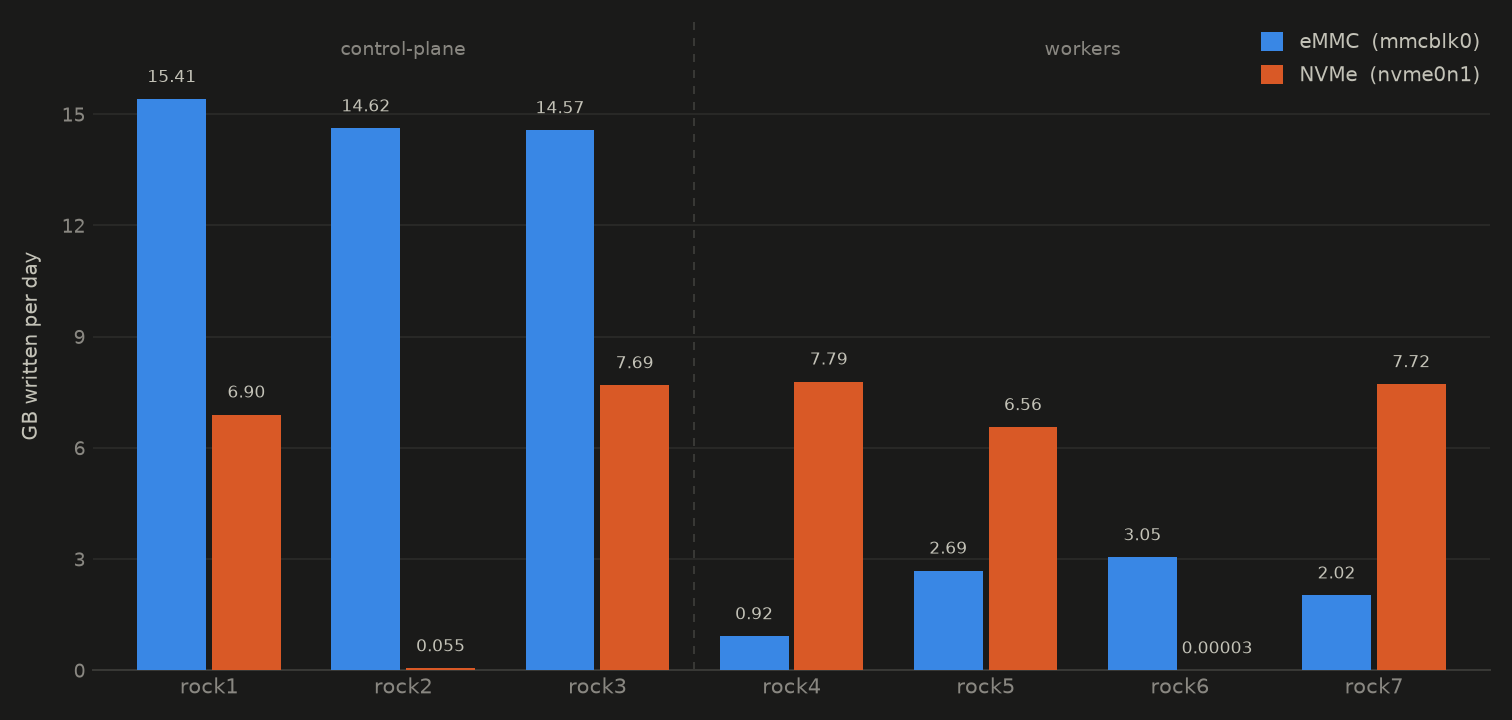
Both numbers come from data that was already being collected. node_disk_written_bytes_total has been in Prometheus since the node exporter went in, and since Prometheus Storage Overhead it has carried a real node label:
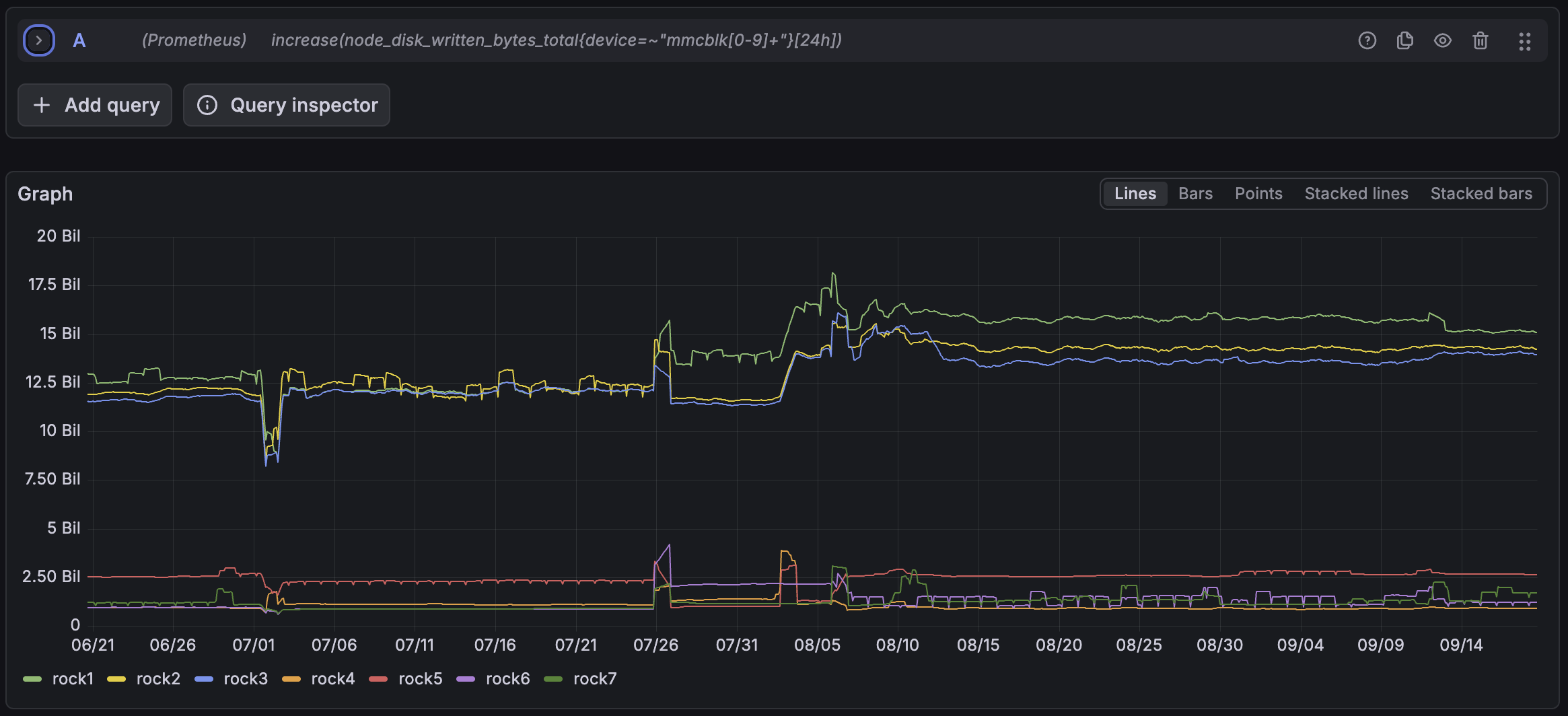
increase(node_disk_written_bytes_total{device=~"mmcblk[0-9]+"}[24h])
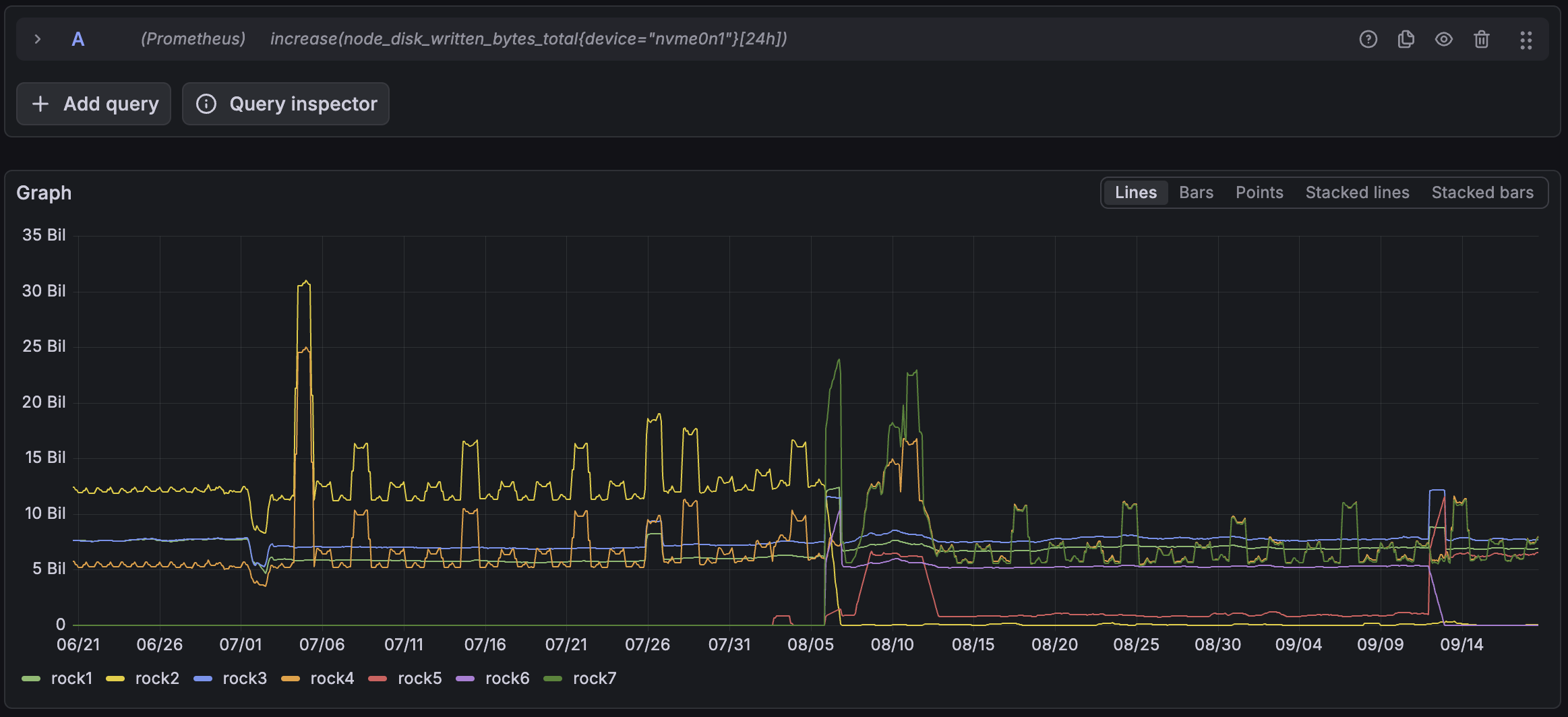
increase(node_disk_written_bytes_total{device="nvme0n1"}[24h])
| Node | Role | eMMC GB/day | NVMe GB/day | eMMC DWPD |
|---|---|---|---|---|
| rock1 | control-plane | 15.41 | 6.90 | 0.482 |
| rock2 | control-plane | 14.62 | 0.055 | 0.457 |
| rock3 | control-plane | 14.57 | 7.69 | 0.455 |
| rock4 | worker | 0.92 | 7.79 | 0.029 |
| rock5 | worker | 2.69 | 6.56 | 0.084 |
| rock6 | worker | 3.05 | 0.00003 | 0.095 |
| rock7 | worker | 2.02 | 7.72 | 0.063 |
Control-plane nodes average 14.87 GB a day on the eMMC, workers 2.17. The difference, about 12.7 GB a day, is etcd. That is roughly where I expected it to be, and it is on the device nothing was watching.
The last column is the same fact expressed as duty cycle. Relative to its own size the eMMC on a control-plane node turns over about 0.46 of itself per day, against 0.03 on the NVMe. The small soldered part works roughly fifteen times harder than the replaceable one.
The cleanest version of the argument
The ratio is not the interesting part. This is:
Every drive actively serving Longhorn replicas writes between 6.6 and 7.8 GB a day, whatever kind of node it is in. rock1 is a control-plane node at 6.90. rock4 is a worker at 7.79. The NVMe does not care.
The eMMC does: about 15 GB a day on a control-plane node, about 2 on a worker.
So the entire difference between a control-plane node and a worker, on this cluster, lives on the device with no health monitoring. That statement does not depend on the NVMe number being stable, only on it being roughly the same everywhere, which matters more than it sounds.
Two devices, two characters
Look at the two graphs above rather than the tables, because the difference is in their shapes. The three control-plane eMMC lines drift: around 12 GB a day through June and July, a step up at the end of July, 14 to 15.5 through September. Slow, monotonic, no spikes. Between the 6 September capture and the 19 September one they moved by under seven percent. The NVMe lines do not drift, they swing. Over the same window rock5 went from 0.95 GB a day to 6.56, nearly sevenfold, rock4 and rock7 rose by about a third, and rock1 and rock3 did not move at all, while every one of them spikes to two or three times its own baseline for a day at a time and then drops back.
The worker eMMC rates move proportionally more than that, some of them doubling, but they are doing one to three gigabytes a day against fifteen, and it is the etcd lines that decide whether this part wears out.
That is not measurement noise. The eMMC carries structural writes, etcd and logs and kubelet state, which happen whether or not anything interesting is going on. The NVMe carries Longhorn volume traffic, which follows whatever the cluster happens to be doing that week. One of those can be projected forward. The other cannot.
Which is an uncomfortable result, because the projectable device is the unmonitored one.
Two caveats on the table, both mine to own. The NVMe column is a single day's traffic read a couple of days back, deliberately stepped past a bulk copy on 19 September so no one transfer dominates it; treat it as a snapshot. And rock2's figure being three orders of magnitude below its neighbours is the loose end the previous post promised a sequel about. It is still a loose end. It is not this post's.
One more thing about that drift, because it matters below: 12 GB a day to 14 or 15.5 is roughly 25% growth in ninety days. Slow is not the same as steady. It plausibly tracks new CloudNativePG tenants landing, which would mean more objects in etcd, but I have not confirmed that.
Why it was never monitored
eMMC has no S.M.A.R.T. There is no smartctl -a /dev/mmcblk0 that returns anything useful, because the device does not implement the command set. It implements JEDEC's EXT_CSD register block instead, which is a different thing accessed a different way.
Six months of storage monitoring, a smartctl exporter on every node, a wear alert firing on two drives, a dashboard, and a full investigation into whether that wear number meant anything. All of it aimed at the devices that turned out to be fine. Not because I decided the eMMC was low risk, but because the instrument I was holding had no way to report it, so the gap never presented itself as a gap.
Reading eMMC health on Talos
The registers are exposed in sysfs, and Talos has no SSH, so talosctl read is how you get at them:
for n in rock{1,2,3,4,5,6,7}.vluwte.nl; do
  echo "=== $n ==="
  talosctl -n $n read /sys/devices/platform/fe2e0000.mmc/mmc_host/mmc0/mmc0:0001/life_time
  talosctl -n $n read /sys/devices/platform/fe2e0000.mmc/mmc_host/mmc0/mmc0:0001/pre_eol_info
  talosctl -n $n read /sys/devices/platform/fe2e0000.mmc/mmc_host/mmc0/mmc0:0001/name
done
fe2e0000.mmc is the RK3588's eMMC controller. If you are following along on other hardware, talosctl -n <node> ls -l /sys/class/mmc_host/ shows you the platform path to substitute.
Two registers matter:
life_timereports two values,DEVICE_LIFE_TIME_EST_TYP_Afor the SLC blocks and_TYP_Bfor the MLC blocks. Each is a bucket from0x01to0x0Ain 10% increments, so0x01means zero to ten percent of the estimated lifetime consumed.pre_eol_infois a single value:0x01normal,0x02warning at 80% of the reserved block pool consumed,0x03urgent.
Worth noticing what these are, because it is the whole reason the next post is small. They are plain sysfs files. No ioctl, no privileged device access, no mmc-utils binary, no vendor tool. Anything that can mount /sys read-only can read them.
The baseline
| Node | Role | life_time |
pre_eol_info |
|---|---|---|---|
| rock1 | control-plane | 0x01 0x01 |
0x01 |
| rock2 | control-plane | 0x01 0x01 |
0x01 |
| rock3 | control-plane | 0x01 0x01 |
0x01 |
| rock4 | worker | 0x01 0x01 |
0x01 |
| rock5 | worker | 0x02 0x02 |
0x01 |
| rock6 | worker | 0x01 0x01 |
0x01 |
| rock7 | worker | 0x01 0x01 |
0x01 |
Healthy, and unchanged when I read them again two weeks later. rock1 has been running since I built the cluster in January, about eight months, and at roughly 15 GB a day that is on the order of 3.8 TB written, something like 120 full-device writes on a 32 GB part. It is still inside the first bucket, which naively puts a floor of more than six and a half years on it.
Both of those numbers come from outside the device, because the eMMC provides neither. It keeps no time counter, so the eight months is the date I built the cluster and nothing more. It keeps no lifetime byte counter either, and node_disk_written_bytes_total restarts at every boot while Prometheus keeps 100 days, so the total is today's rate multiplied by those months rather than anything read off a register. Nothing in this cluster knows what that chip has actually written over its life.
And it is the kernel's number, not the device's. It counts bytes the host handed to the eMMC, while the flash inside writes more than that, because erase blocks are larger than the writes that dirty them and the controller shuffles data to level wear. A real SSD reports both sides of that, which is how write amplification gets measured at all. The eMMC reports neither, so 3.8 TB is a floor on what the NAND actually saw, and I have no way to find the ceiling.
Two more reasons not to lean on that estimate. The rate it assumes has grown 25% over the last ninety days. And a single reading supports no projection at all: 0x01 could mean 1% consumed or 9.9%, and there is no way to tell which from one sample. The value of today's reading is entirely as a baseline. The datum that actually matters is the date each node's life_time first ticks over to 0x02, and that only exists once something is collecting it on a schedule.
rock5's 0x02 is the odd one out, and it is not cluster load: as a worker here it writes 2.69 GB a day, among the lowest in the fleet. The explanation is almost certainly that the board had a previous life. rock5, rock6 and rock7 are second-hand RK1 modules, bought as a set of three, and I am told they ran a Kubernetes cluster with a single control node before they came to me. One of the three carried etcd for that cluster, and exactly one of the three reads 0x02 today. Nothing in the cluster can confirm it, for the reasons above. It stays an inference, and the reading is a baseline either way.
There is no rating to divide by
I went looking for an endurance figure for the BJTD4R and could not find one. No TBW number, no program and erase cycle count, nothing from the vendor. Only third-party estimates spanning a range wide enough to be useless.
The missing number is not a hole in this post. Put the three devices side by side and it is the finding:
| Endurance rating | Health reporting | Usable wear number | |
|---|---|---|---|
| NVMe (Kingston NV1 250 GB) | 60 TBW, from the datasheet | S.M.A.R.T., exported, six rules | data_units_written divided by 60 TBW |
| NVMe (Kingston FURY Renegade 1 TB) | 1.0 PBW, from the datasheet | S.M.A.R.T., exported, the same six rules | data_units_written divided by 1,000 TBW |
eMMC (BJTD4R 32 GB) |
none published | none, no S.M.A.R.T. at all | node_disk_written_bytes_total, and nothing else |
The wear arithmetic that the entire NVMe half of this story rests on simply cannot be performed for the eMMC. There is no denominator. It also sharpens what life_time is worth: a register reporting "zero to ten percent consumed" with no published total is a percentage of an unknown quantity. Still worth collecting, because the date it first moves is real information, but it will never convert into years remaining.
What is left is the write counter the kernel keeps, which owes nothing to any vendor, and which was there the whole time.
What I shipped: alert on the counts, display the estimates
The previous post took percentage_used off the alerting path and left the drives with one rule that fires ninety points too late. This is the replacement, and the principle behind it generalises to all three classes of storage device in this cluster.
Alert on the counts. Display the estimates.
A count is a record of something that physically happened: a block retired, an error logged, a byte written. An estimate is firmware arithmetic about the future. Estimates belong on dashboards, where being wrong costs nothing but a raised eyebrow.
| Device | Alert on the counts | Display the estimate | Status |
|---|---|---|---|
| NVMe | available_spare, media_errors, critical_warning, num_err_log_entries |
percentage_used, a firmware clock |
Rules applied |
| SATA SSD | reallocated sectors, alerting since Cluster Observability Part 6 | none exported | Unchanged |
| eMMC | pre_eol_info, the direct analogue of available_spare |
life_time, honest but useless at 10% granularity |
Nothing can read either |
| All three | node_disk_written_bytes_total, a true odometer |
Collected today |
Six NVMe rules, one deleted:
| Rule | Expression | Severity |
|---|---|---|
NVMeSpareFirstDrop |
available_spare < 100 |
info |
NVMeSpareDegrading |
available_spare < 90 |
warning |
NVMeSpareCapacityLow |
available_spare <= available_spare_threshold |
critical |
NVMeCriticalWarning |
critical_warning > 0 |
critical |
NVMeNewMediaErrors |
increase(media_errors[24h]) > 0 |
critical |
NVMeErrorLogGrowing |
increase(num_err_log_entries[24h]) > 10 |
warning |
NVMeWearHigh |
percentage_used > 80 |
deleted |
promtool check rules passes at 75 rules, up from 51 at Fixing the Alerts and 19 when the first hardware health rules went in.
The ninety point gap, shown rather than asserted
Here are the two numbers the old single rule sat between. Spare capacity on all seven drives, and the manufacturer threshold the rule compared it against:
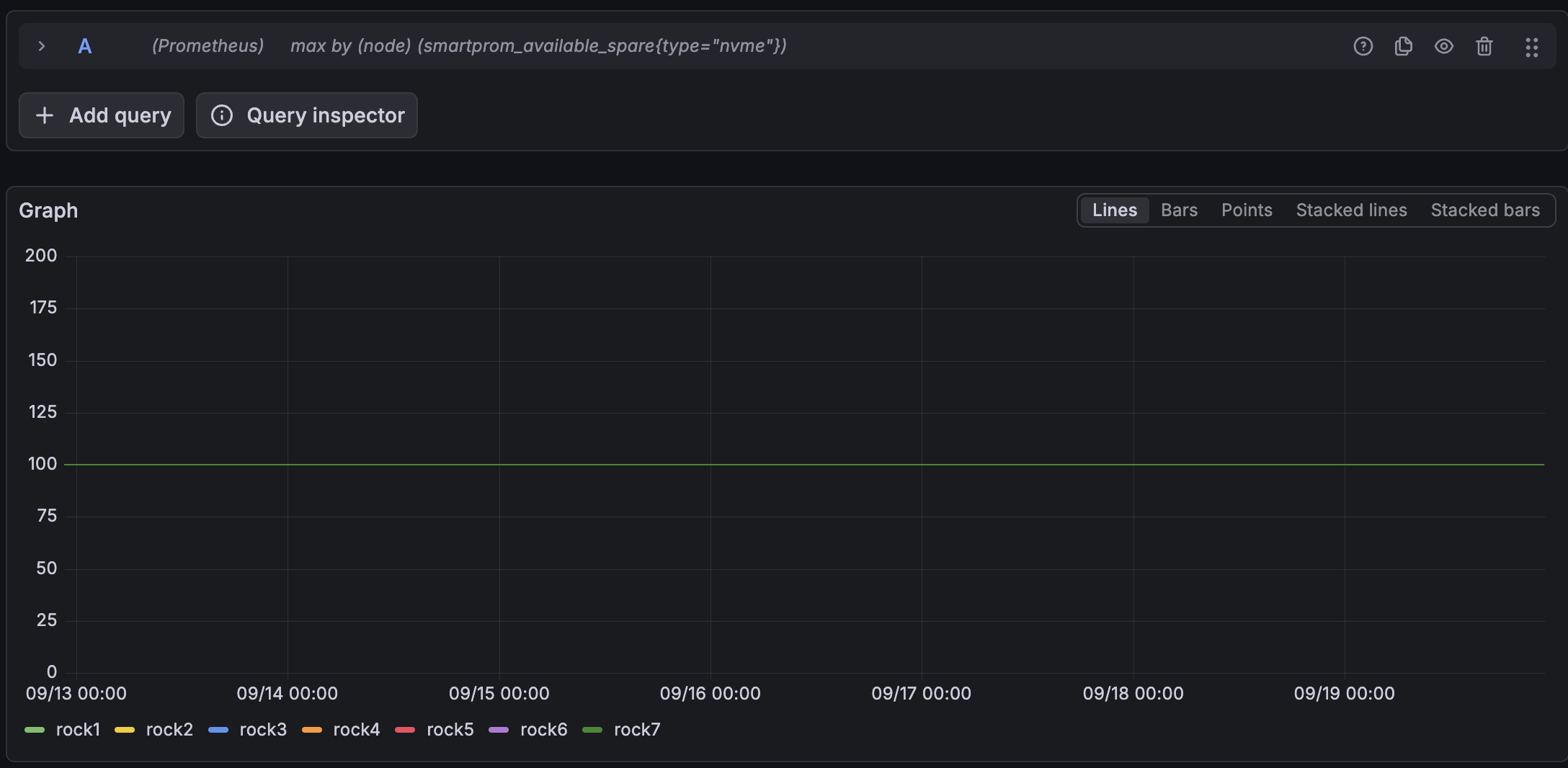
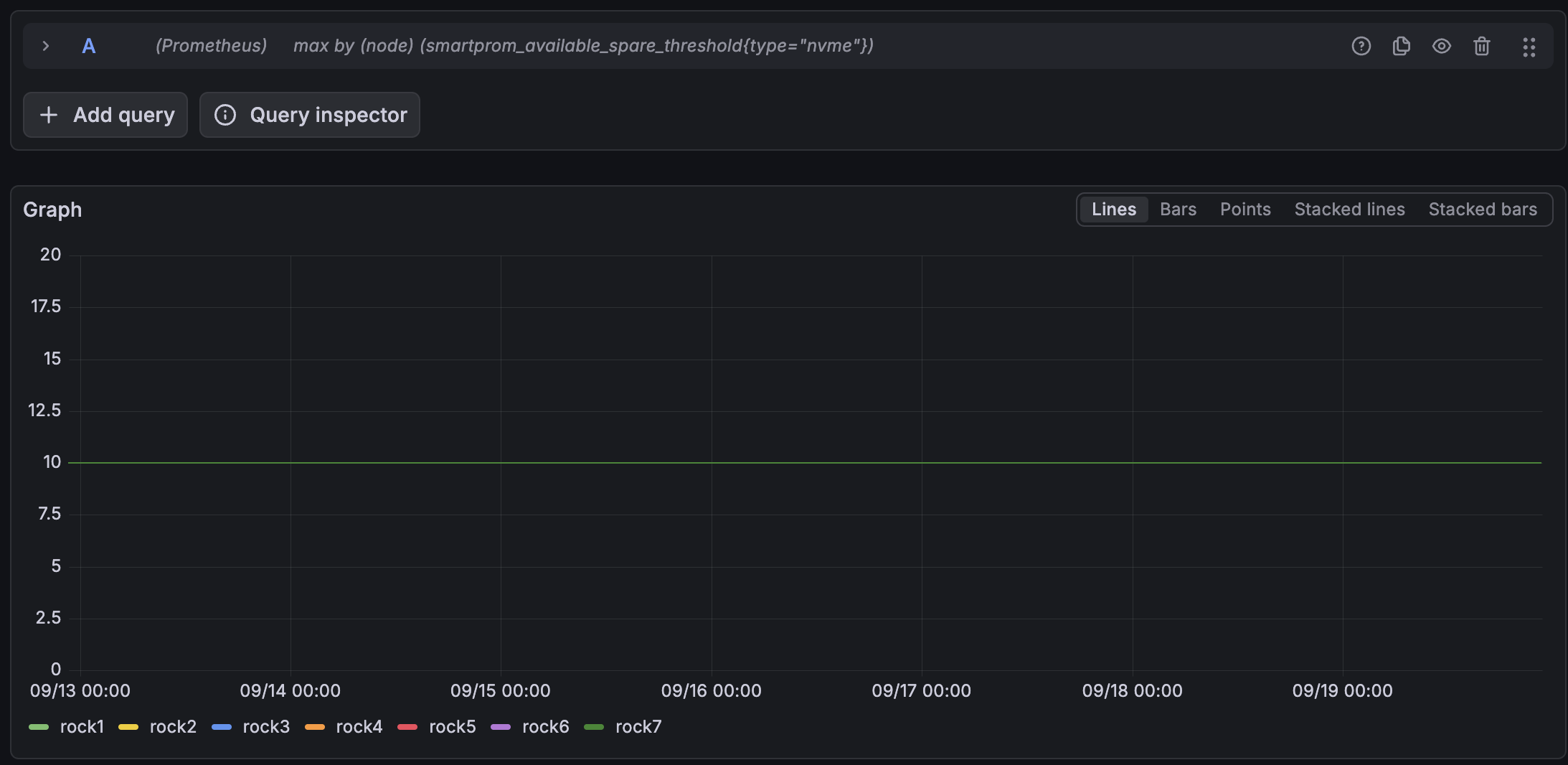
Ninety percentage points of reserve pool could be consumed before NVMeSpareCapacityLow said a word. NVMeSpareFirstDrop at < 100 closes that, and it fires on the single most informative event these drives will ever produce: the retirement of the first block.
The other three counters are all flat at zero across the retention window: no media errors, no critical warning bits, no growth in the error log. That is the honest baseline, and it is also why the rules had to be tested deliberately rather than by waiting.
Making a rule fire on purpose
All seven drives read available_spare = 100, so < 100 cannot fire naturally, and the thing it is waiting for might not happen for years. A rule you have never seen fire is a rule you are trusting on faith, including the delivery path behind it.
So I relaxed the operator on both spare tiers and left everything else alone:
# TEMPORARY, test only. Reverted after capture.
- alert: NVMeSpareFirstDrop
  expr: smartprom_available_spare{type="nvme"} <= 100     # was: < 100
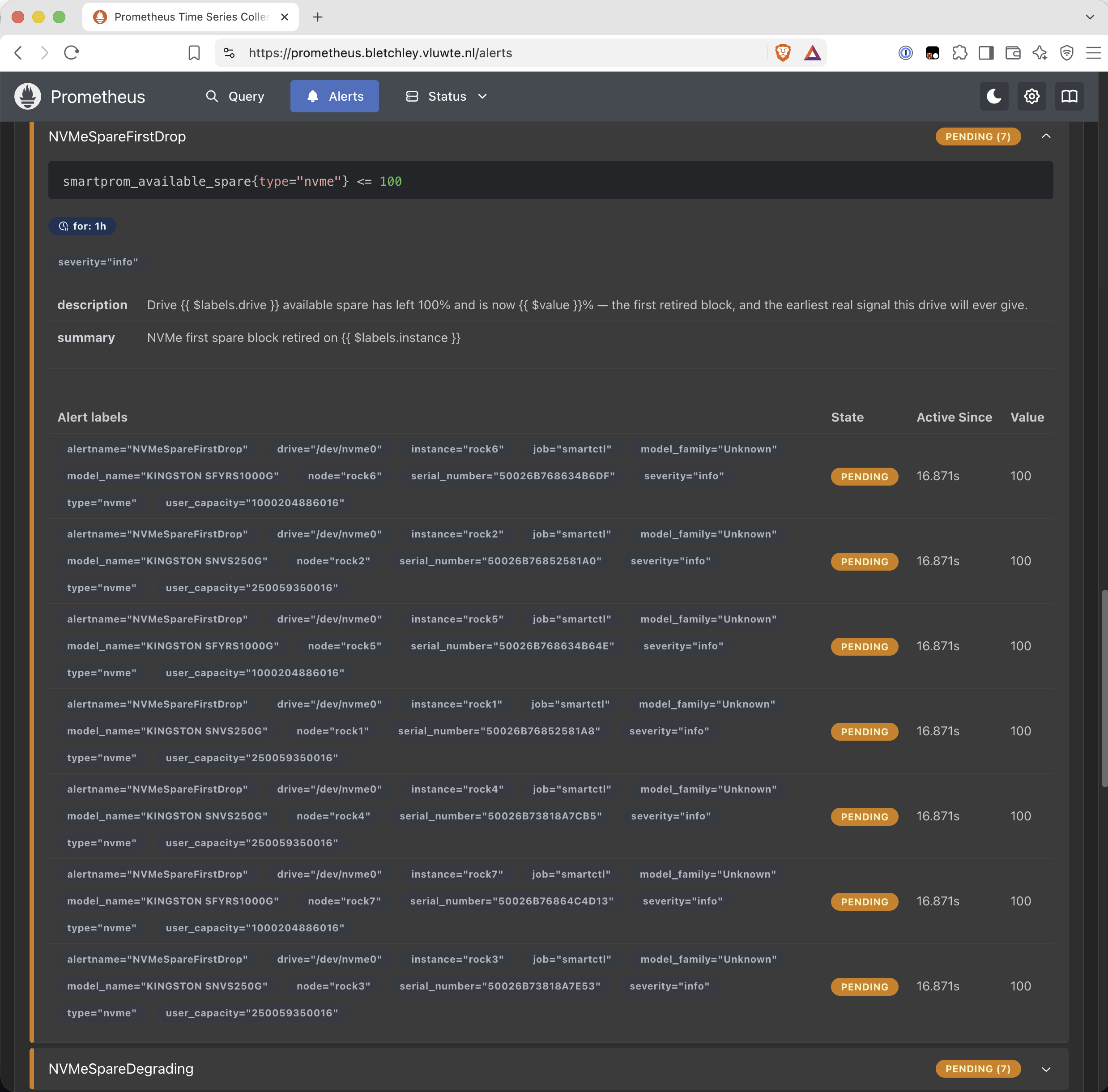
Then it was a matter of waiting out the one hour for: and watching the state change. An hour is right in production, where it suppresses a single bad scrape, and it is a long time to sit watching a screen.
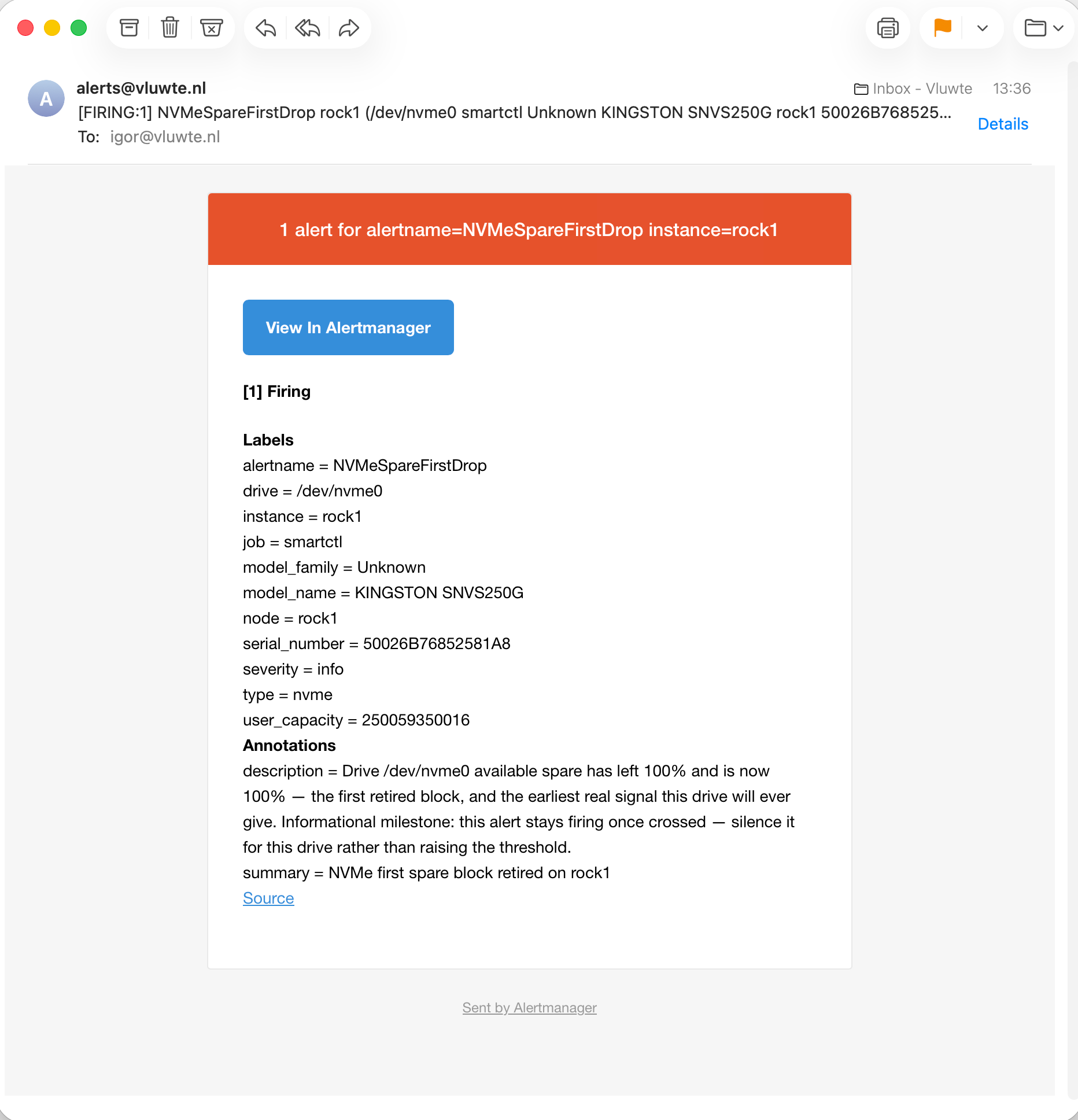
Four things that capture proves, and one artefact.
severity: info routes and delivers. It was a new tier for this ruleset and I had only ever seen it used by a backup notification, so this was worth confirming rather than assuming.
The node label is present and correct. The alert says rock1, not a pod IP, which is the payoff from The Alert That Named a Pod showing up four posts later.
Alertmanager groups by instance, so a condition true across the whole fleet arrives as seven separate emails rather than one digest. Fine for a milestone that fires once per drive. Less fine for anything that can go cluster-wide, and I would not have thought about it without firing the thing.
And the artefact: with the operator relaxed to <= 100, the description renders as "available spare has left 100% and is now 100%", which is nonsense. I deliberately did not touch the annotations for the test. Their job is to read correctly at the production threshold, and the test's job was to prove that the rule evaluates and the mail arrives. Editing the wording to suit a temporary expression would have tested a version of the rule that was never going to run.
Afterwards: operator back, upgraded, and all seven alerts verified back to INACTIVE.
An alert designed to be silenced
NVMeSpareFirstDrop has no lower bound, so once a drive drops below 100 it fires forever. The word "first" is literally true for about an hour of that drive's life.
That is deliberate, not an oversight. The alert marks a date, not a condition. There is nothing to fix when it fires, and nothing that will make it resolve. The intended response is an Alertmanager silence scoped to that one drive, on alertname and drive, which leaves the rule working for the other six and expires on its own. Adding and available_spare >= 90 to the expression would change the rule for the entire fleet to solve a problem one drive has.
Anyone copying this ruleset will meet that behaviour and reasonably assume it is a bug, so the rule now says so itself:
Informational milestone: this alert stays firing once crossed, silence it for this drive rather than raising the threshold.
That went into description rather than a new annotation key, because the Alertmanager email template renders summary and description and nothing else. If you put your operator guidance in a custom annotation, check that it actually reaches the inbox.
The error log is a per-model artefact
One rule needed rethinking before it was written. smartprom_num_err_log_entries reads zero on all four NV1 drives and 199, 267 and 275 on the three FURY Renegades. The split is exactly along the model boundary, not along node role, board, age or workload, and every one of the seven has been flat for the full hundred days of retention available.
So the absolute count is not a health signal. Alerting on the level would page me about the drives that are working perfectly. Only growth is meaningful, which is what NVMeErrorLogGrowing measures, and with a flat hundred-day baseline any increase at all is genuinely new.
Same shape of mistake as percentage_used, caught before it became a rule this time.
One panel, not a rebuild
The previous post ended with the observation that the odometer I thought I already had is one expression away. Here it is, scoped per model because the ratings differ:
(smartprom_data_units_written{model_name="KINGSTON SNVS250G"}  * 512000) / (60   * 1e12) * 100
(smartprom_data_units_written{model_name="KINGSTON SFYRS1000G"} * 512000) / (1000 * 1e12) * 100
Hardcoding by model_name is clearer than a lookup table, and a third model later needs a third query. Both denominators, 60 TBW for the NV1 and 1.0 PBW for the FURY Renegade, come from Kingston's own datasheets rather than from memory, which matters when the whole point of the panel is that one of its two numbers can be trusted and the other cannot.
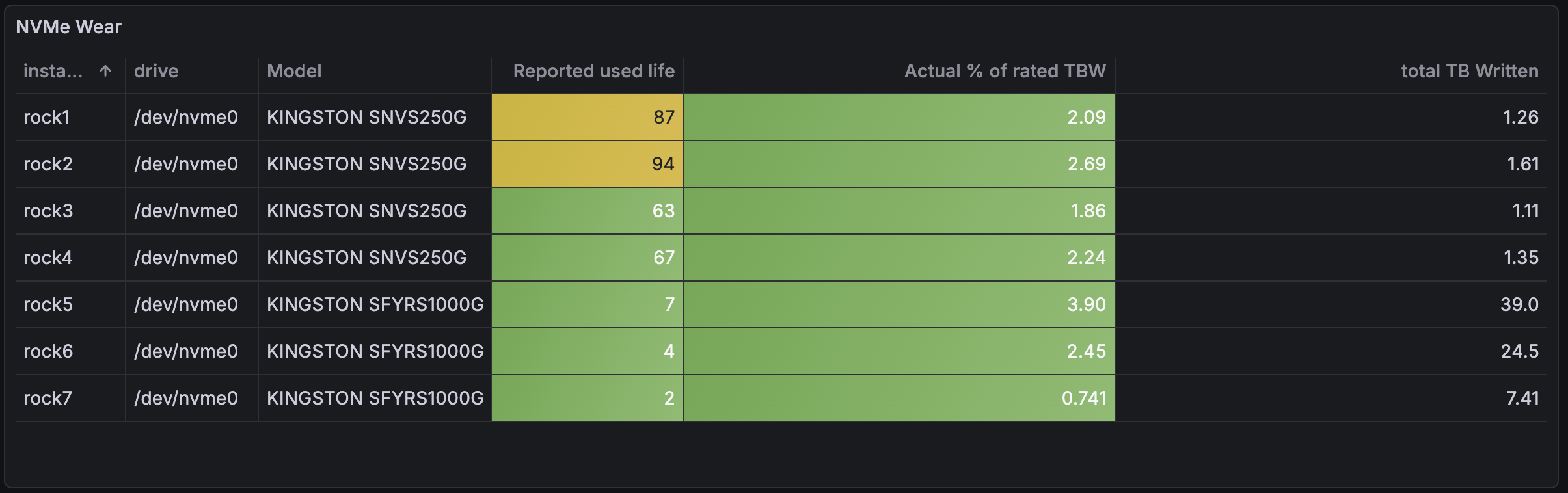
Read the two percentage columns as two rankings of the same seven drives. By the firmware's account rock2 is closest to the end at 94% and rock5 is nearly new at 7%. By bytes written against rated endurance, rock5 is the most consumed drive in the cluster at 3.90% and rock2 is second at 2.69%. The two lists disagree about which drive to worry about, and only one of them is counting anything that happened.
The third column is the one that carries into the rest of this post. Total TB written needs no datasheet, no firmware estimate and no vendor at all: it is the drive's own byte counter, the same kind of number as node_disk_written_bytes_total, and the only kind the eMMC is ever going to give me.
The gap I am leaving open
So here is where the cluster stands.
The NVMe drives, which are replaceable, are covered by six rules watching four counters, tested end to end, with the firmware's own estimate demoted to a dashboard panel. The SATA pair in rock3 has had a reallocated sector rule since Part 6. Both classes are in reasonable shape.
The eMMC, which is not replaceable, has:
pre_eol_info, which is the direct analogue ofavailable_spareand would be a critical alert at anything other than0x01life_time, which would be a warning at0x05and an informational milestone the first time it leaves0x01, with the same never-resolving, silence-it-per-device behaviour asNVMeSpareFirstDrop- no exporter, no metric, no rule, and no way for Prometheus to see either register
Two registers, two thresholds, and nothing in the cluster that can read them. Today those values come from a shell loop I run by hand and paste into a planning file, which is not monitoring. It is a photograph.
There is one thing the eMMC does have, and it is the part I keep turning over. node_disk_written_bytes_total has been collected on that device all along. It is a count, not an estimate, it is maintained by the kernel rather than by firmware, and it needs no vendor datasheet to be meaningful. The device with no health reporting and no published endurance rating is the one with the most honest wear number in the cluster, precisely because no firmware was in the way.
Conclusion
The thing worth taking from this is not the eMMC, or etcd, or any of the specific numbers. It is that monitoring covers what your chosen tool can see, and the shape of the blind spot is the shape of the tool.
I did not decide the eMMC was low risk. I deployed a smartctl exporter, and the set of things a smartctl exporter reports quietly became my definition of "the storage in this cluster". Six months later the most heavily written, least replaceable device in every node had never appeared on a dashboard, and nothing was ever going to raise its hand, because the only thing that could have was structurally incapable of seeing it.
Worth asking of any exporter you run: what class of thing can this not report, and do I own one?
What's Next
The exporter. Two sysfs files, seven nodes, no privileged access required, and the whole point of collecting life_time on a schedule is to capture the date it first moves, which cannot be recovered afterwards. That post also brings the three device classes onto one wear dashboard, and takes a proper look at whether the SATA drives report anything worth alerting on.
After that, the more interesting question that this comparison raises and does not answer: roughly 13 GB a day of etcd traffic onto a soldered, non-replaceable part is currently a default rather than a decision. I would like to know where it actually comes from, and how much of it can go away.
Addendum: the drive health rules as deployed
The whole block from alerting_rules.yml, comments included, since the comments are where the reasoning lives. Temperature rules are omitted here: they are unchanged by this post and have their own thresholds worth a separate discussion.
# -- SMART — All Drives --------------------------------------------
# smartprom_ metrics come from the matusnovak/prometheus-smartctl
# DaemonSet (port 9902). Virtual SCSI devices (TuringPi BMC /
# Longhorn) appear with type="scsi" and must be excluded from all
# rules.

- alert: DiskSMARTFailing
  expr: smartprom_smart_passed{type!="scsi"} == 0
  for: 5m
  labels:
    severity: critical
  annotations:
    summary: "SMART failure on {{ $labels.instance }} drive {{ $labels.drive }}"
    description: "SMART overall health check returned failing status."

# -- SMART — Attribute-Level Monitoring ----------------------------
# Overall SMART status is a coarse signal — drives often report
# PASSED until sudden failure. These rules catch early deterioration
# that precedes a hard failure:
#   SATA: reallocated sectors — the drive has substituted a spare
#         block for a sector it could no longer reliably read/write.
#         Any non-zero count is notable; a rising count is serious.
#   NVMe: media errors — read/write errors that the drive could not
#         correct internally. Zero is the expected baseline.
#         A single error warrants monitoring; growth warrants action.
# Both are warning rather than critical — use DiskSMARTFailing for
# hard failures, these for early signals.

- alert: SATAReallocatedSectors
  expr: smartprom_reallocated_sector_ct_raw{type="sat"} > 0
  for: 5m
  labels:
    severity: warning
  annotations:
    summary: "SATA drive reallocated sectors on {{ $labels.instance }}"
    description: "Drive {{ $labels.drive }} has {{ $value }} reallocated sectors — early sign of drive degradation."

- alert: NVMeMediaErrors
  expr: smartprom_media_errors{type="nvme"} > 0
  for: 5m
  labels:
    severity: warning
  annotations:
    summary: "NVMe media errors on {{ $labels.instance }}"
    description: "Drive {{ $labels.drive }} has {{ $value }} media errors — monitor closely for increase."

# NVMeMediaErrors above is a level check on a monotonic counter: once
# a single error has occurred it fires forever and never resolves.
# That makes it a statement that an error happened, not that errors
# are accumulating. This rate form answers the second question, and
# is the one worth waking up for.

- alert: NVMeNewMediaErrors
  expr: increase(smartprom_media_errors{type="nvme"}[24h]) > 0
  for: 5m
  labels:
    severity: critical
  annotations:
    summary: "NVMe media errors increasing on {{ $labels.instance }}"
    description: "Drive {{ $labels.drive }} recorded {{ $value }} new media errors in the last 24h — errors are accumulating, not historical."

# -- SMART — NVMe Specific -----------------------------------------
# NVMe drives use different SMART attributes from SATA.
# available_spare and available_spare_threshold are NVMe-only.
# available_spare_threshold is manufacturer-set (Kingston: 10%).
#
# percentage_used is NOT alerted on. On these drives it advances with
# power-on time at a rate fixed per firmware revision and is almost
# independent of data written — a clock, not an odometer. It stays on
# the dashboard as a panel. The real odometer is data_units_written
# against rated TBW. See "The Wear That Wasn't".
#
# Spare capacity is the metric that reflects physical reality: it
# counts reserve blocks the drive has actually retired. Baseline is
# 100% on all seven drives — not one block has ever been retired.
# Three tiers, because the old single rule at the manufacturer
# threshold fired ninety points too late to be an early warning.

- alert: NVMeSpareFirstDrop
  expr: smartprom_available_spare{type="nvme"} < 100
  for: 1h
  labels:
    severity: info
  annotations:
    summary: "NVMe first spare block retired on {{ $labels.instance }}"
    description: "Drive {{ $labels.drive }} available spare has left 100% and is now {{ $value }}% — the first retired block, and the earliest real signal this drive will ever give. Informational milestone: this alert stays firing once crossed — silence it for this drive rather than raising the threshold."

- alert: NVMeSpareDegrading
  expr: smartprom_available_spare{type="nvme"} < 90
  for: 1h
  labels:
    severity: warning
  annotations:
    summary: "NVMe spare capacity degrading on {{ $labels.instance }}"
    description: "Drive {{ $labels.drive }} available spare at {{ $value }}% — more than a tenth of the reserve pool consumed."

- alert: NVMeSpareCapacityLow
  expr: smartprom_available_spare{type="nvme"} <= smartprom_available_spare_threshold{type="nvme"}
  for: 1h
  labels:
    severity: critical
  annotations:
    summary: "NVMe spare capacity critical on {{ $labels.instance }}"
    description: "Drive {{ $labels.drive }} available spare {{ $value }}% at or below manufacturer threshold."

# The drive's own verdict, already exported and never used. Bitfield:
# spare below threshold, temperature out of range, degraded
# reliability, read-only mode, volatile memory backup failed. Any
# bit set is the controller reporting a problem about itself.

- alert: NVMeCriticalWarning
  expr: smartprom_critical_warning{type="nvme"} > 0
  for: 5m
  labels:
    severity: critical
  annotations:
    summary: "NVMe critical warning flag set on {{ $labels.instance }}"
    description: "Drive {{ $labels.drive }} critical_warning bitfield is {{ $value }} — the controller is reporting spare, temperature, reliability, read-only or backup-power failure."

# Error log growth. The FURY drives already carry a few hundred
# entries accumulated over their lives, so the absolute count says
# little. A rising count over 24h is the signal.

- alert: NVMeErrorLogGrowing
  expr: increase(smartprom_num_err_log_entries{type="nvme"}[24h]) > 10
  for: 1h
  labels:
    severity: warning
  annotations:
    summary: "NVMe error log growing on {{ $labels.instance }}"
    description: "Drive {{ $labels.drive }} added {{ $value }} error log entries in the last 24h."
Two rules in there are worth reading twice. NVMeMediaErrors and NVMeNewMediaErrors look redundant and are not: the first says an error has ever happened, the second says errors are happening now, and only the second is worth being woken by. And NVMeSpareFirstDrop is the one that never resolves on purpose.
← Previous: Cluster-Wide Certificate Expiry Monitoring
Questions or suggestions? Leave a comment below or reach out at igor@vluwte.nl.