Cluster Networking: MetalLB and Traefik
Adding MetalLB and Traefik to Bletchley: real IPs for LoadBalancer services, hostname-based routing, and a reader-suggested improvement that preserves source IPs from day one.
Introduction
Grafana and Longhorn have both been running fine — but only accessible via kubectl port-forward, which means a terminal window open on your workstation, tied to a specific local port, that dies the moment you close the tab. That's fine for a quick look, but it's not how you want to use your monitoring stack day to day.
This post fixes that by adding two components: MetalLB, which gives Kubernetes the ability to assign real IP addresses to services on VLAN 140, and Traefik, which routes incoming HTTP traffic to the right service based on hostname. Together they turn port-forwarded experiments into properly addressed services. By the end, Grafana is at http://grafana.bletchley.vluwte.nl and Longhorn is at http://longhorn.bletchley.vluwte.nl — no port-forwarding, no terminal window required.
One decision changed during planning: the original intention was to use ingress-nginx here. The Kubernetes community retired that project in March 2026 — no more releases, no security patches. Installing it now would mean immediately running unmaintained, internet-facing software. Traefik is the replacement: actively maintained, supports the same standard Kubernetes Ingress API, and is straightforward to configure.
🏠 This is part of the Homelab Journey series - building a production Kubernetes cluster from scratch.
- Grafana Dashboards
- Cluster Networking: MetalLB and Traefik (you are here)
- Certificate Management
This post assumes MetalLB and Traefik are being added to an existing cluster with Longhorn, Prometheus, and Grafana already running. If you're starting from scratch, the earlier posts in this series cover each of those components.
How the Two Components Fit Together
MetalLB and Traefik solve two different problems that are each useless without the other.
MetalLB fills a gap that only exists on bare metal. On a cloud provider, creating a Kubernetes Service with type: LoadBalancer automatically provisions a cloud load balancer with a public IP. On a bare-metal cluster, the same manifest results in the service sitting in <pending> forever — there's no cloud provider to fulfil the request. MetalLB runs inside the cluster as a controller and a DaemonSet of speaker pods, one per node. When a LoadBalancer service is created, the controller assigns an IP from a configured pool, and the speaker on the elected node starts responding to ARP requests for that IP. From the network's perspective, the IP appears to live on that node.
Traefik is the ingress controller — it receives all incoming HTTP traffic on the MetalLB IP and routes it to the correct backend service based on the hostname in the request. grafana.bletchley.vluwte.nl goes to Grafana, longhorn.bletchley.vluwte.nl goes to the Longhorn UI. Both DNS names resolve to the same IP address; Traefik is what distinguishes between them.
The dependency between them is strict: Traefik requests a LoadBalancer service, MetalLB assigns it an IP, and only then does Traefik have an address that DNS can point at. They're deployed in sequence for this reason.
MetalLB
Namespace and pod security
MetalLB's speaker pods run on the host network to handle ARP responses at the node level — same privilege requirement as node exporter and Longhorn before it. The namespace needs the privileged pod security label.
kubectl create namespace metallb-system
kubectl label namespace metallb-system \
  pod-security.kubernetes.io/enforce=privileged \
  pod-security.kubernetes.io/audit=privileged \
  pod-security.kubernetes.io/warn=privileged
Installing MetalLB
MetalLB is configured through CRDs applied after installation, not through Helm values — so the install itself is minimal:
helm install metallb metallb/metallb \
  --namespace metallb-system \
  --version 0.15.3 \
  --wait
The --wait flag blocks until all pods are ready. Checking the result:
kubectl -n metallb-system get pods -o wide

One thing worth noting: the speakers show 4/4 ready rather than 1/1. MetalLB speakers include multiple containers — the speaker itself plus FRR (a routing daemon) and a reloader sidecar. All four are healthy; the count just reflects the multi-container pod design.
Configuring the IP pool
MetalLB's configuration is applied as Kubernetes CRDs. Two resources are needed: an IPAddressPool defining the range MetalLB can assign from, and an L2Advertisement telling MetalLB to advertise those IPs via ARP.
# ~/talos-cluster/bletchley/metallb/metallb-config.yaml
apiVersion: metallb.io/v1beta1
kind: IPAddressPool
metadata:
  name: bletchley-pool
  namespace: metallb-system
spec:
  addresses:
    - 10.0.140.100-10.0.140.120
---
apiVersion: metallb.io/v1beta1
kind: L2Advertisement
metadata:
  name: bletchley-l2
  namespace: metallb-system
spec:
  ipAddressPools:
    - bletchley-pool
The pool range 10.0.140.100–10.0.140.120 sits well clear of both the node IPs (.11–.14), the Kubernetes API VIP (.10), and the DHCP dynamic range (.200–.250). Twenty-one addresses available for services — more than enough for Bletchley's current and near-future workloads.
kubectl apply -f ~/talos-cluster/bletchley/metallb/metallb-config.yaml
kubectl -n metallb-system get ipaddresspools
# NAME             AUTO ASSIGN   AVOID BUGGY IPS   ADDRESSES
# bletchley-pool   true          false             ["10.0.140.100-10.0.140.120"]
A note on L2 mode behaviour
In L2 mode, one node at a time holds the MetalLB IP — the same single-node characteristic as the Talos API VIP. All traffic for a given service flows to that elected node, which then forwards it to the actual pod (which may be on any node). If the elected node goes down, MetalLB detects the failure via its memberlist protocol and elects another speaker to take over, sending a gratuitous ARP to update the network's ARP cache. Failover typically takes a few seconds.
This is a deliberate trade-off: L2 mode works on any flat Ethernet network without requiring BGP peering with the router. For a homelab with moderate traffic, it's the right starting point.
Traefik
Installing Traefik
Traefik goes in its own namespace. Unlike MetalLB, it doesn't need host network access — no privileged label required.
kubectl create namespace traefik
# ~/talos-cluster/bletchley/traefik/traefik-values.yaml
service:
  type: LoadBalancer

ingressRoute:
  dashboard:
    enabled: true
    entryPoints:
      - web

providers:
  kubernetesIngress:
    enabled: true
service.type: LoadBalancer is the line that triggers MetalLB — Traefik requests a LoadBalancer service, MetalLB sees it and assigns the first available IP from the pool. Without this setting, Traefik would deploy as a ClusterIP service, reachable only from inside the cluster.
providers.kubernetesIngress: enabled: true keeps standard Kubernetes Ingress objects working. Traefik has its own more powerful IngressRoute CRD, but standard Ingress objects are simpler and sufficient for routing HTTP traffic to internal services.
helm install traefik traefik/traefik \
  --namespace traefik \
  --version 38.0.2 \
  --values ~/talos-cluster/bletchley/traefik/traefik-values.yaml \
  --wait
Checking whether MetalLB assigned the IP:
kubectl -n traefik get svc traefik

10.0.140.100 assigned, 80 and 443 both mapped. The cluster now has a permanent address on VLAN 140.
A note on externalTrafficPolicy: Local
After the initial setup, a reader suggested setting externalTrafficPolicy: Local on the Traefik service. The theory is sound: with Cluster (the default), kube-proxy may forward traffic to any node, adding an extra hop and rewriting the client's source IP in the process. With Local, traffic only routes to pods on the node that received it — no extra hop, and the original source IP is preserved all the way through to Traefik's access logs.
On paper this pairs well with MetalLB's L2 election: MetalLB prefers to elect the node running the healthy endpoint as its ARP responder, so with a single Traefik replica the elected node and the pod node should always match.
I applied it. A few hours later Grafana went dark.
What happened: after a transient network event, MetalLB's memberlist — the gossip protocol speakers use to coordinate elections — reshuffled. With Local mode, speakers only announce an IP if their health check NodePort confirms a local endpoint is healthy. The health check was returning 200 OK correctly on rock1, but the speaker election never completed. Every speaker concluded it was not the owner, nobody announced the IP, and 10.0.140.100 went silent on the network. The IP was allocated in MetalLB's state but no ARP was being sent.
The fix was to patch the service back to Cluster:
kubectl patch svc traefik -n traefik -p '{"spec":{"externalTrafficPolicy":"Cluster"}}'
Within seconds MetalLB elected a speaker and announced the IP. Everything came back immediately.
The values file stays as-is, without the Local setting:
# ~/talos-cluster/bletchley/traefik/traefik-values.yaml
service:
  type: LoadBalancer

ingressRoute:
  dashboard:
    enabled: true
    entryPoints:
      - web

providers:
  kubernetesIngress:
    enabled: true
The Local setting is the right idea — source IP preservation is genuinely useful once access logging is wired up. But something about this cluster's setup causes the MetalLB speaker election to silently fail when Local is active. I haven't found the root cause yet. If you've hit the same thing and found a fix, I'd love to hear about it — see the question at the bottom of this post.
DNS records
With the IP known, two DNS records go on the internal DNS server — both pointing at the same MetalLB IP:
grafana.bletchley.vluwte.nl  →  10.0.140.100
longhorn.bletchley.vluwte.nl →  10.0.140.100
Traefik routes them to the right backend by the Host header in each HTTP request. Verification from the workstation:
host grafana.bletchley.vluwte.nl
# grafana.bletchley.vluwte.nl has address 10.0.140.100

host longhorn.bletchley.vluwte.nl
# longhorn.bletchley.vluwte.nl has address 10.0.140.100
Ingress resources
Each service gets a standard Kubernetes Ingress object. Grafana is in the monitoring namespace, Longhorn in longhorn-system — Traefik watches across all namespaces and picks both up.
# ingress-grafana.yaml
apiVersion: networking.k8s.io/v1
kind: Ingress
metadata:
  name: grafana
  namespace: monitoring
spec:
  ingressClassName: traefik
  rules:
    - host: grafana.bletchley.vluwte.nl
      http:
        paths:
          - path: /
            pathType: Prefix
            backend:
              service:
                name: grafana
                port:
                  number: 80
# ingress-longhorn.yaml
apiVersion: networking.k8s.io/v1
kind: Ingress
metadata:
  name: longhorn-ui
  namespace: longhorn-system
spec:
  ingressClassName: traefik
  rules:
    - host: longhorn.bletchley.vluwte.nl
      http:
        paths:
          - path: /
            pathType: Prefix
            backend:
              service:
                name: longhorn-frontend
                port:
                  number: 80
kubectl apply -f ~/talos-cluster/bletchley/traefik/ingress-grafana.yaml
kubectl apply -f ~/talos-cluster/bletchley/traefik/ingress-longhorn.yaml
Verifying both were picked up:
kubectl get ingress --all-namespaces
# NAMESPACE         NAME          CLASS     HOSTS                          ADDRESS        PORTS   AGE
# longhorn-system   longhorn-ui   traefik   longhorn.bletchley.vluwte.nl   10.0.140.100   80      36s
# monitoring        grafana       traefik   grafana.bletchley.vluwte.nl    10.0.140.100   80      42s
Both show ADDRESS 10.0.140.100 — Traefik has registered the routes.
Verification
Traefik dashboard
Traefik's own dashboard is accessible at http://10.0.140.100/dashboard/ (direct IP, trailing slash required). It shows the routing state of the whole cluster.
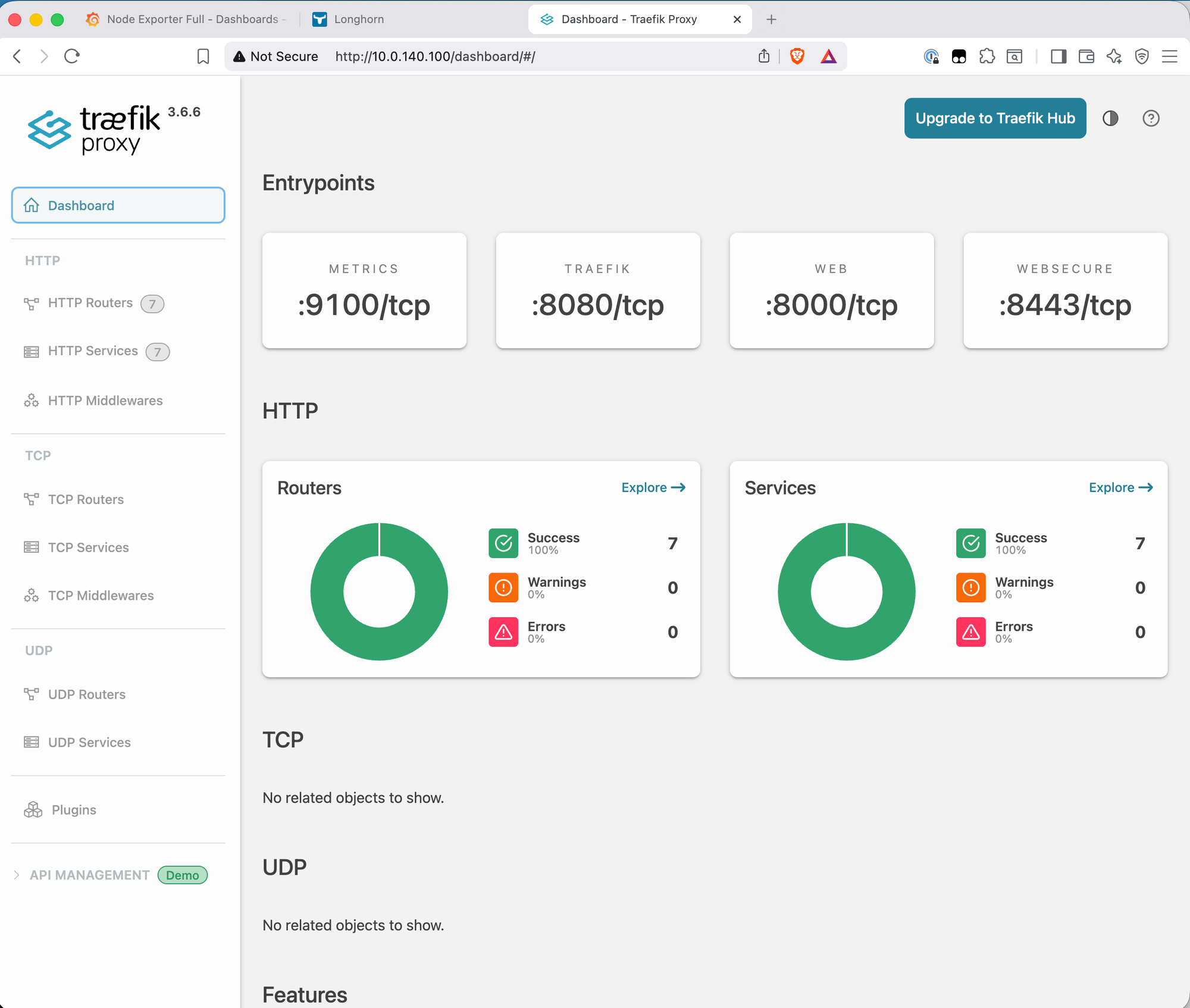
The dashboard is currently accessible via IP only. Adding a DNS record (traefik.bletchley.vluwte.nl → 10.0.140.100) and an Ingress object for it would follow exactly the same pattern as Grafana and Longhorn — straightforward to add when needed.
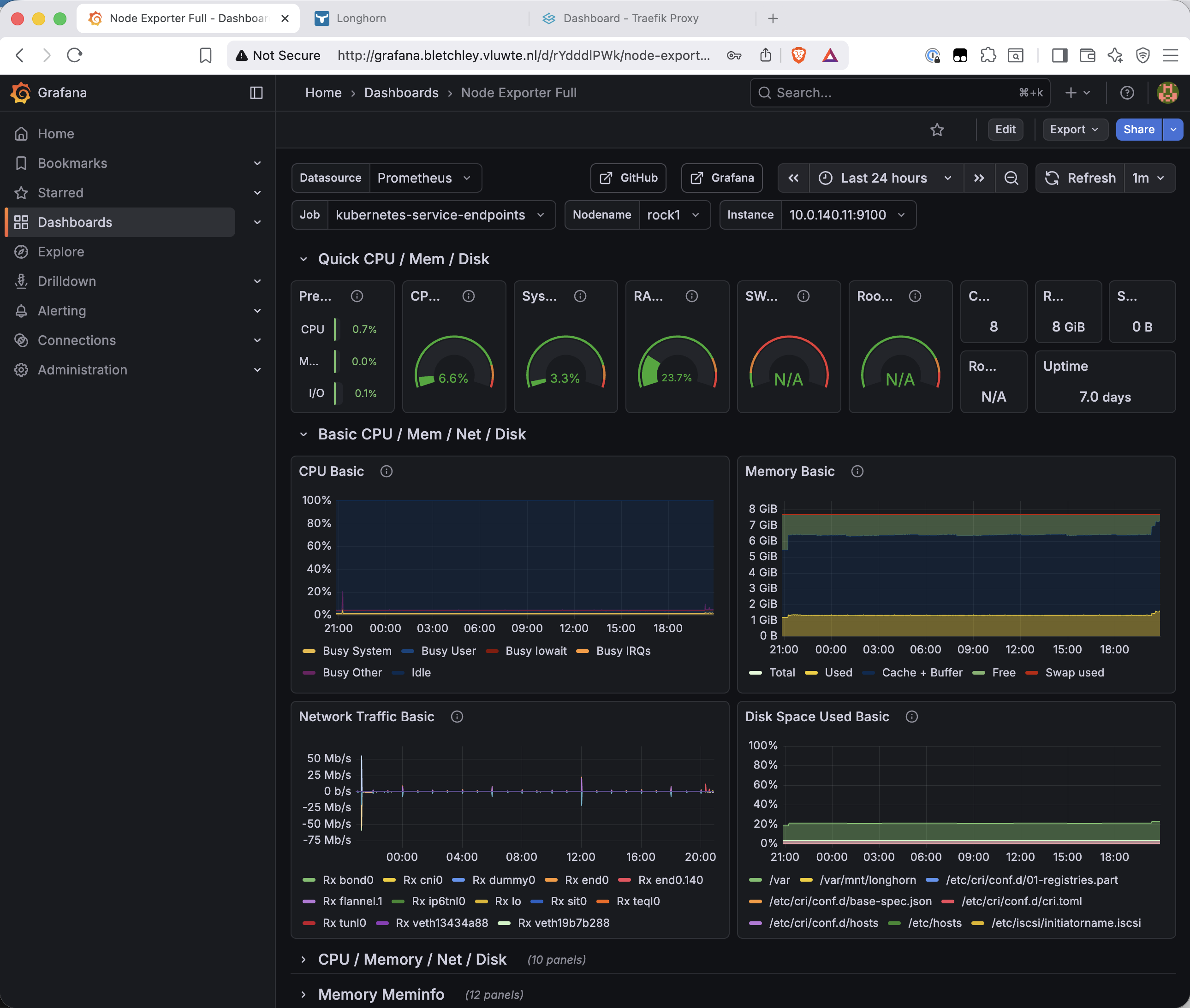
Grafana via hostname
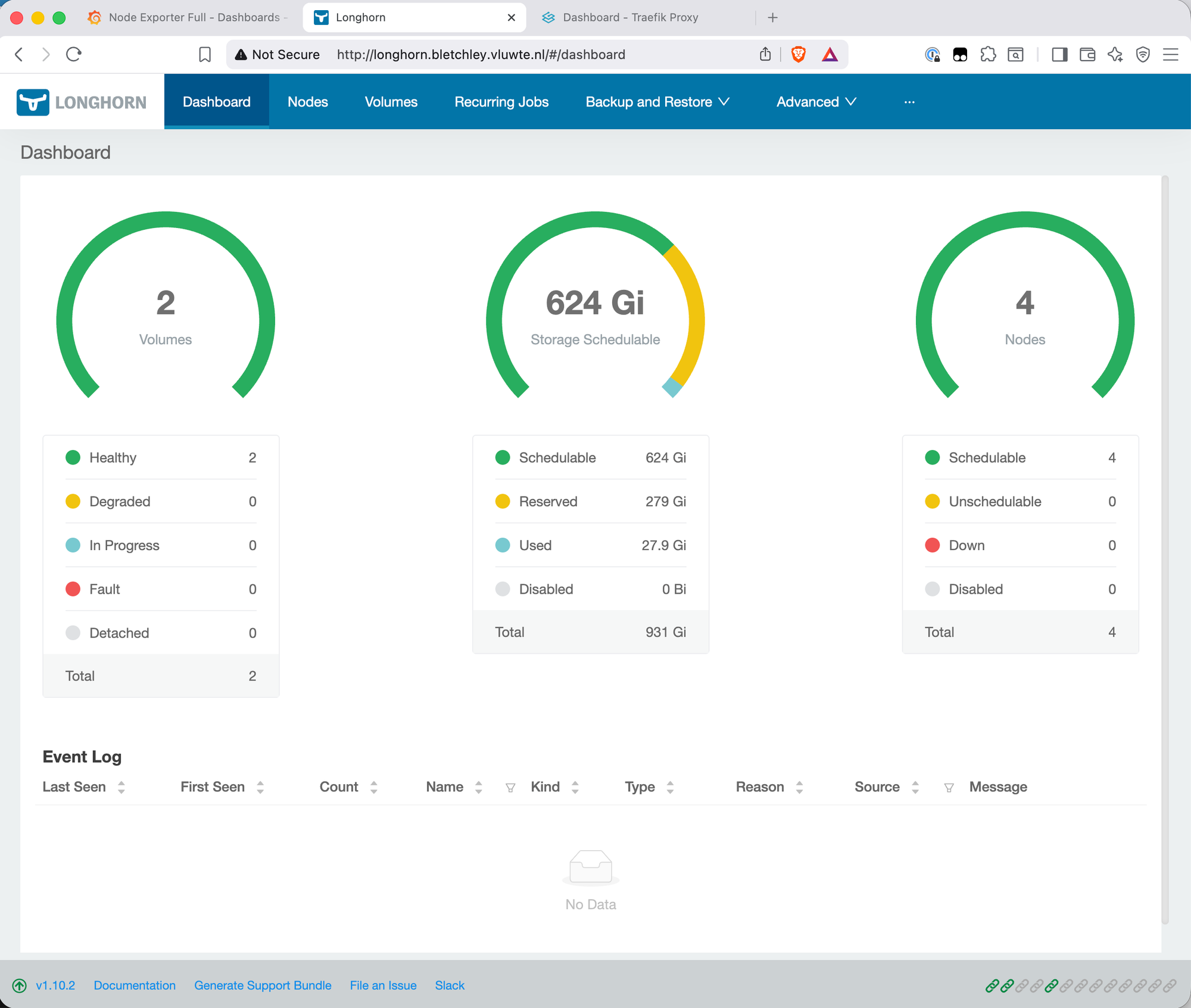
Longhorn via hostname
What's Missing — and Why
Three things are intentionally absent from this setup that are worth naming directly.
HTTPS. Both services load over plain HTTP. The browser's "Not Secure" badge is visible in the screenshots above. The path to fixing this is cert-manager with an internal certificate authority — cert-manager integrates with Traefik to provision and renew TLS certificates automatically. That's a dedicated post; it involves more moving parts than belongs in this one.
Authentication on Longhorn and the Traefik dashboard. Longhorn has no built-in authentication — anyone who can reach http://longhorn.bletchley.vluwte.nl on VLAN 140 can access it. The Traefik dashboard is in the same position. The standard fix is a Traefik BasicAuth or ForwardAuth middleware applied to the Ingress object, which sits in front of the service and challenges unauthenticated requests. Also a future post.
For now, both services are only reachable from VLAN 140 — the cluster's isolated network segment. That's an acceptable interim boundary for a homelab where VLAN 140 access is controlled at the switch level. The gaps are documented, not forgotten.
What's Working Now
- ✅ MetalLB installed in
metallb-systemwith IP pool10.0.140.100–10.0.140.120 - ✅ L2 advertisement configured — MetalLB responds to ARP for assigned IPs on VLAN 140
- ✅ Traefik installed in
traefiknamespace withEXTERNAL-IP 10.0.140.100 - ✅ Grafana accessible at
http://grafana.bletchley.vluwte.nl - ✅ Longhorn accessible at
http://longhorn.bletchley.vluwte.nl - ✅ Traefik dashboard accessible at
http://10.0.140.100/dashboard/ - ⚠️ HTTP only — HTTPS not yet configured
- ⚠️ No authentication on Longhorn or Traefik dashboard — mitigated by VLAN isolation
- ⚠️
externalTrafficPolicy: Cluster— source IP not preserved in logs;Localcaused a MetalLB speaker election failure on this setup (see note above)
A Question for Readers
Setting externalTrafficPolicy: Local on the Traefik service caused MetalLB's speaker election to silently fail on this setup — the health check NodePort was returning 200 OK correctly, all pods were healthy, but no speaker would complete the election and announce the IP. Switching back to Cluster fixed it immediately.
The theory behind Local is solid and it should work — and plenty of people run it successfully with MetalLB on bare metal. Something specific to this cluster (Talos Linux on TuringPi RK1, VLAN-isolated network, kube-proxy in iptables mode) is causing the election to stall after a memberlist reshuffle.
If you've run into the same thing and found a fix, I'd genuinely like to know. Leave a comment below or reach out at igor@vluwte.nl. Bonus points if you can explain exactly which part of the election logic gets stuck.
← Previous: Grafana Dashboards
→ Next: Certificate Management
Questions or suggestions? Leave a comment below or reach out at igor@vluwte.nl.