Secret Management Part 3: Auto-Unseal with OpenBao on Proxmox
Auto-unseal via Transit on Proxmox LXC: what worked, what didn't, and the honest trade-off when the Shamir fallback assumption turned out to be wrong.
Introduction
Parts 1 and 2 of this series got the cluster into a good state: OpenBao installed, all credentials migrated, nothing gitignored, ESO syncing secrets across eight namespaces. The credentials gap is closed. But there is one operational problem left — every time OpenBao restarts, it comes back sealed. Before anything that depends on a secret can start, I have to provide two unseal key shares manually.
With everything now dependent on OpenBao, a sealed instance means every secret-dependent workload waits. Cert-manager can't renew certificates. ESO can't sync secrets. Authelia can't start. The cluster isn't broken — it's just frozen until I intervene. For a cluster that may restart due to a power event, this is too fragile. The solution is auto-unseal: configuring OpenBao to decrypt its master key automatically at startup, without human input.
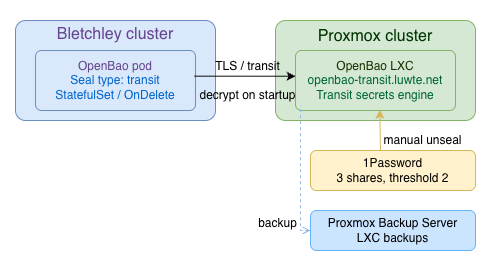
The approach is a second OpenBao instance running as an LXC container on the Proxmox cluster, acting as a Transit KMS. Bletchley's OpenBao calls it at startup to decrypt the master key. This is the Transit auto-unseal pattern — and it turns out to be more interesting to implement than the docs suggest.
The core insight going in, and the thread running through everything that follows: auto-unseal does not remove trust — it relocates it. The manual unseal ceremony placed trust in key shares held by a human. Transit auto-unseal places that same trust in the Proxmox OpenBao instance, the token used to reach it, and the transit key it holds. The operational burden is reduced, but the trust surface still exists and now has a different shape. Understanding where that trust now lives is what makes the rest of this post make sense.
🏠 This is part of the Homelab Journey series - building a production Kubernetes cluster from scratch.
- Secret Management Part 2: Securing the Remaining Cluster Secrets
- Secret Management Part 3: Auto-Unseal with OpenBao on Proxmox (you are here)
- Coming next: Secret Management Part 4: Worst Case Recovery
This post assumes you have OpenBao installed on Bletchley with ESO managing all cluster secrets, as covered in Secret Management Part 1 and Secret Management Part 2.
Why Transit auto-unseal, and why on Proxmox
The Transit auto-unseal pattern works like this: a second OpenBao instance holds a Transit secrets engine with an encryption key. Bletchley's OpenBao is configured with a seal "transit" stanza pointing at it. At startup, Bletchley sends its encrypted master key to the Proxmox Transit instance, which decrypts it and returns the plaintext master key to Bletchley over TLS. The Transit encryption key itself never leaves Proxmox — but the decrypted master key does travel back over the connection, held in memory. If the Transit instance is unavailable, Bletchley can't unseal.
One thing worth stating explicitly: the Transit instance does not store any secret data — only the key used to decrypt the master key. It is a dependency for access, not a backup. Losing the Transit instance doesn't mean secrets are gone; it means Bletchley cannot be unsealed until the Transit instance is restored. Part 4 of this series covers what that actually means in practice.
That last sentence matters and I'll come back to it.
The alternatives I considered were AWS KMS, Azure Key Vault, and GCP Cloud KMS — all of which would remove the second instance to operate, but would introduce a cloud dependency. That violates the self-hosted requirement for this cluster. A minimal OpenBao on Proxmox uses existing infrastructure, keeps everything on-premises, and gives the right failure domain separation: the Proxmox cluster is independent of Bletchley. When Bletchley restarts due to Kubernetes instability, storage churn, or a rolling upgrade, Proxmox is unaffected and the Transit instance stays available.
The failure domain is partially physical — both sit in the same house on the same power feed. Proxmox does have a UPS, so short outages should leave it running. But the main value of the separation is Kubernetes stability, not physical isolation.
Setting up OpenBao on Proxmox LXC
This was my first LXC on Proxmox. I'd used VMs extensively but never an LXC container. The process was straightforward — the main thing to know is that LXC templates download from Proxmox's configured repositories, not manually:
# On gmk1
pveam update
pveam available --section system | grep ubuntu-24.04
pveam download local ubuntu-24.04-standard_24.04-2_amd64.tar.zst
Creating the container:
pct create 501 local:vztmpl/ubuntu-24.04-standard_24.04-2_amd64.tar.zst \
  --hostname openbao-transit \
  --memory 512 \
  --cores 1 \
  --net0 name=eth0,bridge=vmbr0,tag=10,ip=10.0.0.81/24,gw=10.0.0.1 \
  --storage nvme_pool \
  --rootfs nvme_pool:4
LXC 501 on gmk1, VLAN 10, IP 10.0.0.81. I added a DNS record for openbao-transit.luwte.net straight away — I wanted to use the FQDN everywhere rather than IP addresses, which keeps config stable if the IP ever changes.
Inside the container, OpenBao installs cleanly via the official apt repository:
# Add the OpenBao apt source to /etc/apt/sources.list.d/openbao.sources
apt update && apt install openbao
This installed OpenBao 2.5.2 and — usefully — automatically generated a self-signed TLS certificate and key in /opt/openbao/tls/. However the auto-generated cert had no Subject Alternative Names, which means it would be rejected by any client doing proper TLS validation. I regenerated it with the correct SANs:
openssl req -x509 -newkey rsa:4096 -sha256 -days 1095 \
  -nodes \
  -keyout /opt/openbao/tls/tls.key \
  -out /opt/openbao/tls/tls.crt \
  -subj "/CN=openbao-transit.luwte.net" \
  -addext "subjectAltName=DNS:openbao-transit.luwte.net,IP:127.0.0.1,IP:10.0.0.81"
The config I used for the Proxmox instance is minimal — file backend, TLS, api_addr set to the FQDN:
# /etc/openbao/openbao.hcl
api_addr = "https://openbao-transit.luwte.net:8200"

listener "tcp" {
  address       = "0.0.0.0:8200"
  tls_cert_file = "/opt/openbao/tls/tls.crt"
  tls_key_file  = "/opt/openbao/tls/tls.key"
}

storage "file" {
  path = "/opt/openbao/data"
}
One thing the systemctl status output flagged was a warning about Systemd 255 detected. You may need to enable nesting. — worth keeping in mind if the service fails to start. In my case it started cleanly.
Before running any bao commands locally, two environment variables are needed because the cert is self-signed:
export BAO_ADDR="https://openbao-transit.luwte.net:8200"
export BAO_CACERT="/opt/openbao/tls/tls.crt"
I added these to /root/.bashrc so they persist across sessions.
Initialise with 3 shares, threshold 2 — separate from Bletchley's shares, stored in 1Password under a clearly distinct label:
bao operator init -key-shares=3 -key-threshold=2
Connectivity from Bletchley confirmed:
kubectl exec -it -n openbao openbao-0 -- /bin/sh
wget --no-check-certificate -S -O - https://openbao-transit.luwte.net:8200/v1/sys/health
# HTTP/1.1 501 Not Implemented
HTTP 501 means the service is running but not yet initialised — exactly right at that point.
Operational considerations for the LXC
Running OpenBao inside a Proxmox LXC works, but a few known considerations are worth stating explicitly rather than leaving as implicit assumptions.
The nesting warning. Both pct create and pct start produced WARN: Systemd 255 detected. You may need to enable nesting. Nesting allows an LXC container to use certain kernel features — cgroup namespaces, nested containers — that Proxmox disables by default for security reasons. Systemd 255 uses some of these. In this case the OpenBao service started fine without enabling nesting, because OpenBao doesn't require those features in normal operation. If the service had failed to start, enabling nesting with pct set 501 --features nesting=1 would have been the first thing to try. For now it's unnecessary and better left disabled.
Entropy. OpenBao is cryptographically intensive — key generation, seal operations, and token generation all require good entropy. LXC containers share the host kernel and its entropy pool, so if the Proxmox host has adequate entropy (via a hardware RNG, haveged, or rng-tools), the container does too. This wasn't a problem in practice here, but it's worth checking on a new Proxmox installation: cat /proc/sys/kernel/random/entropy_avail should return a healthy value (4096 is the max on modern kernels). Low entropy can cause OpenBao startup to stall silently.
Clock drift. OpenBao uses time for token TTLs, lease expiry, and TLS certificate validation. LXC containers inherit the host clock, so drift between the Proxmox host and the LXC isn't a concern. What matters is synchronisation between the Proxmox host and the Bletchley nodes — if the clocks diverge significantly, TLS handshakes on the transit unseal connection can fail. NTP on both sides handles this; just worth confirming both are configured.
Syscall restrictions. Proxmox applies a seccomp profile to LXC containers by default. OpenBao normally uses mlock to lock memory and prevent the master key from being swapped to disk — this is a privileged syscall that may be restricted depending on the LXC configuration. If mlock is unavailable or fails silently, the master key could theoretically be paged to disk. For a dedicated single-purpose LXC on a trusted Proxmox host this is an acceptable risk, but it's worth being aware of. Verify with journalctl -u openbao after startup — OpenBao logs a warning if mlock fails.
File backend fsync guarantees. The Proxmox OpenBao uses the file backend for simplicity — one instance, no Raft, no cluster overhead. The file backend relies on the filesystem's fsync behaviour for durability. For the transit key specifically, which is written once at initialisation and rarely changed, this is much less of a concern than it would be for a high-write workload. The practical risk: if the Proxmox node loses power at exactly the moment a key write is in progress, the file backend could be in an inconsistent state. PBS backup is the mitigation — a known-good snapshot is always available to restore from.
Configuring the Transit engine
After unsealing and logging in with the root token:
bao login  # root token
bao secrets enable transit
bao write -f transit/keys/bletchley-unseal
The key type is aes256-gcm96 by default — correct for Transit auto-unseal. Then a policy scoped to just this key:
path "transit/encrypt/bletchley-unseal" {
  capabilities = ["update"]
}
path "transit/decrypt/bletchley-unseal" {
  capabilities = ["update"]
}
bao policy write bletchley-unseal /tmp/bletchley-unseal-policy.hcl
bao token create -policy=bletchley-unseal -period=768h -orphan
The token output confirmed token_renewable: true — while the pod is running and healthy, OpenBao renews this token automatically with no human involvement. This is different from the ESO static token situation in Part 2, where renewal required manual steps and hit the max_lease_ttl ceiling. The transit unseal token is a system-to-system credential managed by OpenBao's own renewal mechanism.
Token renewal depends on continuous connectivity to the Transit instance — prolonged interruptions during the renewal window can lead to silent expiry. If Proxmox is temporarily unavailable precisely when a renewal call is due and that state persists for the full token period, the token expires without warning. Clock skew between Bletchley and Proxmox can also cause token validation to fail even when both instances are running and healthy — NTP on both sides is the mitigation. These are edge cases given the 768-hour period, but worth understanding.
One edge case worth documenting: if the pod is down for longer than the token period — 768 hours, just over 32 days — the token expires. On the next startup, the transit unseal call fails not because Proxmox is unavailable but because the token is no longer valid. Recovery in that case means creating a new token on the Proxmox instance and updating the Helm values before Bletchley can unseal. This is an unlikely scenario given the 32-day window, but it's in the DR runbook.
Beyond expiry, the token can fail for other credential reasons that aren't infrastructure failures at all: the token is revoked deliberately or accidentally on the Proxmox instance, or the policy is modified to remove decrypt capability. In any of these cases, Bletchley behaves identically to "Proxmox is unavailable" — CrashLoopBackOff, no useful error message distinguishing the cause. The fix is always the same (new token, updated Helm values), but the diagnosis requires checking the Proxmox instance directly. This is why monitoring the Proxmox OpenBao instance matters — the infrastructure dependency is obvious, the credential dependency less so.
Root token revoked after the ceremony.
The bootstrapping secret problem
The transit unseal token needs to be in Bletchley's OpenBao configuration before the seal migration. That creates a problem: this is the one secret that OpenBao cannot protect itself, because OpenBao needs it to unseal. There is always one secret at the bottom of the chain that the secret management system can't manage.
My first instinct was to use extraSecretEnvironmentVars in the Helm chart and reference the token from a Kubernetes Secret, keeping it out of openbao-values.yaml entirely. The Helm chart supports this pattern:
extraSecretEnvironmentVars:
  - envName: BAO_TRANSIT_TOKEN
    secretName: openbao-transit-token
    secretKey: token
And then in the seal stanza: token = env("BAO_TRANSIT_TOKEN").
This failed on startup with:
error loading configuration from /tmp/storageconfig.hcl: At 13:21: Unknown token: 13:21 IDENT env
The env() function is standard HCL but the OpenBao Helm chart's config parser doesn't support it. The token has to be in plaintext in the config.
The approach I landed on: the token is stored as a placeholder in the committed version of openbao-values.yaml:
token = "###BLETCHLEY_UNSEAL_TOKEN###"
The README.md documents the upgrade procedure:
sed 's/###BLETCHLEY_UNSEAL_TOKEN###/<real-token>/' openbao-values.yaml | \
  helm upgrade openbao openbao/openbao -n openbao -f -
The real token is substituted inline at upgrade time and never written to disk or committed to git. It lives in 1Password and exists temporarily in the upgrade pipeline.
Is this perfect? No. The token travels through the helm upgrade invocation and ends up in the pod's config. Anyone with cluster-admin or direct etcd access can read it. That's a real limitation — though worth noting that mitigations exist: encryption at rest via a KMS provider, or avoiding etcd materialisation entirely with the CSI Secrets Store driver. In this cluster, ESO materialises secrets into Kubernetes Secrets in etcd — a trade-off explicitly accepted in Part 1. The attack surface for the transit token specifically is: cluster-admin, or etcd access. That's the threat model. The attack surface has been reduced from dozens of plaintext credentials in gitignored files to a single bootstrapping secret with a clear, documented boundary. That's a conscious choice, not an oversight.
One additional consideration the current setup doesn't address: there is no client identity verification on the Transit unseal calls beyond the token itself. The policy is scoped to transit/encrypt/bletchley-unseal and transit/decrypt/bletchley-unseal, but the Transit instance has no way to verify that the caller is actually Bletchley's OpenBao — it only verifies that the caller presents a valid token with the right policy. Possession of the token effectively grants the ability to decrypt the OpenBao master key, making it a high-value credential equivalent to root access for unseal purposes. Anyone with that token and network access to port 8200 can call the decrypt endpoint. The firewall rule scoping traffic to the four node IPs (rock1–rock4) is the only network control in place. mTLS between the instances would close this gap but isn't implemented here.
Migrating Bletchley from Shamir to Transit
Before touching anything, I took a Longhorn backup of the OpenBao PVC as a rollback point:
kubectl describe backups.longhorn.io backup-e2b662710fae440e -n longhorn-system | grep -E "State|Backup Created"
# State: Completed
# Backup Created At: 2026-04-07T08:22:16Z
The seal migration procedure: add the seal "transit" stanza to the Helm config — no Shamir stanza needed, Shamir is the implicit default — and the presence of the Transit stanza alone triggers migration mode on next pod restart.
The CA cert for the Proxmox TLS connection needs to be mounted in the pod. One thing worth noting: the Helm chart's extraVolumes of type secret mount at /openbao/userconfig/<secret-name>/, not at the path specified in extraVolumeMounts. The tls_ca_cert path in the seal stanza must use the chart's actual mount path:
# openbao-values.yaml — seal stanza in server.standalone.config
seal "transit" {
  address         = "https://openbao-transit.luwte.net:8200"
  token           = "###BLETCHLEY_UNSEAL_TOKEN###"
  disable_renewal = "false"
  key_name        = "bletchley-unseal"
  mount_path      = "transit/"
  tls_ca_cert     = "/openbao/userconfig/openbao-transit-ca/ca.crt"
}
# openbao-values.yaml — CA cert volume
server:
  extraVolumes:
    - type: secret
      name: openbao-transit-ca
After helm upgrade confirmed the StatefulSet had the correct config, one more thing to check before restarting: the StatefulSet uses updateStrategy: OnDelete. kubectl rollout restart does nothing — Kubernetes only replaces the pod when it's deleted manually. The correct command is always:
kubectl delete pod openbao-0 -n openbao
With the Proxmox OpenBao confirmed unsealed, the rollback backup confirmed present, and the Shamir keys open in 1Password — the pod was deleted.
OpenBao came up in migration mode. The bao operator unseal -migrate flag is required, and because the command prompts interactively, it needs a shell:
kubectl exec -it -n openbao openbao-0 -- /bin/sh
/ $ bao operator unseal -migrate   # Key share 1
/ $ bao operator unseal -migrate   # Key share 2
Key                      Value
---                      -----
Seal Type                transit
Recovery Seal Type       shamir
Initialized              true
Sealed                   false
Seal Type: transit. The migration completed. The Shamir keys are now recovery keys — they have a different role after Transit migration and cannot be used to directly unseal the pod if OpenBao isn't running. More on that shortly.
All 8 ExternalSecrets remained synced throughout.
Proxmox OpenBao is now the root of trust
Before getting into the failure scenarios, something worth stating explicitly: after this migration, the Proxmox OpenBao instance is operationally more critical than the Bletchley OpenBao it serves.
Bletchley's OpenBao holds all the cluster credentials. But it cannot start — at all — without Proxmox being available and unsealed. That makes the Proxmox instance the root of trust for the entire cluster's restart capability. If it's misconfigured, if its token is revoked, if its transit key is corrupted, or if it's simply sealed — Bletchley is frozen on the next restart regardless of how healthy everything else is.
This is worth internalising. The operational priority order is: keep Proxmox OpenBao healthy first, keep Bletchley OpenBao healthy second. Monitor both. Keep both backed up. The Proxmox instance is a dependency, not a convenience.
This is what "auto-unseal relocates trust" means in practice: the trust that used to live with the humans holding the key shares now lives in the Proxmox instance and everything required to keep it running.
Testing the failure scenarios
Scenario 1 — Bletchley restarts, Proxmox up:
kubectl delete pod openbao-0 -n openbao
kubectl exec -n openbao openbao-0 -- bao status
# Seal Type: transit, Sealed: false
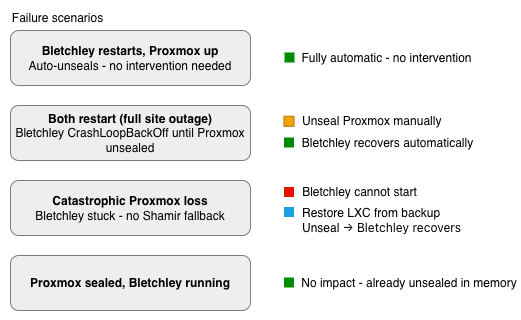
Fully automatic. No intervention. This is the normal case and it works exactly as intended.
Scenario 2 — Proxmox seals while Bletchley is running:
Sealed the Proxmox instance manually. Bletchley was completely unaffected — it's already unsealed in memory and doesn't need the Transit instance until the next restart.
Scenario 3 — Both sealed simultaneously (full site outage):
This produced the most interesting result. I sealed both instances, then deleted the Bletchley pod to simulate a restart. The pod entered CrashLoopBackOff — OpenBao was trying to reach the Transit instance, getting a sealed response, and the pod was crashing on startup. Because Proxmox responded quickly with a sealed error rather than timing out, the CrashLoopBackOff cycles came regularly.
Then I unsealed the Proxmox instance. Without touching the Bletchley pod at all:
openbao-0   0/1   CrashLoopBackOff   3 (43s ago)   9m9s
openbao-0   0/1   Running            4 (43s ago)   9m9s   <- proxmox unsealed
openbao-0   1/1   Running            4 (49s ago)   9m15s  <- bletchley auto-unsealed
Bletchley recovered on the next CrashLoopBackOff cycle — automatically, without a manual pod restart. The DR procedure for a full site outage is: unseal Proxmox, then wait.
One important distinction: this worked cleanly because Proxmox was sealed but running, so OpenBao got a fast sealed response on each attempt. When I tested with Proxmox completely down — LXC stopped entirely — the behaviour was different. OpenBao had to wait for a TCP timeout on each attempt before failing, and the exponential backoff of CrashLoopBackOff compounds on top of that. Kubernetes CrashLoopBackOff caps at 5 minutes between restart attempts — combined with a TCP timeout of 30–60 seconds per attempt, each cycle can take 6–7 minutes. Recovery time becomes unpredictable and potentially long. The mechanism still works, but "wait" may mean waiting through several of those cycles before Bletchley comes up.
Scenario 4 — Catastrophic Proxmox failure:
This is where the assumption I'd been carrying broke down. I stopped the LXC entirely to simulate permanent loss, then tried to unseal Bletchley directly using the Shamir recovery keys:
kubectl exec -it -n openbao openbao-0 -- /bin/sh
/ $ bao operator unseal
Error unsealing: Put "http://127.0.0.1:8200/v1/sys/unseal": dial tcp 127.0.0.1:8200: connect: connection refused
OpenBao isn't running at all. There's no process to accept unseal commands. After Transit migration, the Shamir keys are recovery keys — they authorise specific operations like root token generation, but they cannot start OpenBao when the Transit instance is unavailable. The pod stays in CrashLoopBackOff indefinitely.
I went looking for whether this is a known limitation. It is. A dual seal (Transit primary + Shamir emergency fallback) was proposed in PR #1830 as an "Emergency Seal RFC" — but the PR was closed without being accepted or merged. It's not on the official OpenBao RFC roadmap. There's also seal "static" introduced in OpenBao 2.4.0, which I'd seen mentioned as a possible solution — but it's a different feature entirely. The static seal uses a 32-byte AES-256 key provided via environment variable or file as a replacement for Transit, not as a companion to it. It doesn't solve the fallback problem.
The mitigation is the Proxmox Backup Server. LXC 501 is backed up by PBS. If the LXC is permanently lost, the recovery procedure is: restore from PBS backup, start the LXC, unseal the restored Proxmox OpenBao with the key shares from 1Password, and Bletchley recovers automatically on the next CrashLoopBackOff cycle. The PBS backup preserves the Transit key in the file backend — the same key Bletchley's master key is encrypted against — so no re-migration of Bletchley is needed.
This is the trade-off: the benefits of auto-unseal for the common cases (Bletchley restart, full site outage) outweigh the operational complexity of the catastrophic Proxmox loss case, which is mitigated by PBS and clearly documented.
The DR runbook
The full recovery runbook is committed to Forgejo at docs/runbooks/openbao-recovery.md. The practical summary:
Normal operation (Bletchley restarts): No action required. OpenBao auto-unseals via Transit.
Full site outage (both restart): Unseal Proxmox OpenBao with 2 of 3 key shares from 1Password. Wait — Bletchley recovers automatically via CrashLoopBackOff.
Planned maintenance (LXC node migration): LXC migration is a stop/start, not a live migration. Proxmox OpenBao will be sealed after migration. Unseal it, Bletchley recovers.
Catastrophic Proxmox loss: Restore LXC 501 from PBS backup. Start the LXC. Unseal with key shares. Bletchley recovers.
The key share locations are documented clearly in the runbook — Bletchley shares and Proxmox shares are separate items in 1Password with distinct labels.
Key rotation and backup alignment
The Transit key can be rotated on the Proxmox instance:
bao write -f transit/keys/bletchley-unseal/rotate
OpenBao's Transit engine keeps all previous key versions by default — Bletchley can still unseal after a rotation without any config change, because the old version remains available for decryption. Rotation generates a new key version for future encrypt operations but doesn't invalidate existing ciphertexts.
However, key rotation creates a critical interaction with PBS backups. When Bletchley restarts after a rotation, OpenBao re-encrypts the master key against the new key version. From that point, the master key ciphertext stored in Bletchley's Raft storage requires the new key version to decrypt.
If a catastrophic Proxmox failure then occurs and PBS restores an older backup — one taken before the rotation — the restored instance has the old key version only. The Bletchley master key was encrypted with the new version that doesn't exist in the restored backup. Bletchley cannot unseal.
The mitigation is simple but must be explicit in the runbook: always take a PBS backup immediately after rotating the transit key. The window of unrecoverability is the gap between the rotation and the next backup. Never rotate without backing up immediately after.
A secondary consideration: the min_decryption_version setting on the transit key controls which old versions are still usable for decryption. The default keeps all versions. Advancing min_decryption_version to revoke old versions is a legitimate security practice, but must never be done carelessly — if the version used to encrypt Bletchley's current master key is revoked, Bletchley cannot unseal even with a healthy Proxmox instance.
What's working now
- ✅ Bletchley OpenBao unseals automatically via Proxmox Transit on every pod restart
- ✅ Seal Type: transit — migration from Shamir completed successfully
- ✅ All 8 ExternalSecrets showing SecretSynced across 7 namespaces
- ✅ Full site outage tested — Bletchley recovers via CrashLoopBackOff automatically after Proxmox is unsealed, no manual pod restart needed
- ✅ Transit unseal token stored as placeholder in git, substituted at upgrade time via
sed - ✅ LXC 501 backed up via PBS — catastrophic failure recovery procedure documented and tested
- ⚠️ No Shamir emergency fallback — Bletchley cannot start without Proxmox. PR #1830 closed, no confirmed timeline for dual seal support. Mitigated by PBS backup of LXC 501.
What's next
The secret management arc is functionally complete for normal operations. The cluster has centralised secret management, all credentials in OpenBao, ESO syncing across all namespaces, and auto-unseal with a documented DR procedure.
There is one more post in this series worth writing, and it addresses something that almost never gets documented: what actually happens in the absolute worst case — when the Proxmox OpenBao instance is permanently lost and no backup is available. Part 3 names that scenario and explains why it's a recovery operation rather than a data loss event, but the rebuild sequence deserves its own dedicated treatment. If you want to understand the full blast radius, how to rebuild OpenBao from first principles, and why 1Password is the real source of truth in this architecture, Secret Management Part 4: Worst Case Recovery covers that in detail. If Part 3 is as far as you need to go, that's a perfectly complete stopping point.
Beyond that, there are OpenBao operational practices worth a dedicated post — the UI, enabling audit logging, token and policy management in practice. Those will follow as Part 5.
← Previous: Secret Management Part 2
Questions or suggestions? Leave a comment below or reach out at igor@vluwte.nl.