Fixing a Postgres Backup Failure: Region Mismatch and a Missing NAS Copy
A LogQL finding led to a one-line AWS CLI region fix for postgres housekeeping — and uncovered a second gap: backups never synced to the NAS.
Introduction
The LogQL error hunt surfaced a finding I'd filed away as "investigate later": the postgres housekeeping CronJob was hitting Garage with 400 Bad Request errors, visible in the Garage logs but invisible from the postgres side. The job kept running, the PostgresHousekeepingFailed alert was catching it, and nothing was on fire — so it sat there.
It turned out to be a one-line fix, but tracking it down was a good reminder that "monitored" and "fixed" are not the same thing. Along the way I also found a second gap: the postgres-backups bucket had never been synced to the NAS, unlike Longhorn and etcd backups which already make that hop via rclone. Both got fixed in the same pass.
🏠 This is part of the Homelab Journey series - building a production Kubernetes cluster from scratch.
- Longhorn Disk Alerting
- Fixing a Postgres Backup Failure: Region Mismatch and a Missing NAS Copy (you are here)
This post assumes you've read PostgreSQL Backups on Kubernetes, which covers the backup and housekeeping CronJobs this post fixes, and Offloading Bletchley Backups, which set up the rclone sync pattern this post extends.
Finding the Bug
The LogQL post found this by cross-referencing the postgres and garage namespaces for the string housekeeping. The postgres side showed the housekeeping script writing its .housekeeping-in-progress touch file. Seven seconds later, the Garage side logged a 400 Bad Request in response to one of the script's S3 calls. Two namespaces, two log formats, one incident — the kind of thing that's easy to miss if you only ever look at one side.
The PostgresHousekeepingFailed Loki alert already existed to catch exactly this:
count_over_time({namespace="garage"} |= "400 Bad Request" |= "housekeeping" [30m]) > 0
So the failure was monitored. But monitored isn't fixed, and I'd never gone back to find the actual cause.
I went looking at the Garage error metrics in Prometheus to see what the pattern looked like over time:
increase(api_s3_error_counter{job="garage", status_code="400"}[1h])
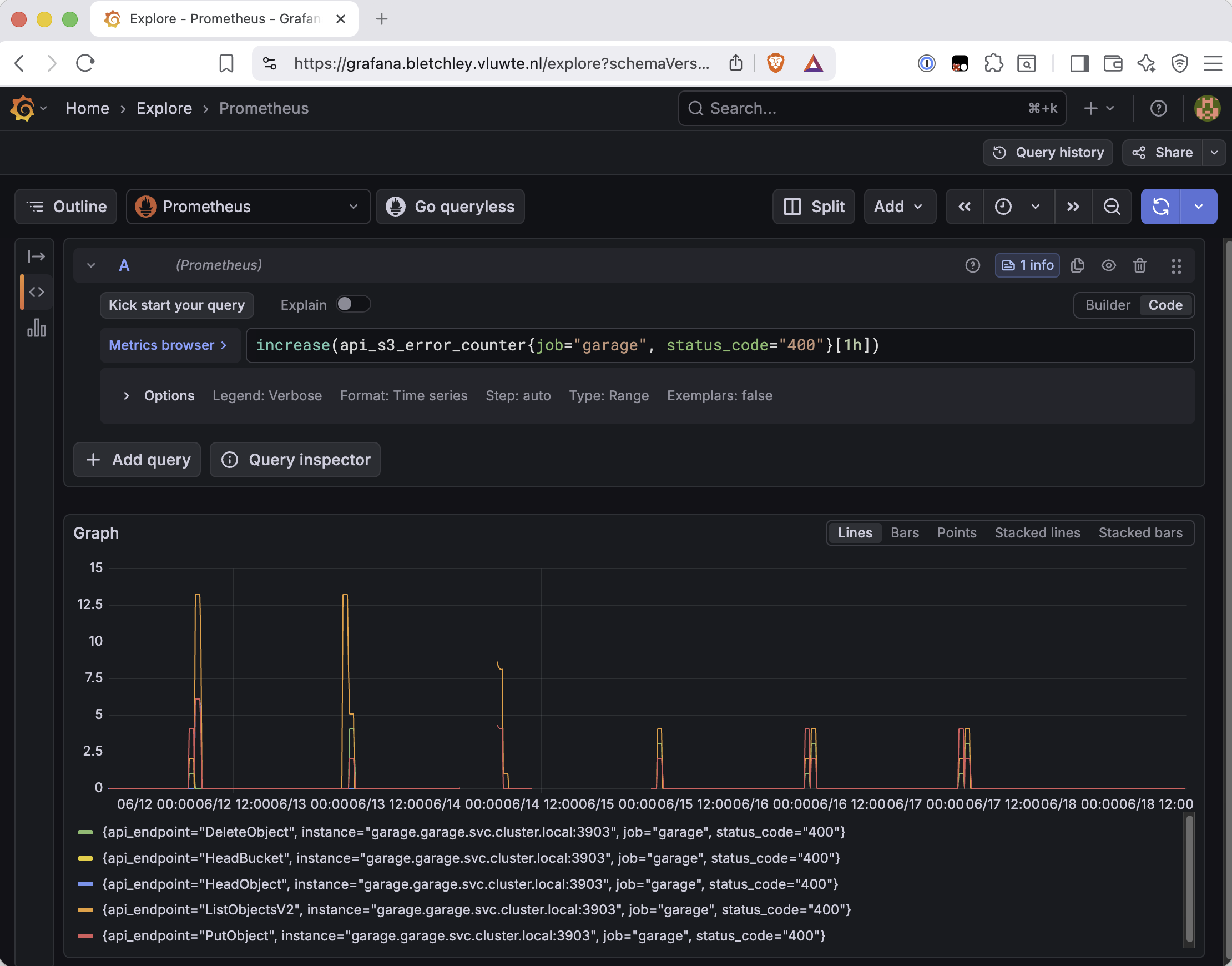
A clean once-a-day spike, every day, across five different api_endpoint values (DeleteObject, HeadBucket, HeadObject, ListObjectsV2, PutObject). That pattern — same time, same shape, every single day — is what a script hitting the same wrong configuration on every run looks like. It's not random failures; it's one root cause firing on a schedule.
Root Cause: The AWS CLI Defaults to us-east-1
The postgres backup and housekeeping CronJobs both use a custom image (postgres-backup-runner, built on postgres:17-alpine with the AWS CLI added) to talk to Garage's S3-compatible API. Both scripts call aws s3 repeatedly — listing touch files, uploading dumps, promoting weekly backups, pruning old ones.
The AWS CLI needs a region. If you don't set one, it defaults to us-east-1. Garage doesn't accept that — it expects whatever region string is configured as s3_region in garage.toml, which on this cluster is garage. Send us-east-1 and Garage replies with a 400 Bad Request.
The interesting part is that this cluster already had the correct answer sitting in a different piece of code. The Go Prometheus exporter that reads backup metrics from S3 — the one covered in the original backup post — uses the AWS SDK for Go, and its config is explicit:
cfg, err := config.LoadDefaultConfig(context.TODO(),
    config.WithCredentialsProvider(
        credentials.NewStaticCredentialsProvider(accessKey, secretKey, ""),
    ),
    config.WithRegion("garage"),
)
Whoever wrote that (me, six weeks earlier) knew the region had to be garage. The shell scripts using the AWS CLI just never got the equivalent. Two different tools talking to the same Garage instance, one configured correctly and one silently defaulting to the wrong region the entire time.
This also matches the precedent in the rclone setup from Offloading Bletchley Backups — rclone's garage remote on the Synology has the same requirement: the region has to match s3_region in garage.toml, not the AWS default.
The Fix
The actual git diff made the shape of the bug clearer than I'd assumed going in. Most aws s3 calls in the backup script had no --region flag at all — nothing, not even a reference to an unset variable. The housekeeping script was more inconsistent: a few calls (the Friday promotion and the daily/weekly pruning loops) already passed --region "${AWS_DEFAULT_REGION}", but several others — the very first .backup-complete check, the in-progress touch file write, the final cleanup — didn't. And in every case, across both scripts, AWS_DEFAULT_REGION was never defined in the env block. So the calls that did reference it were passing an empty string, and the calls that didn't reference it at all were just relying on the AWS CLI default.
Two gaps stacked on top of each other, either one sufficient on its own to cause the same 400 Bad Request:
- The variable didn't exist. No
AWS_DEFAULT_REGIONanywhere in either CronJob's env block. - The flag wasn't consistently applied. Even after adding the variable, several
aws s3calls would still default tous-east-1because they never passed--regionin the first place.
Fixing it meant closing both, in both CronJob manifests:
- name: AWS_DEFAULT_REGION
  value: "garage"
(Credential and endpoint wiring is unchanged from the original backup post — this just adds one line to that existing env block.)
Then every aws s3 call that was missing the flag got it added. A representative example from the backup script — the touch-file write that previously had no region handling at all:
   echo "${DATE}" | aws s3 cp - "${S3_PREFIX}/.backup-in-progress" \
-    --endpoint-url "${GARAGE_ENDPOINT}"
+    --endpoint-url "${GARAGE_ENDPOINT}" \
+    --region "${AWS_DEFAULT_REGION}"
That pattern repeated across roughly a dozen call sites between the two scripts — tedious but mechanical, once the env var existed it was just a matter of finding every aws s3 invocation and making sure it referenced it. While in there, I also aligned both CronJobs on the same image tag (postgres-backup-runner:1.0.1) — the backup job had drifted to an older tag than housekeeping, with no reason for the difference.
Applied both manifests, then triggered a manual run of each to confirm:
kubectl apply -f cronjob-backup.yaml
kubectl apply -f cronjob-housekeeping.yaml

kubectl create job -n postgres --from=cronjob/postgres-backup backup-test-$(date +%s)
kubectl create job -n postgres --from=cronjob/postgres-housekeeping housekeeping-test-$(date +%s)
No 400s in the Garage logs during either run. The Prometheus graph above shows it plainly — the daily spike pattern just stops after June 17.
What the Bucket Revealed
Before assuming the fix was sufficient, I wanted to know what state the bucket was actually in. Housekeeping had presumably been broken since the backup system was first deployed — the oldest failed job I could find in the cluster's job history was 34 days old — which raised the question of whether old backups had been quietly piling up the whole time.
Garage's CLI doesn't have an ls — that's purely an S3-API operation — so checking bucket contents means running the AWS CLI from a pod with credentials:
kubectl run -n postgres s3-check --rm -it --restart=Never \
  --image=10.0.0.80:5000/postgres-backup-runner:1.0.1 \
  --env="AWS_ACCESS_KEY_ID=$(kubectl get secret -n postgres postgres-backup-s3 -o jsonpath='{.data.AWS_ACCESS_KEY_ID}' | base64 -d)" \
  --env="AWS_SECRET_ACCESS_KEY=$(kubectl get secret -n postgres postgres-backup-s3 -o jsonpath='{.data.AWS_SECRET_ACCESS_KEY}' | base64 -d)" \
  -- aws s3 ls s3://postgres-backups/ --recursive \
     --endpoint-url http://garage-s3.garage.svc.cluster.local:3900 \
     --region garage
The listing was small and, in hindsight, made complete sense given what was broken:
2026-06-17 04:00:47    .housekeeping-complete
2026-06-10 03:00:22    daily/2026-06-10/umami.custom
2026-06-11 03:00:22    daily/2026-06-11/umami.custom
2026-06-12 03:00:22    daily/2026-06-12/umami.custom
2026-06-15 03:00:23    daily/2026-06-15/umami.custom
2026-06-16 03:00:22    daily/2026-06-16/umami.custom
2026-06-17 03:00:22    daily/2026-06-17/umami.custom
2026-06-17 03:00:29    metrics/umami.json
Six daily backups, no accumulation problem, no manual cleanup needed — the 7-day retention had nothing to over-retain because there was only one database (umami) to back up. But two things stood out:
- No
weekly/folder at all. The Friday promotion step had simply never run successfully. Every Friday since deployment, housekeeping hit the region error before it got anywhere near the promotion logic. - June 14 is missing. That's the reboot incident from the metrics-server post — the backup CronJob likely failed outright that day, separate from the region issue.
Nothing here needed fixing retroactively — there's no way to back-create a missing weekly backup — but it confirmed the fix mattered for more than just clearing log noise. The rotation logic genuinely hadn't run since the system went live.
The Second Gap: No NAS Copy
While digging through the bucket, I realized something that should have been obvious from the original backup post: postgres-backups had never been added to the Synology rclone sync. Longhorn backups and etcd backups both make the hop from Garage to the NAS automatically. Postgres backups stopped at Garage.
If Garage or the whole cluster were lost, the only copy of the postgres backups would be gone too — exactly the single point of failure the rclone sync exists to eliminate for everything else.
Reusing the Existing Pattern
The Synology already runs a daily job (07:00 CEST) that syncs longhorn-backups and etcd-backups from Garage using rclone in Docker, with the remote credentials and config mounted from /volume1/docker/rclone/config. Adding postgres meant extending that same job rather than building anything new.
First question was credentials — the existing garage remote on the Synology uses a specific access key, and that key didn't automatically have access to the postgres-backups bucket. Rather than adding a second remote with separate credentials, I granted the existing Synology key read-only access to the new bucket:
kubectl exec -n garage garage-0 -- /garage bucket allow postgres-backups \
  --read --key <synology-key>
One remote, one set of credentials, now covering three buckets instead of two.
The job script itself needed three small additions — a log cleanup line, a third docker run sync block, and a third section in the email summary:
# cleanup old logfiles
(cat /dev/null > /volume1/dump/Bletchley/rclone-longhorn.log && cat /dev/null > /volume1/dump/Bletchley/rclone-etcd.log && cat /dev/null > /volume1/dump/Bletchley/rclone-postgres.log)

docker run --rm \
  -v /volume1/docker/rclone/config:/config/rclone \
  -v /volume1/dump/Bletchley:/bletchley \
  rclone/rclone \
  sync garage:postgres-backups /bletchley/postgres \
  --log-file /bletchley/rclone-postgres.log \
  --log-level INFO

#and mail
(echo "..." && echo "=== postgres ===" && grep -v " INFO " /volume1/dump/Bletchley/rclone-postgres.log) | ssmtp igor@vluwte.nl
(Longhorn and etcd sync blocks omitted above — see Offloading Bletchley Backups for the full original script.)
Verifying End to End
The first sync after adding postgres came through clean:
=== postgres ===
Transferred:   	  152.584 KiB / 152.584 KiB, 100%, 0 B/s, ETA -
Checks:                 8 / 8, 100%, Listed 35
Deleted:                1 (files), 1 (dirs), 74.568 KiB (freed)
Transferred:            4 / 4, 100%
Elapsed time:         0.2s
The deletion is worth noting — rclone's sync mode mirrors the source exactly, so when housekeeping pruned the June 10 and June 11 dailies on the Garage side, the next NAS sync removed them locally too. That's the correct behaviour: the NAS copy should track retention, not become an unintended permanent archive of everything that ever existed in the bucket.
The real test was Friday, June 19 — the first weekly promotion since the fix. Housekeeping's 04:00 run produced exactly what it should have:
2026-06-19 04:00:13    .housekeeping-complete
2026-06-12 03:00:22    daily/2026-06-12/umami.custom
2026-06-15 03:00:23    daily/2026-06-15/umami.custom
2026-06-16 03:00:22    daily/2026-06-16/umami.custom
2026-06-17 03:00:22    daily/2026-06-17/umami.custom
2026-06-18 03:00:06    daily/2026-06-18/umami.custom
2026-06-19 03:00:06    daily/2026-06-19/umami.custom
2026-06-19 03:00:07    metrics/umami.json
2026-06-19 04:00:05    weekly/2026-06-19/umami.custom
June 10 and 11 pruned off (7-day retention), June 19's daily promoted to weekly/ at exactly the same size as that day's daily — a clean same-day promotion. Three hours later, the 07:00 Synology sync picked it up:
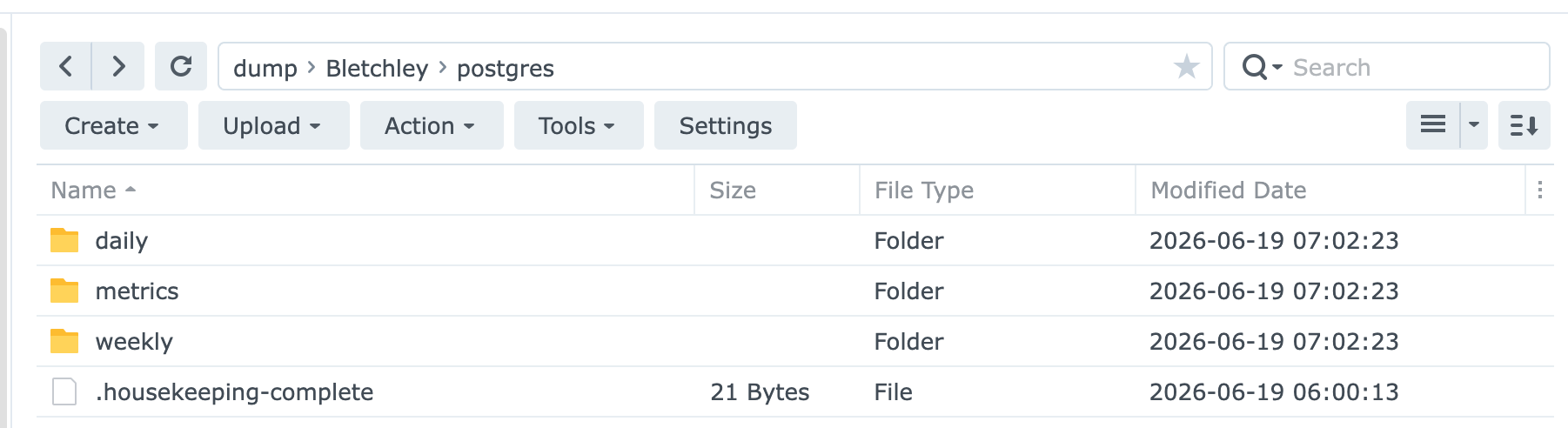
Daily, metrics, and weekly all present, all dated the same morning. Region fix, bucket rotation, and NAS sync all confirmed working together in one cycle.
What's Working Now
- ✅
AWS_DEFAULT_REGION: garageset explicitly in both backup and housekeeping CronJobs - ✅ Both CronJobs aligned on
postgres-backup-runner:1.0.1 - ✅ Daily backup, 7-day pruning, and Friday weekly promotion all confirmed working end to end
- ✅ Garage
api_s3_error_counter{status_code="400"}baseline clean — no more daily spikes - ✅ postgres-backups bucket now synced to the Synology NAS daily, alongside longhorn-backups and etcd-backups
- ✅ Synology rclone key granted read-only access to the new bucket — no separate credentials to manage
Lessons Learned
- A monitored failure is not a fixed failure. The
PostgresHousekeepingFailedalert had been catching this for weeks. It did its job — I knew something was wrong — but knowing and fixing are different steps, and it's easy for the first to feel like enough. - Check whether you've already solved the problem elsewhere. The correct region string was already written down, in working code, in the same backup system. The Go exporter got it right from day one. A quick look across all the tools touching the same backend would have caught this immediately rather than requiring a log-correlation investigation weeks later.
- Partial fixes look like complete ones until you check carefully. Some
aws s3calls already had--regionwired up; most didn't; the variable backing all of them was undefined either way. None of that was visible from a quick skim — it took reading the actualgit diffline by line to see which calls needed the flag added versus which already had it. - A backup system is only as resilient as its least-checked component. Longhorn and etcd backups had off-cluster copies from early on. Postgres backups, added later, quietly didn't — and nothing flagged that gap until I went looking for an unrelated reason.
Conclusion
Nothing here failed silently. The alert fired, the logs were there, and the evidence was available the entire time. The real problem wasn't observability — it was assuming that "known issue" and "resolved issue" were the same thing. Once I finally followed the trail, the fix was a one-line region setting, and it uncovered a missing off-cluster backup path I'd overlooked from the start.
← Previous: Longhorn Disk Alerting
Questions or suggestions? Leave a comment below or reach out at igor@vluwte.nl.