k9s: A Terminal UI for Navigating Your Kubernetes Cluster
k9s gives you an interactive terminal UI for your Kubernetes cluster. I installed it and immediately found a backup job that had been silently failing for eleven days.
Introduction
kubectl is the right tool for scripting, automation, and precise one-off operations. But for interactive cluster navigation - checking what's running, tailing logs, watching a deployment roll out - it gets verbose quickly. Every command requires a full resource type, a namespace flag, and usually a name you have to look up first. It works, but it's slow.
k9s is a terminal UI for Kubernetes. It connects to your existing kubeconfig, reads your cluster's state in real time, and presents everything in a keyboard-driven interface. No cluster-side components to install, no browser required. Just a local binary and your existing access.
I installed it expecting a convenient way to browse pods. Within five minutes of opening it, I'd found something broken that had been silently failing for eleven days. That's a better argument for k9s than anything I could have planned.
🛠️ This is part of the Homelab Tools series - useful applications and utilities running on the Bletchley cluster.
- IT-Tools on Bletchley
- k9s: A Terminal UI for Navigating Your Kubernetes Cluster (you are here)
Installation
k9s is a single binary. On macOS, Homebrew is the easiest route:
brew install k9s
That's it. No cluster-side install, no configuration required. k9s reads your existing kubeconfig and connects with the same credentials kubectl uses.
Launch it with an explicit context to avoid relying on whatever context happens to be active:
k9s --context bletchley
The version installed via Homebrew was v0.50.18, connecting to a Kubernetes v1.35.0 cluster running on Talos Linux. No issues, no Talos-specific configuration needed.
First Look
k9s opens on a context selection screen showing your available kubeconfig contexts. Select one and press Enter to connect. The header fills in immediately:
Context: admin@bletchley [RW]
Cluster: bletchley
K9s Rev: v0.50.18
K8s Rev: v1.35.0
CPU:     n/a
MEM:     n/a
The [RW] confirms read-write access. If you launch with k9s --readonly, this shows [RO] instead - and all modification commands are disabled. That's worth knowing if you're cautious about accidental changes (more on that later).
CPU: n/a and MEM: n/a are expected - k9s can show live resource utilisation, but only if the metrics-server is installed in the cluster. Bletchley doesn't have it. Navigation and inspection work fine without it; utilisation metrics don't.
The default view lands on pods in the default namespace, which on Bletchley contains no workloads. It looks like nothing is running. The fix is one key: press 0 to switch to all namespaces.
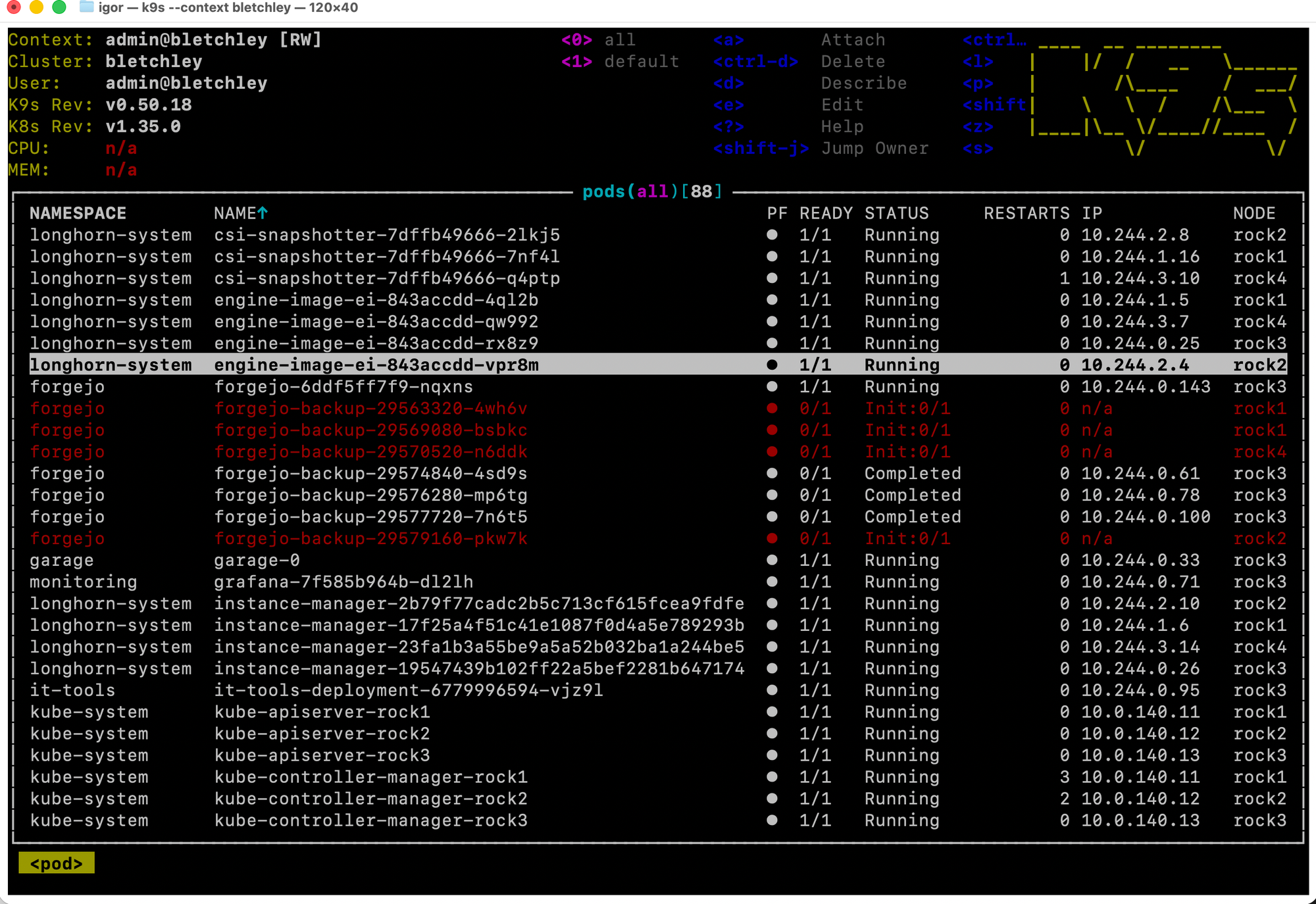
Eighty-eight pods across every namespace, all visible at once. And several of them were red.
The Finding
The red rows were in the forgejo namespace: backup pods with status Init:0/1. Four of them, started between March 18 and March 22 - up to eleven days earlier - stuck with no IP assigned and no sign of progress.
I navigated to one and pressed d to describe it:
Name:      forgejo-backup-29563320-4wh6v
Namespace: forgejo
Node:      rock1/10.0.140.11
Start Time: Wed, 18 Mar 2026 03:00:00 +0100
Status:    Pending
...
Conditions:
  PodScheduled: True
...
Events: <none>
PodScheduled: True - the scheduler had successfully placed the pod on rock1. But the init container never started, and there were no events explaining why. The pod had been pending for eleven days without a single log line.
The volumes section was the clue:
Volumes:
  forgejo-data:
    Type:      PersistentVolumeClaim
    ClaimName: forgejo-data
    ReadOnly:  true
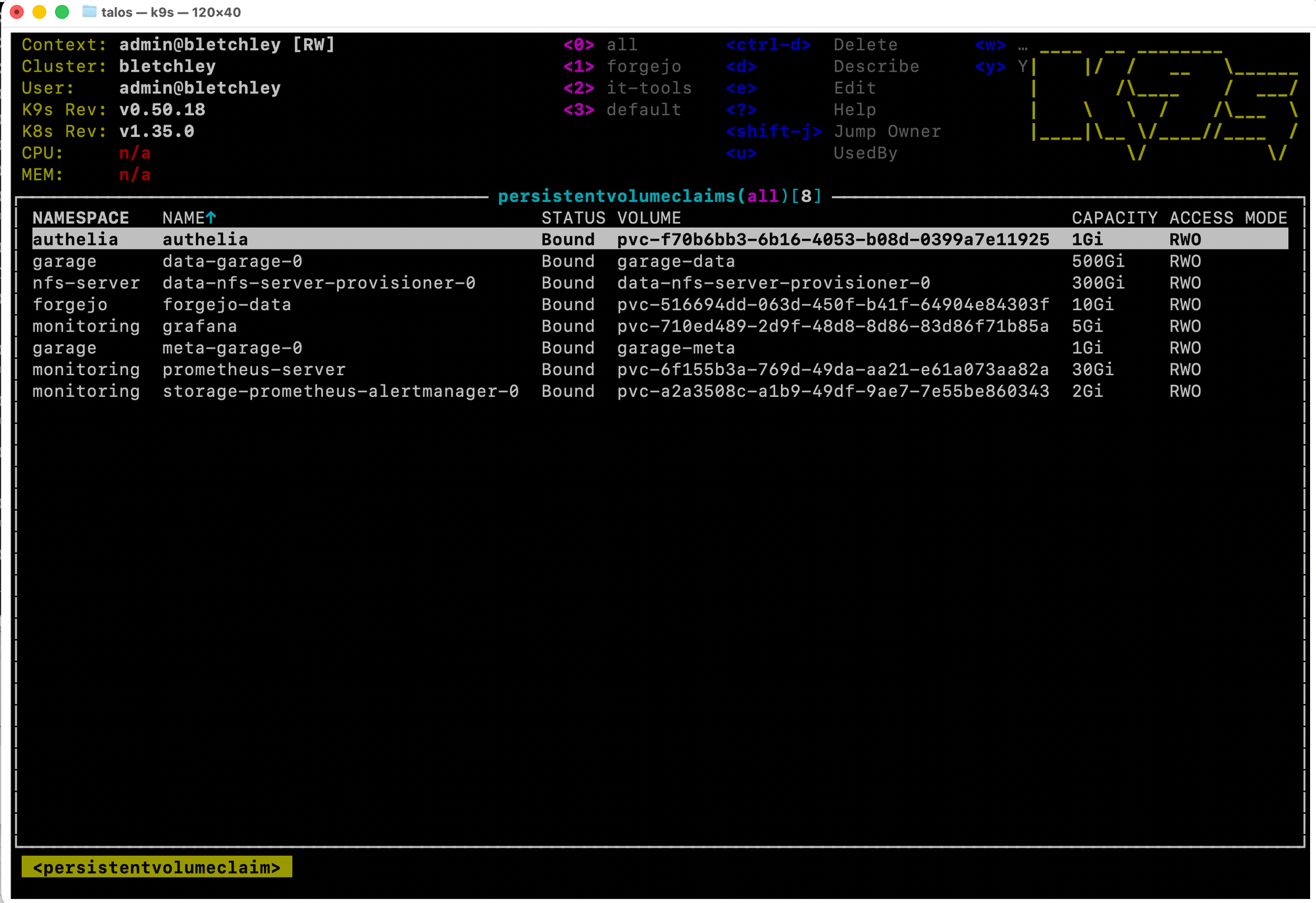
The backup job mounts the forgejo-data PVC read-only to create a dump without interrupting the running service. That sounds reasonable - but the PVC is ReadWriteOnce.
RWO volumes in Longhorn can only be attached to one node at a time. Not one pod - one node. Even a read-only mount from a second node is blocked at the volume attachment level. Forgejo was running on rock4 with forgejo-data attached there. The backup CronJob was scheduling pods to other nodes - rock1, rock4 (when Forgejo wasn't there), wherever the scheduler put them. When a backup pod landed on a node that wasn't rock4, it couldn't attach the volume and sat pending indefinitely. No error. No event. Just silence.
The :pvc view confirmed it - every PVC on the cluster is RWO:
The Fix
The backup CronJob needed a podAffinity rule to ensure backup pods always schedule to the same node as the Forgejo pod. The relevant addition to the CronJob spec:
affinity:
  podAffinity:
    requiredDuringSchedulingIgnoredDuringExecution:
      - labelSelector:
          matchLabels:
            app: forgejo
        topologyKey: kubernetes.io/hostname
This tells the scheduler: only place this pod on a node that already has a pod matching app: forgejo. Since forgejo-data is attached to whichever node Forgejo is running on, the backup pod lands there too and can mount the volume.
After applying the fix, I triggered a manual job to verify:
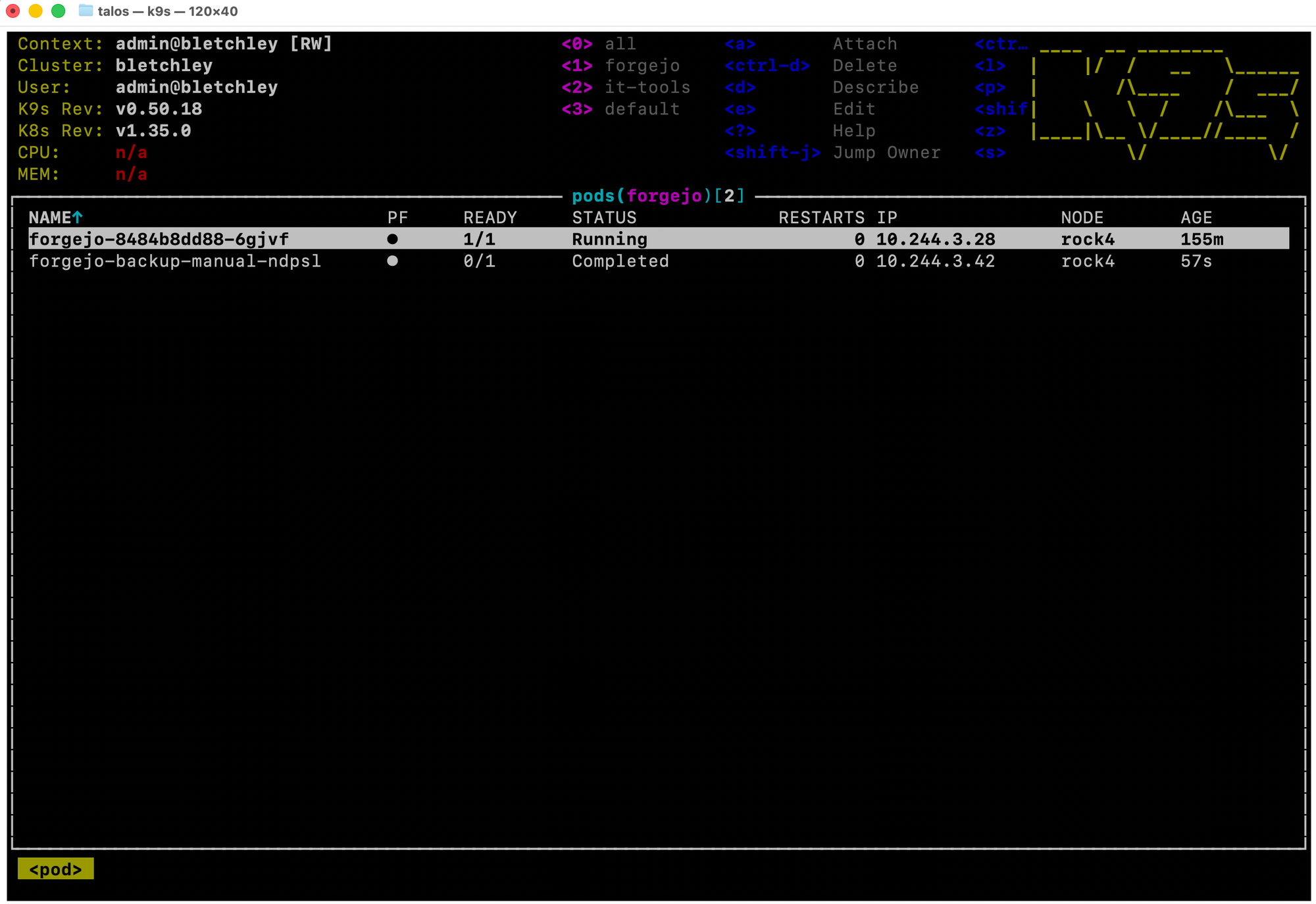
Forgejo on rock4. Backup pod on rock4. Status: Completed. The eleven-day silence was over.
Navigating the Cluster
With the finding documented, here's a quick tour of the views that are useful day to day.
Pods
The default view. Press 0 for all namespaces, number keys for specific ones (k9s adds namespaces as you use them - the header shows <0> all <1> forgejo <2> it-tools <3> default in this session). Arrow keys to navigate, / to filter by name.
Press l on a selected pod to tail its logs live. Here's it-tools:
/docker-entrypoint.sh: Configuration complete; ready for start up
10.244.3.32 - - [29/Mar/2026:12:54:23 +0000] "GET /sw.js HTTP/1.1" 304 0 ...
10.244.3.32 - - [29/Mar/2026:13:09:37 +0000] "GET /sw.js HTTP/1.1" 304 0 ...
The access log updates in real time as requests come in. Press Escape to go back.
Press d to describe any resource - the equivalent of kubectl describe, but without typing the resource name.
Events
Type :events and press Enter. Events are sorted by most recent first and cover the whole cluster. On a healthy cluster, everything shows Normal. The Longhorn rebuild cycle - Rebuilding → Rebuilt → Healthy - appears here when Longhorn rebalances replicas after a node restart. Seeing it appear and resolve is reassuring; seeing it appear and stay is a signal to investigate.
Deployments
Type :deploy for the deployments view. Twenty deployments on Bletchley, all showing the expected Ready ratios. The AGE column tells the cluster's recent history at a glance - authelia at 7 days, it-tools at 46 hours on the day I took this screenshot.
Services
Type :svc for services. This is where I noticed metallb-test-svc - a LoadBalancer service left over from the initial MetalLB verification, sitting in the default namespace with an external IP it no longer needed.
Nodes
Type :nodes for the node view:
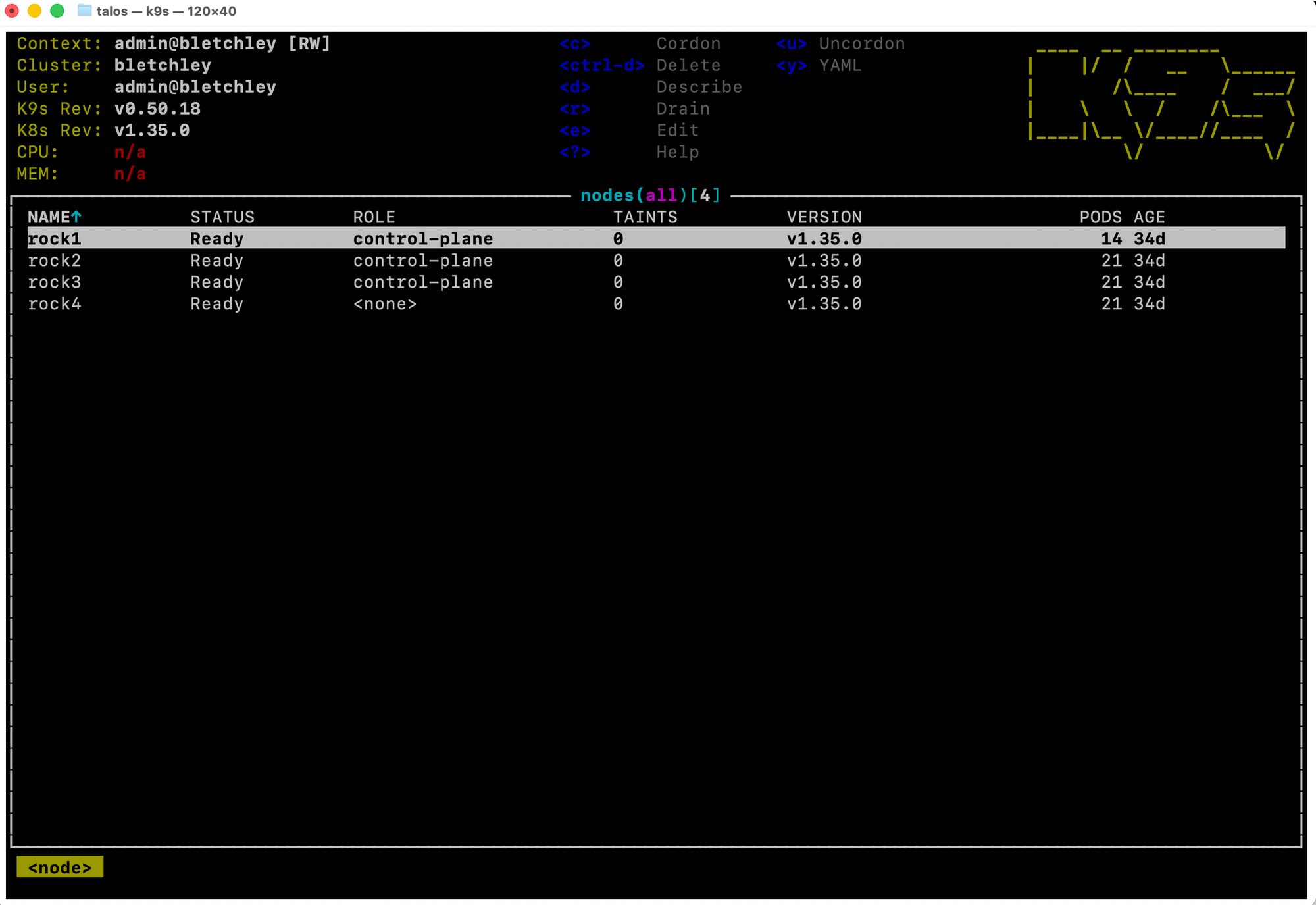
The cluster's topology is visible at a glance: three control-plane nodes and one dedicated worker. Rock1 runs fewer pods (14 vs 21) because control-plane nodes have less workload scheduled to them by default.
CPU and MEM show n/a here too - same metrics-server limitation as the header. For a cluster this size, eyeballing pod counts and statuses is sufficient. If utilisation visibility becomes important, installing metrics-server is the fix.
Housekeeping: Deleting the MetalLB Leftover
While in the services view, I navigated to metallb-test-svc and pressed ctrl-d.
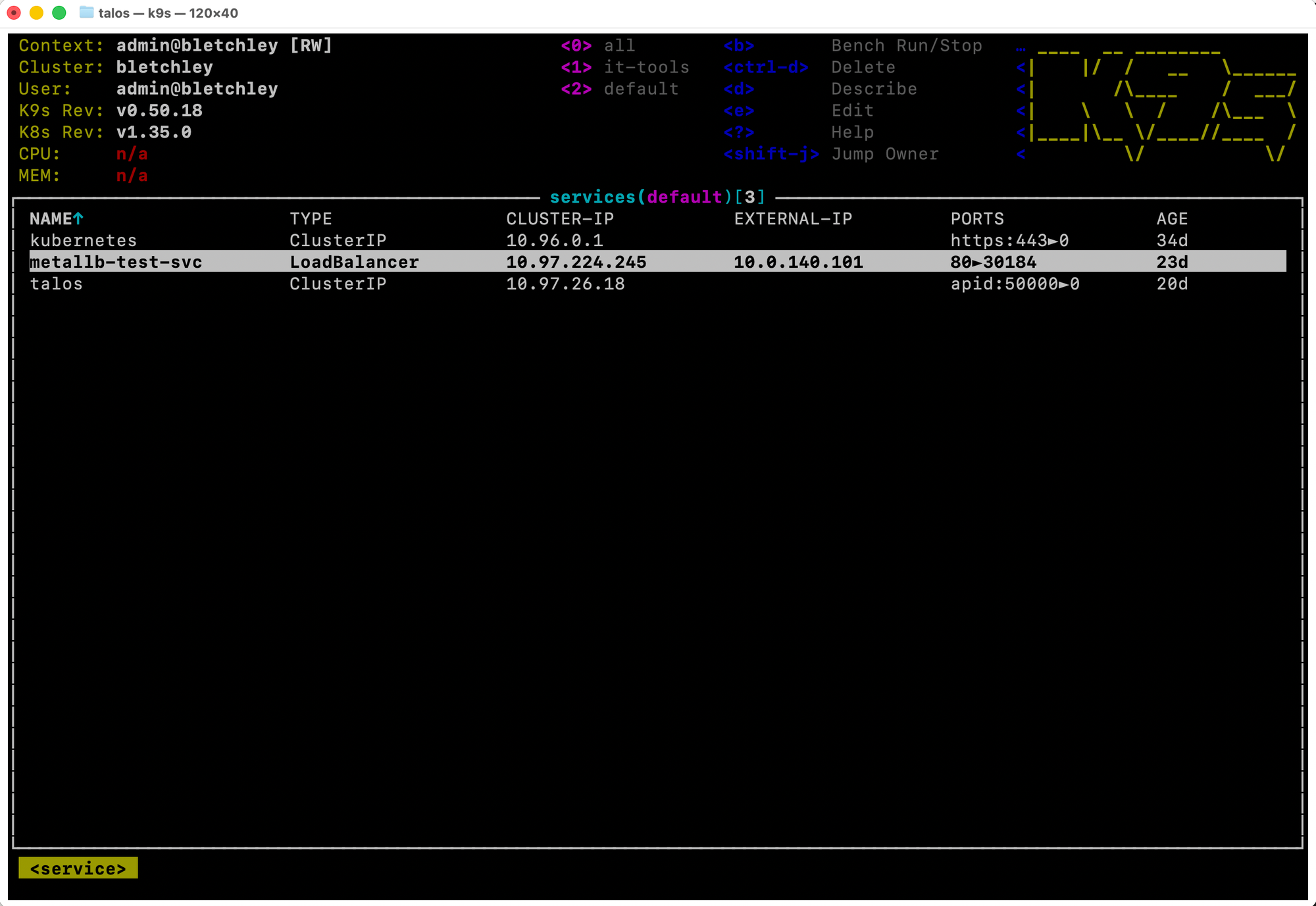
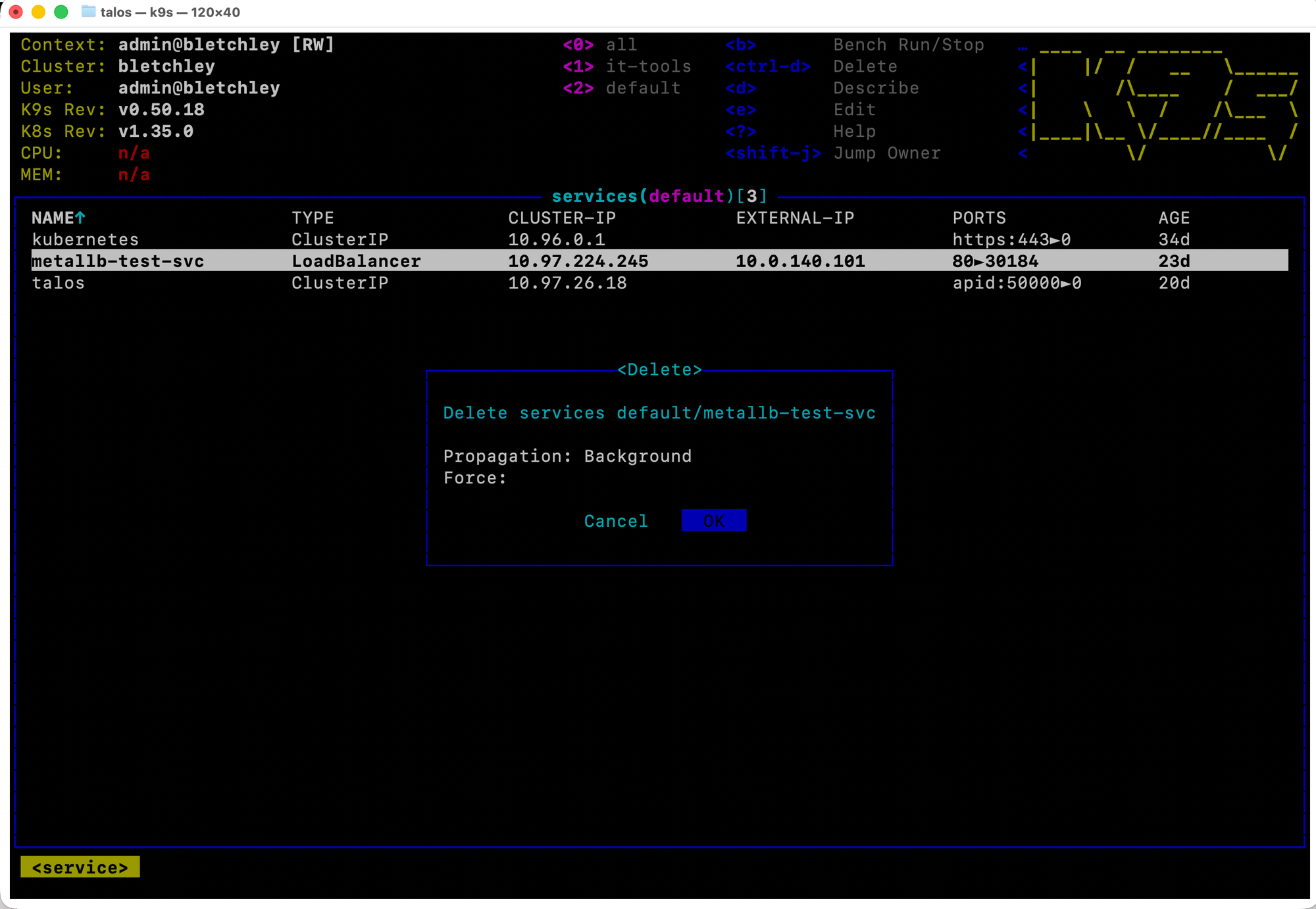
The dialog shows the full resource path (services default/metallb-test-svc), defaults to Cancel, and requires you to navigate to OK and press Enter. After confirming, the service disappeared from the list immediately.
A Note on ctrl-d
For anyone with Unix terminal habits: ctrl-d in k9s is Delete, not EOF. This is jarring if you're used to ctrl-d closing a shell session. The good news is the confirmation dialog means a single accidental keypress won't destroy anything. The bad news is that ctrl-k - kill, which forces immediate deletion with no confirmation - exists and has no safety net. Know what both do before you use either.
If you want to explore k9s without any risk of modifying the cluster, launch with --readonly:
k9s --context bletchley --readonly
In readonly mode, ctrl-d, ctrl-k, and all other modification commands are disabled. The header shows [RO] to remind you. It's a good way to get comfortable with navigation before using k9s for actual cluster operations.
k9s is now part of my daily cluster workflow. The views covered here are the ones I reach for most. When metrics-server gets installed on Bletchley - which is on the list - the top view and live CPU/MEM columns will become useful too. That's a post for another day.
What's Working Now
- ✅ k9s installed via Homebrew (v0.50.18), connects to the Bletchley cluster without any additional configuration
- ✅ Works cleanly against a Talos Linux cluster - no Talos-specific issues or workarounds needed
- ✅ All key views functional: pods, logs, describe, events, deployments, services, nodes, PVCs
- ✅ Forgejo backup CronJob fixed -
podAffinityadded, backup pods now co-locate with Forgejo on rock4 - ✅ MetalLB test service cleaned up
- ⚠️ CPU/MEM metrics unavailable - metrics-server is not installed; k9s shows
n/afor utilisation everywhere
← Previous: IT-Tools on Bletchley
→ Next: Secret Management Part 1
Questions or suggestions? Leave a comment below or reach out at igor@vluwte.nl.